


Browse our curated list of Azure Consulting Companies
Most Indian companies that pick Azure already have a Microsoft estate: Windows servers in a rack, SQL Server under the ERP, Active Directory for logins and Microsoft 365 for email. Buying Azure migration services to move that estate isn't hard in principle. The hard part is choosing a partner who will size it correctly, use the licences you already pay for and not leave you with a cloud bill bigger than the server room it replaced.
This guide is for IT heads and founders shortlisting an Azure migration partner in India. It covers what the partner should do, what Azure migrations cost in 2026, the Microsoft programmes that can cut that cost, how to check a partner’s credentials, and the questions to ask before you sign.
If you only have a minute
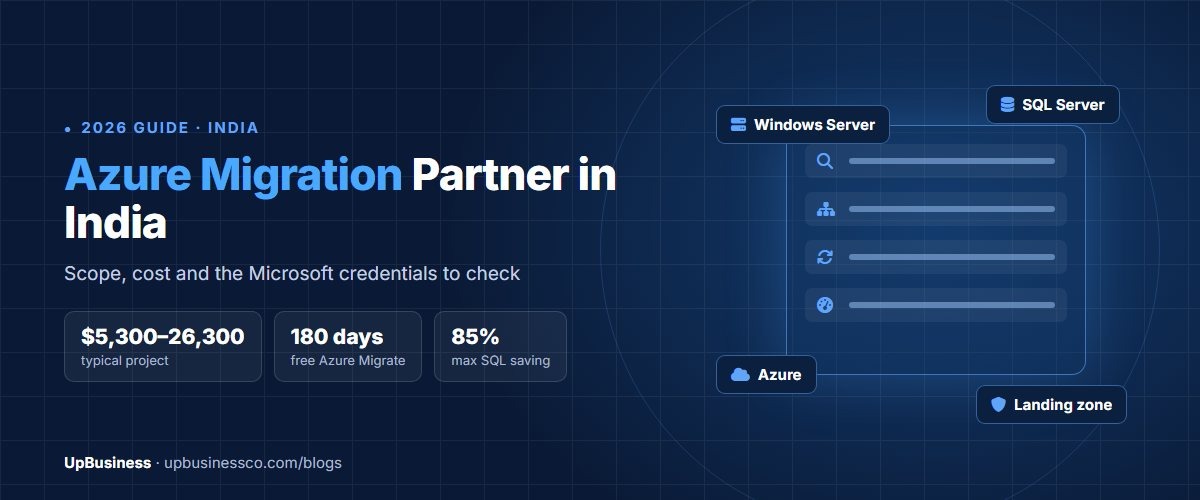
- Published Indian prices put an Azure migration project at roughly $5,300–26,300[1], with one provider quoting $8,400–26,300 for up to 50 servers and $26,300–84,200 for 50–200 servers[2]. The monthly Azure bill is extra.
- Microsoft’s Azure Migrate tool has no extra charge, and server migration through it is free for the first 180 days per machine[3].
- If you own Windows Server or SQL Server licences with Software Assurance, Azure Hybrid Benefit can cut SQL Server costs by up to 85% against pay-as-you-go pricing[4]. A partner who doesn’t ask about your licences is leaving money on the table.
- Extended Security Updates for Windows Server 2012 and 2012 R2 end on 13 October 2026, on Azure and off it[5]. Any of those servers in your plan needs an OS upgrade, not just a move.
What an Azure Migration Partner Actually Does
An Azure migration partner plans and carries out the move of your servers, databases and applications from your own hardware (or another cloud) into Microsoft Azure, and makes sure they run properly once they’re there. In a well-run project the work falls into four stages.
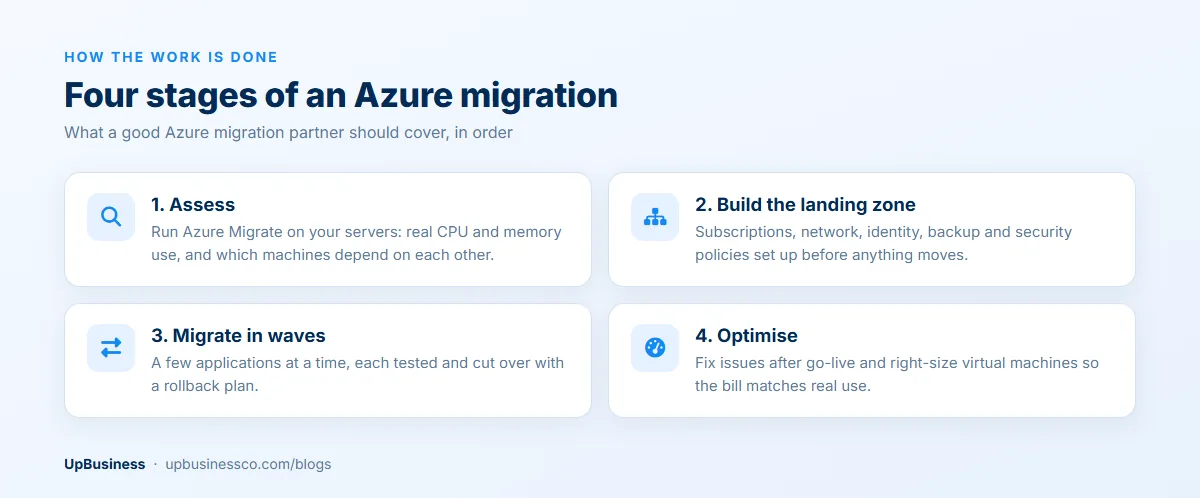
Assessment comes first. The partner runs Azure Migrate against your environment to list every server, its real CPU and memory use, and which machines talk to each other. That last part matters more than people expect, because an old reporting job that quietly reads the accounts database is exactly the kind of thing that breaks on cutover day.
Next is the landing zone, which Microsoft describes as the pre-built foundation of subscriptions, networking, identity and policies that your workloads move into[6]. Skipping it to save a week is the most common shortcut, and it usually shows up later as open storage accounts or an admin account everyone shares.
The migration itself happens in waves, a few applications at a time, each tested and cut over with a way back if something fails. After go-live, a good partner stays on for a few weeks to fix issues and right-size the virtual machines so you aren’t paying for peak capacity all month.
Some partners stop at go-live. Others offer to run your Azure environment afterwards as a managed service, which overlaps with DevOps consulting. Ask which one you’re being quoted for, because the two prices aren’t comparable.
When Azure Is the Right Cloud (and When It Isn’t)
Azure usually makes the most sense when your business already runs on Microsoft software. Windows Server, SQL Server, .NET applications, Active Directory, Dynamics and Microsoft 365 all move across with less rework, and your team’s existing skills carry over.
Licensing is the bigger reason. Azure Hybrid Benefit lets you apply Windows Server and SQL Server licences you already own, with active Software Assurance or qualifying subscriptions, to Azure, and it covers Red Hat and SUSE Linux subscriptions too[4]. For a company with a dozen SQL Server cores already paid for, that can change the monthly bill more than any discount a partner offers.
It’s less clear-cut if your stack is mostly Linux and open-source databases, or if you’re building a new SaaS product with no Microsoft dependency. AWS and Google Cloud are both strong options there. Our guide to cloud migration services in India compares the three clouds and the general migration process, so this page sticks to the Azure-specific decisions.
Data location is rarely a problem. Azure runs three regions in India: Central India in Pune, South India in Chennai and West India in Mumbai[7]. For payment companies it’s a requirement rather than a preference, since the RBI requires payment system data to be stored only in India[8], so tell the partner about any regulatory rules before they design the landing zone.
Windows Server 2012 Deadline: Check This First
For three years, moving old Windows Server 2012 and 2012 R2 machines to Azure was an easy way to keep getting security patches, because Extended Security Updates were free on Azure. That period ends on 13 October 2026, whether the servers run in Azure or in your own data centre[5].
So if your inventory still has 2012-era servers, a straight lift and shift no longer solves the problem. The migration plan needs an operating system upgrade for each of them, either before the move or as part of it. Microsoft notes that non-clustered servers can be upgraded in place from Windows Server 2012 R2 directly to Windows Server 2025[5], but the applications on them still have to be tested on the new version.
Ask every partner on your shortlist how they’d handle these servers, and how many days of testing they’ve allowed for them. A quote that treats them like any other server is underpriced.
What Azure Migration Services Cost in India (2026)
There’s no standard price list, but a few Indian providers publish ranges. Treat them as a starting point, since they come from firms that sell this work and the scope behind each number differs.
| Migration size | Published price range (services only) | Source |
|---|---|---|
| Typical Azure migration project | $5,300–26,300 | Azure partner guide[1] |
| SME, up to 50 servers | $8,400–26,300 | Azure migration provider[2] |
| Enterprise, 50–200 servers | $26,300–84,200 | Azure migration provider[2] |
| Full data centre exit to Azure | $84,200–158,000 or more | Azure migration provider[2] |
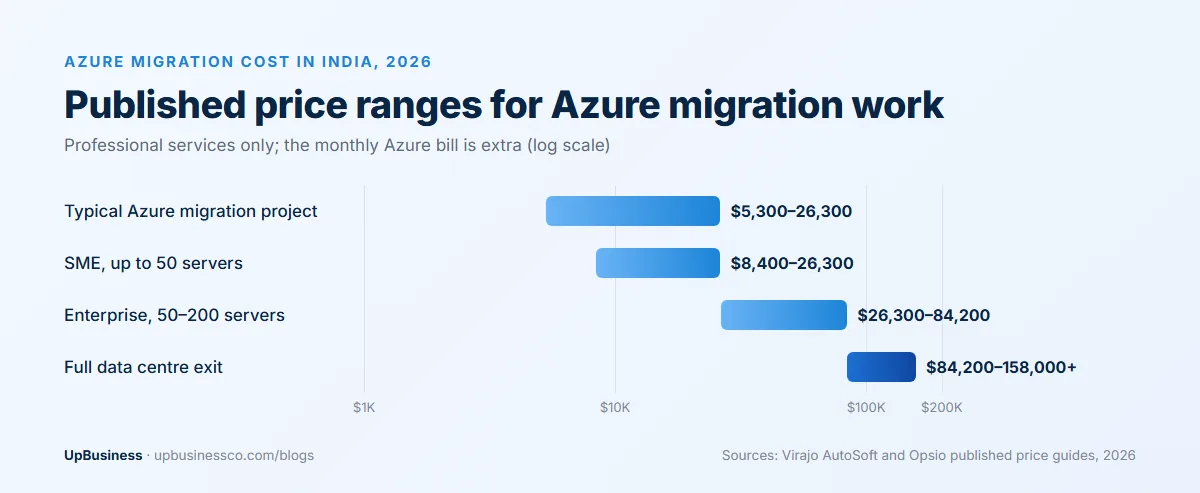
Server count is only one input. What actually moves a quote is the number of applications that need changes rather than a straight move, the volume of data to transfer, old operating systems that need upgrading, and compliance work for regulated data. A 30-server estate running one ERP is a very different job from 30 servers running 15 separate applications.
On timing, one Azure partner puts a 50-server migration at 12–16 weeks including assessment, landing zone setup and phased migration[1], and another says typical enterprise migrations in India run eight to sixteen weeks depending on the portfolio[2]. If someone offers to move 50 servers in three weeks without seeing your environment, ask how they plan to test each application.
Microsoft Programmes That Lower the Cost
A capable Azure partner should bring Microsoft’s own tools and funding into the plan without you having to ask. These are the four worth raising.
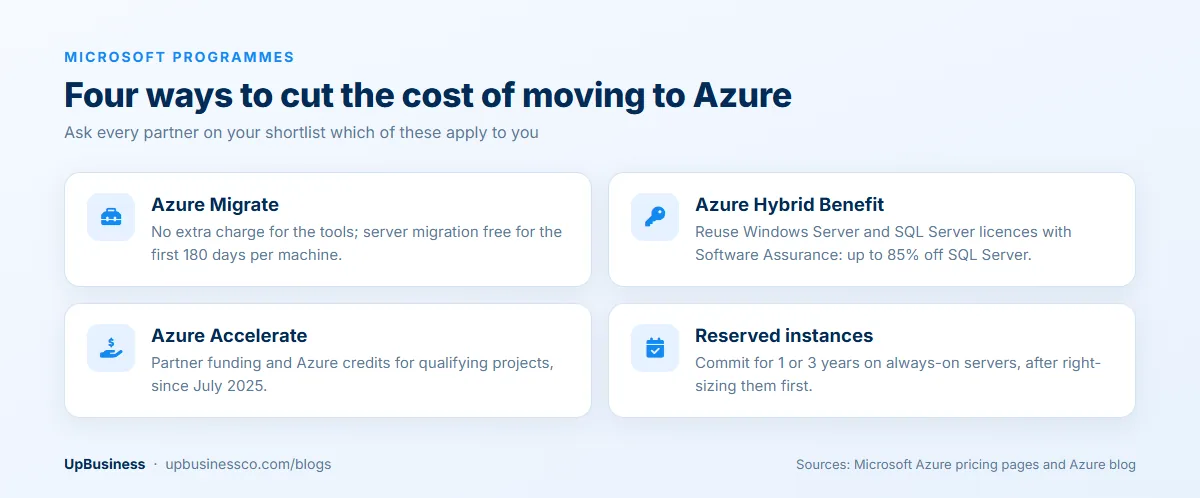
- Azure Migrate. The discovery, assessment and migration tools have no extra charge, and server migration is free for the first 180 days per machine. After that, Microsoft charges $25 a month per replicated instance, and you may pay for storage and data transfer during replication[3].
- Azure Hybrid Benefit. Microsoft quotes savings of up to 80% on Windows Server and up to 85% on SQL Server against pay-as-you-go rates for eligible licences[4]. Those are best-case figures, so ask the partner to show the saving on your own servers.
- Azure Accelerate. Launched in July 2025, it combines Azure Migrate and Modernize, Azure Innovate and Cloud Accelerate Factory, and offers partner funding and Azure credits for qualifying projects, plus free deployment help from Microsoft engineers for over 30 Azure services[9]. Partners usually nominate the project, so ask whether yours could qualify and who does the paperwork.
- Reserved instances. Committing to one or three years for servers that run all the time typically saves 30–40% for predictable workloads, according to one Indian Azure partner[1]. Just don’t commit until the servers have been right-sized after migration.
How to Check an Azure Partner’s Credentials
“Microsoft partner” on a website can mean anything from a company that resells licences to one that has moved hundreds of SQL Server estates. Microsoft’s partner programme gives you a more precise way to check.
The designation to look for is Solutions Partner for Infrastructure (Azure). Above that sit specialisations, and the one that matters here is Infra and Database Migration to Microsoft Azure, which is meant for partners with proven experience moving Windows Server, SQL Server and Linux workloads, and which requires an active Solutions Partner for Infrastructure (Azure) or Data & AI (Azure) designation first[10]. Microsoft also publishes a separate specialisation for migrating enterprise applications.
Credentials don’t replace references, though. A smaller team without a specialisation may still be the better fit for a 15-server move if the engineers who’ll do your work have done several similar projects recently. Ask to speak to one client whose migration was close to yours in size, and ask that client what went wrong, not just whether they were happy.
What the Proposal Should Spell Out
Before comparing prices, make sure every proposal answers the same things. Proposals for migration work differ wildly in what they include, and the cheapest one often leaves out the landing zone, testing or post-migration support.
| Item | What a good proposal says | Ask if it’s missing |
|---|---|---|
| Assessment | Uses Azure Migrate on your real environment, with a dependency map | Will you quote a fixed price before or after discovery? |
| Target design | Landing zone, network, identity, backup and security policies | Who designs and owns the landing zone? |
| Per-server plan | Rehost, upgrade, move to managed database or retire, for each server | Which servers need an OS upgrade, and how is that priced? |
| Licensing | Which licences move under Azure Hybrid Benefit | Have you checked our Software Assurance status? |
| Cutover | Wave schedule, downtime window and rollback plan for each wave | What happens if a cutover fails at 2 a.m.? |
| Run cost | Estimated monthly Azure bill after migration | How did you size this, and when will you right-size? |
| Ownership | Subscriptions and admin accounts in your company’s name | Who holds the global admin access after you leave? |
| Support | Hypercare period after go-live and the cost of ongoing support | What’s included in the first 30 days? |
Our guide to comparing software development proposals shows how to score quotes with fixed weights so the cheapest one doesn’t win by default. The same method works for migration proposals.
Questions to Ask Before You Sign
- How many Azure migrations of our size have you completed in the last year, and can we speak to one of those clients?
- Which Microsoft designations and specialisations does your company hold?
- Will the engineers on our project be your own staff or subcontractors?
- Does our project qualify for Azure Accelerate funding or credits, and will you apply on our behalf?
- How will you handle our Windows Server 2012 machines?
- What will our Azure bill be in month three, and what’s your plan to reduce it in month six?
- Who reviews the security setup before go-live? If it’s the same team that built it, consider a separate cloud security review.
Watch how they answer, not just what they say. A partner who admits that some applications are hard to estimate before discovery is usually more reliable than one with a confident fixed price after a 20-minute call.
UpBusiness Data: Azure Consulting Project Sizes
The 6 approved Azure consulting companies on UpBusiness report a median average project size of $10,500, and four of the six say their typical project is $10,500 or more. Their minimum project sizes start lower, at a median of about $4,000, so a smaller assessment or a single-workload move is usually within reach. Half of them have been in business for more than ten years.
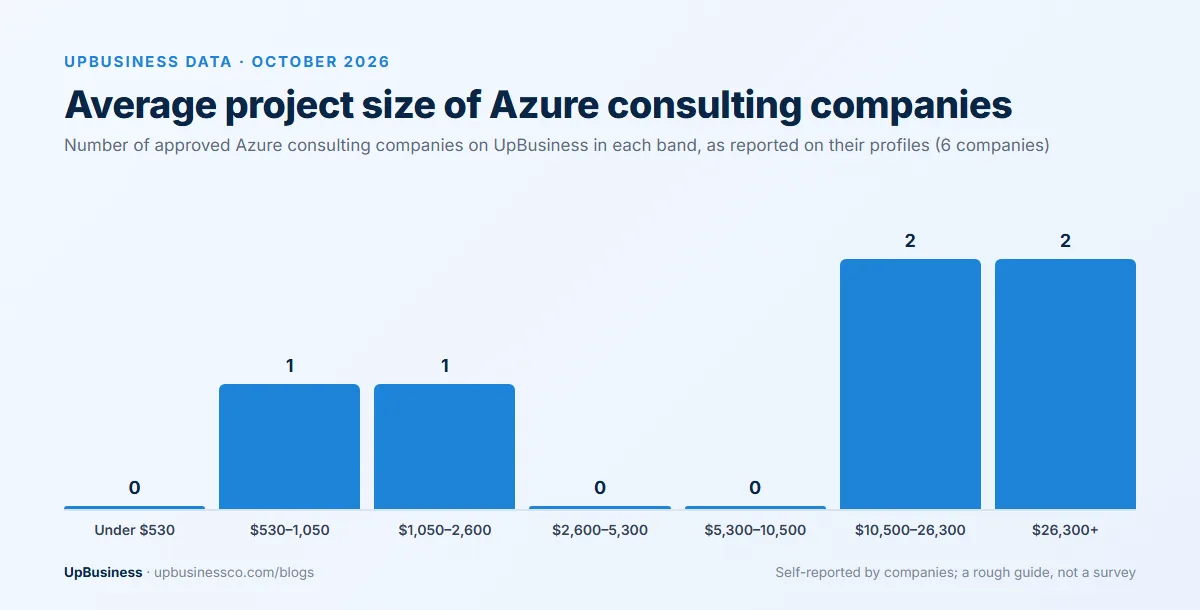
These figures are self-reported on company profiles and come from a small group, so use them as a rough guide alongside the published price ranges earlier in this guide.
Finding an Azure Migration Partner on UpBusiness
On UpBusiness you can compare verified Azure consulting companies and cloud migration companies by their TrustScores, project sizes and profiles before contacting anyone. If your move involves large databases, teams that specialise in data migration are worth adding to the shortlist. You can also post your project once, with your server list and timeline, and get proposals from verified partner companies that answer the same brief.