


Browse our curated list of Cloud Migration Companies
Most Indian businesses don’t move to the cloud because of a strategy deck. They move because the server room is out of space, a hardware refresh quote just arrived, the ERP slows to a crawl at month-end, or a customer asked about disaster recovery and nobody had a good answer.
Moving is the easy decision. Doing it without downtime, surprise bills or a security gap is the hard part, and that’s where a cloud migration partner comes in. This guide covers what cloud migration services cost in India in 2026, how long a migration takes, the risks that cause most problems, and a checklist for choosing a partner.
If you only have a minute
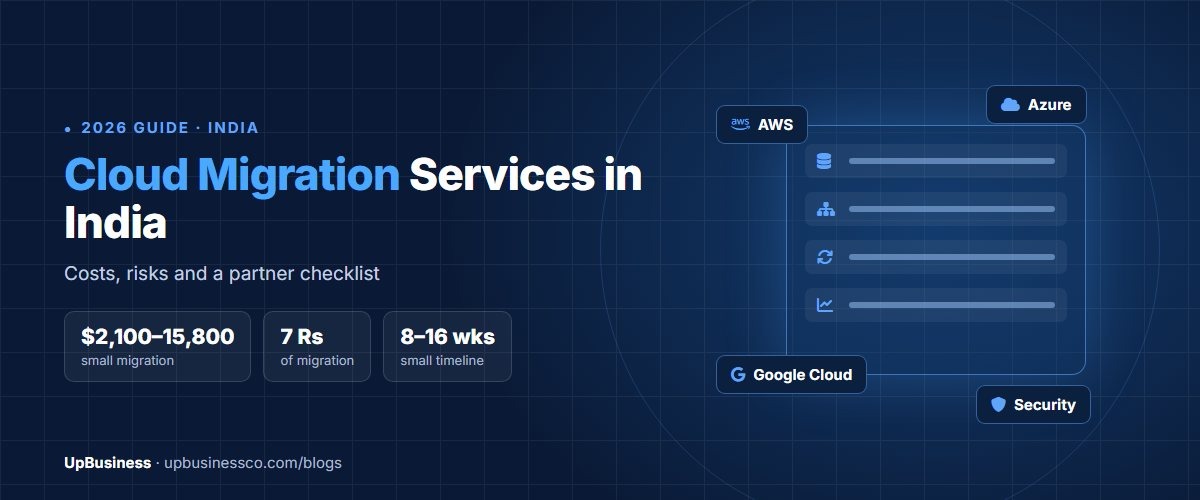
- Published prices put a small migration of 5–20 servers at around $2,100–15,800 in professional services[1], and an SME migration of up to 50 servers at $10,500–31,600[2]. Your cloud bill is extra.
- A small migration usually takes 8–16 weeks, and a medium one of 20–100 servers 16–32 weeks[1].
- Budget for 2–3 months of running the old and new systems in parallel[1].
- Most applications should be moved first and modernised later. AWS itself recommends rehosting or replatforming during a large migration rather than rebuilding[3].
What Cloud Migration Services Include
A cloud migration partner plans and runs the move of your applications, databases and files from your own servers (or another cloud) to AWS, Microsoft Azure or Google Cloud. A typical engagement covers:
- Discovery: listing every server, application, database and the connections between them.
- Strategy: deciding what happens to each application, from switching it off to rebuilding it.
- Landing zone: setting up accounts, networks, access controls and backups in the cloud before anything moves.
- Migration in waves: moving applications in planned batches, testing each one, then cutting over.
- Hypercare and optimisation: fixing issues after cutover and right-sizing resources so the bill matches real use.
Some partners stop at the move. Others also run your cloud afterwards as a managed service, which overlaps with DevOps consulting services. Ask which you’re buying.
Signs Your Business Is Ready to Migrate
Cloud migration makes the most sense when you have a reason to move, not just a feeling that you should. Common triggers for Indian businesses include:
- A server hardware refresh is due, and the quote is large enough to make you compare it against the cloud.
- Your applications slow down at month-end, during sales or at GST filing time, and adding hardware for those peaks feels wasteful.
- You have no tested disaster recovery, and a single server failure would stop billing or dispatch.
- Customers or partners have started asking about security certifications or data handling.
- Your team spends more time maintaining servers than improving the software that runs on them.
If none of these apply and your current setup is stable, a migration may simply move your costs around. A good partner will tell you that during the assessment rather than selling you a project you don’t need.
The 7 Rs: Deciding What Happens to Each Application
Not every application should move the same way. AWS groups the options into seven migration strategies, known as the 7 Rs[3]:
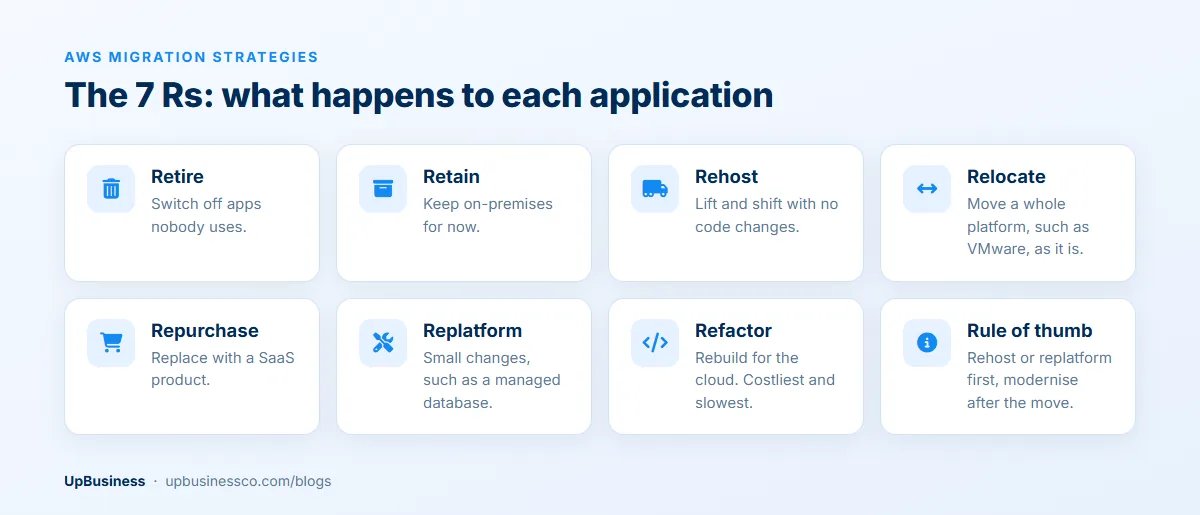
For most Indian SMEs, the bulk of the work is rehosting (lift and shift) plus some replatforming, such as moving a self-managed database onto a managed service. AWS describes refactoring as the most complex and costly strategy, and for large migrations recommends modernising applications after the move is complete[3]. Be wary of a partner who wants to rebuild everything during the migration; it multiplies cost and risk.
What Cloud Migration Costs in India (2026)
These are published price ranges for the migration work itself, from an AWS partner’s guide and a Bangalore-based cloud provider. Treat them as a starting point, since they come from firms that sell these services.
| Migration size | Typical cost (professional services) | Source |
|---|---|---|
| Small business, 5–20 servers | $2,100–15,800 | AWS partner guide[1] |
| SME, up to 50 servers | $10,500–31,600 | Cloud provider[2] |
| Enterprise, 50–200 servers | $31,600–105,000 | Cloud provider[2] |
| Full data centre exit | $105,000–211,000 or more | Cloud provider[2] |
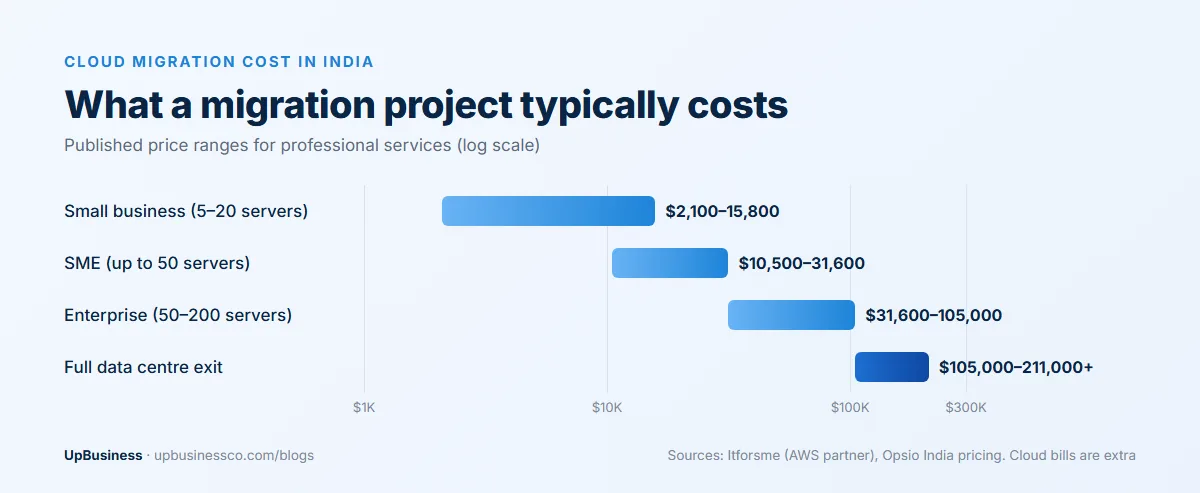
Three things move a quote more than the server count: how much data has to move, how many applications need changes rather than a straight lift and shift, and compliance work for regulated data. On top of the project fee, plan for the cloud bill itself and for 2–3 months of paying for both your old setup and the cloud while you run them in parallel[1].
Larger migrations on AWS may qualify for its Migration Acceleration Program. One Indian partner says eligible projects can receive credits of up to 25% of migration spend[2]. Ask every shortlisted partner whether your project qualifies and who applies for it.
How Long a Migration Takes
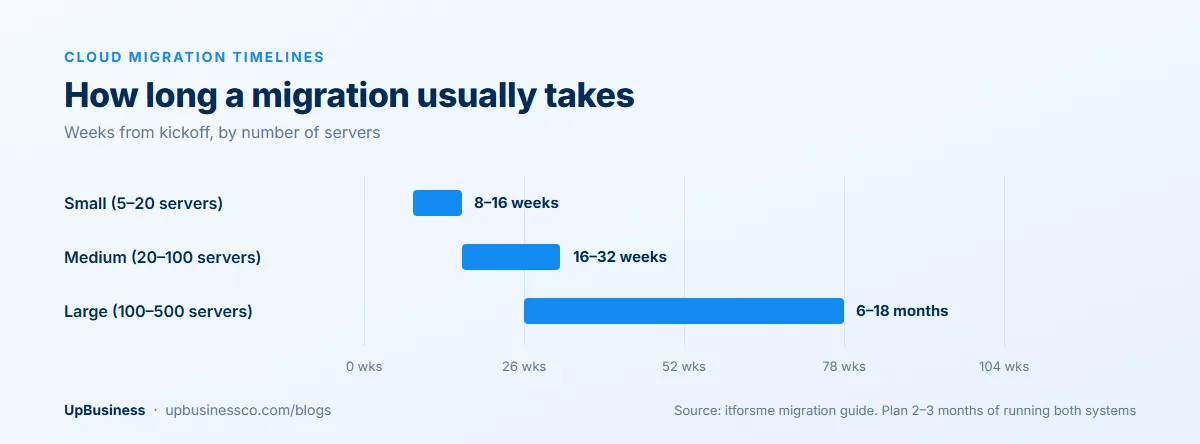
Discovery and assessment usually take 2–4 weeks, a pilot migration of one or two applications another 4–6 weeks, and the production migration 8–26 weeks depending on the size of the estate[1]. If a partner promises to move 50 servers in a month without seeing your environment, ask how they plan to test each application.
AWS, Azure or Google Cloud?
All three major clouds can run typical Indian business workloads well, so the choice usually comes down to what you already use and who will run it afterwards.
| If you mainly… | Usually look first at | Why |
|---|---|---|
| Run Microsoft software (Windows Server, SQL Server, Dynamics, Microsoft 365) | Microsoft Azure | Existing Microsoft licences and skills often carry over |
| Run a SaaS product or modern web applications | AWS | Widest range of managed services and the largest pool of experienced partners |
| Rely on data analytics, BigQuery or Google Workspace | Google Cloud | Strong data and analytics tools that fit Google-centred teams |
These are starting points, not rules. Ask each shortlisted partner to estimate your monthly bill on the platform they recommend, and to explain why the others are a worse fit for you. A partner that only ever recommends one cloud may be recommending what it knows rather than what suits you.
Data Location: Keep India-Specific Rules in Mind
All three major providers run cloud regions in India. AWS has regions in Mumbai and Hyderabad[4], and Microsoft Azure has Central India (Pune), South India (Chennai) and West India (Mumbai)[5]. For most businesses an Indian region is the sensible default, both for speed and for data residency questions from customers.
For some sectors it isn’t optional. The RBI requires payment system providers to store the entire data relating to the payment systems they operate in a system only in India[6]. If you’re in payments, lending or another regulated sector, give the partner your compliance requirements before they design the landing zone, not after.
Risks That Cause Most Migration Problems
- Unknown dependencies. An old reporting tool quietly reads the production database, and it breaks the day the database moves. Proper discovery prevents most of these.
- Bill shock. Servers sized for peak load and left running all month cost far more in the cloud than they did on-premises. Ask for a cost estimate before migration and a right-sizing review after it.
- Security gaps. Open storage buckets and over-broad admin access are common mistakes in a rushed landing zone. A cloud security review before go-live is worth the cost.
- No rollback plan. Every cutover should have a tested way back if something fails.
- Data migration errors. Large databases need checks that every record arrived intact. Teams that specialise in data migration can help with this part.
Checklist for Choosing a Cloud Migration Partner
- Which cloud do you recommend for us, and why that one rather than the others?
- Will you run a discovery of our environment before quoting a fixed price?
- Which of our applications will you rehost, replatform or retire, and why?
- What will our monthly cloud bill be after migration, and how did you estimate it?
- What is the rollback plan for each cutover, and how much downtime should we expect?
- Will all cloud accounts be created in our company’s name, with your team given access?
- Does our project qualify for any migration funding or credits, and who applies?
- What support do you provide in the first 30 days after go-live, and what happens after that?
On UpBusiness, you can compare verified partner companies that offer cloud migration, broader cloud services and DevOps, as well as platform specialists in AWS consulting, Azure consulting and Google Cloud migration. If you’d rather have companies come to you, post your project and get matched with verified teams.