


Browse our curated list of Computer Vision Companies
Computer vision development cost depends less on the model than on three things buyers often price last: the images you need to label, the cameras and devices that run the system, and the accuracy you require on the cases that matter. This guide prices each part from published sources, including the cloud vision APIs' own price lists, peer-reviewed research on labelling time, NVIDIA's hardware prices and US wage data. It's for operations, product and IT leads planning a defect inspection, counting, safety, document or retail vision project with a partner company.
Demand is growing fast. Grand View Research puts the global computer vision market at $23.6 billion in 2025, rising to $28.2 billion in 2026[1]. Published price guides, though, are mostly written by firms selling the work, and few show where their numbers come from.
Key takeaways
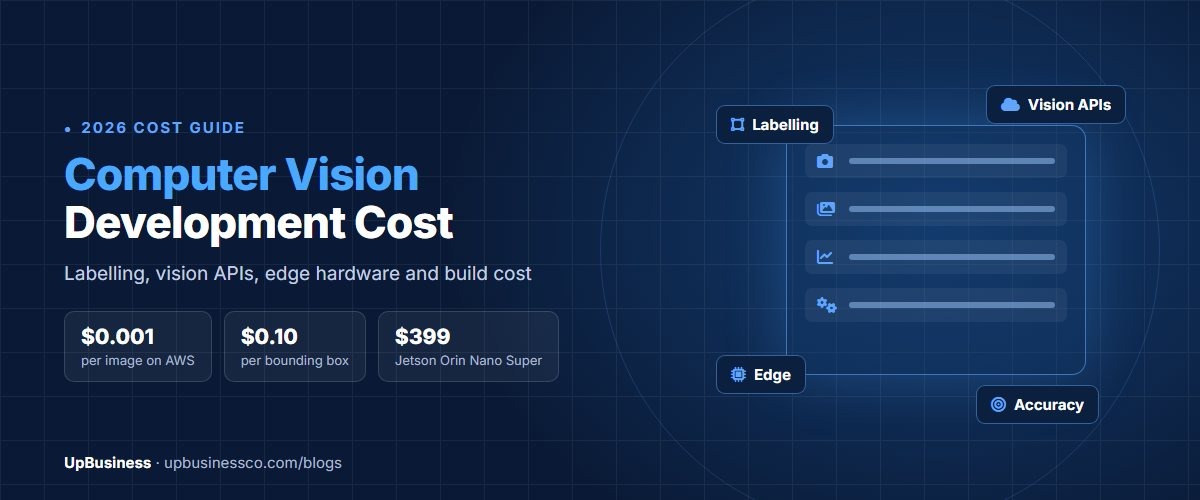
- Cloud vision APIs are cheap per image: AWS Rekognition starts at $0.001 an image[2] and Google Cloud Vision at $1.50 per 1,000 for label detection[3]. Analysing live video in the cloud is a different story.
- One camera analysed around the clock with Rekognition's stored-video label detection at $0.10 a minute would cost about $4,320 a month. An NVIDIA Jetson Orin Nano Super kit costs $399 after July 2026's price rise[4].
- Labelling is often the biggest hidden cost. A careful bounding box took 35 seconds in published research, and fine pixel-level labelling took more than 1.5 hours per image.
- Write accuracy targets per class, a hidden test set and a false-alarm limit into the contract, not one overall accuracy figure.
How Much Does Computer Vision Development Cost in 2026?
The table below prices the engineering work for three common project sizes using US wage data, so you can compare quotes against a checkable baseline. The US Bureau of Labor Statistics puts the median software developer wage at $135,980 a year[5], and wages are about 70% of total employer cost[6], which gives roughly $93 an hour including benefits.
| Project size | What it covers | Typical effort | Engineering cost at US employer rates |
|---|---|---|---|
| Proof of concept | One use case, a few hundred labelled images, a pretrained model fine-tuned, tested offline | About 6 person-weeks | About $22,400 |
| Pilot | One site or line, thousands of labelled images, live camera feed, basic dashboard | About 16 person-weeks | About $59,800 |
| Production | Several sites, edge or cloud deployment, integrations, monitoring and retraining | About 40 person-weeks | About $149,400 |
These figures cover engineering only. Labelling, hardware, cloud fees and ongoing support are separate lines, priced in the sections below. Partner companies outside the US usually charge less per hour; see our AI developer rates guide for rates by country. For Machine Learning projects that don't involve images or video, see our Machine Learning development cost guide.
Should You Use a Vision API, a Fine-Tuned Model or a Custom One?
The approach decides most of the engineering cost, so settle it first.
| Approach | Best for | Data you need | Relative cost |
|---|---|---|---|
| Cloud vision API as it is | Generic tasks: reading text, common objects, faces, explicit content | A test set only | Lowest build cost; pay per image |
| Pretrained model fine-tuned on your images | Your own objects or defects, such as a specific part or product | Hundreds to a few thousand labelled images | Medium; the most common choice |
| Custom model trained from scratch | Unusual image types, such as X-ray, thermal or microscopy, or strict speed limits | Large labelled datasets | Highest; rarely needed |
Start with the simplest approach that meets your accuracy target on your own images. A good partner company will test an API or a pretrained model on a sample of your data before proposing anything custom. If you're still deciding whether computer vision is the right type of AI for your problem, our guide to the types of AI development services compares it with the alternatives.
What Do Google Cloud Vision and AWS Rekognition Actually Cost?
Some published guides quote cloud vision at $0.10 or more per image. The providers' own price lists are far lower for still images.
| Monthly images | Google Cloud Vision, label detection | AWS Rekognition, label detection |
|---|---|---|
| 10,000 | About $14 | About $10 |
| 100,000 | About $149 | About $100 |
| 1,000,000 | About $1,499 | About $1,000 |
| 10,000,000 | About $12,499 | About $7,000 |
Google charges $1.50 per 1,000 units after the first 1,000 free each month, dropping to $1.00 above 5 million, and charges each feature separately, so label and text detection on the same image count twice[3]. AWS charges $0.001 per image for the first million, $0.0008 for the next three million and $0.0006 for the next 30 million[2].
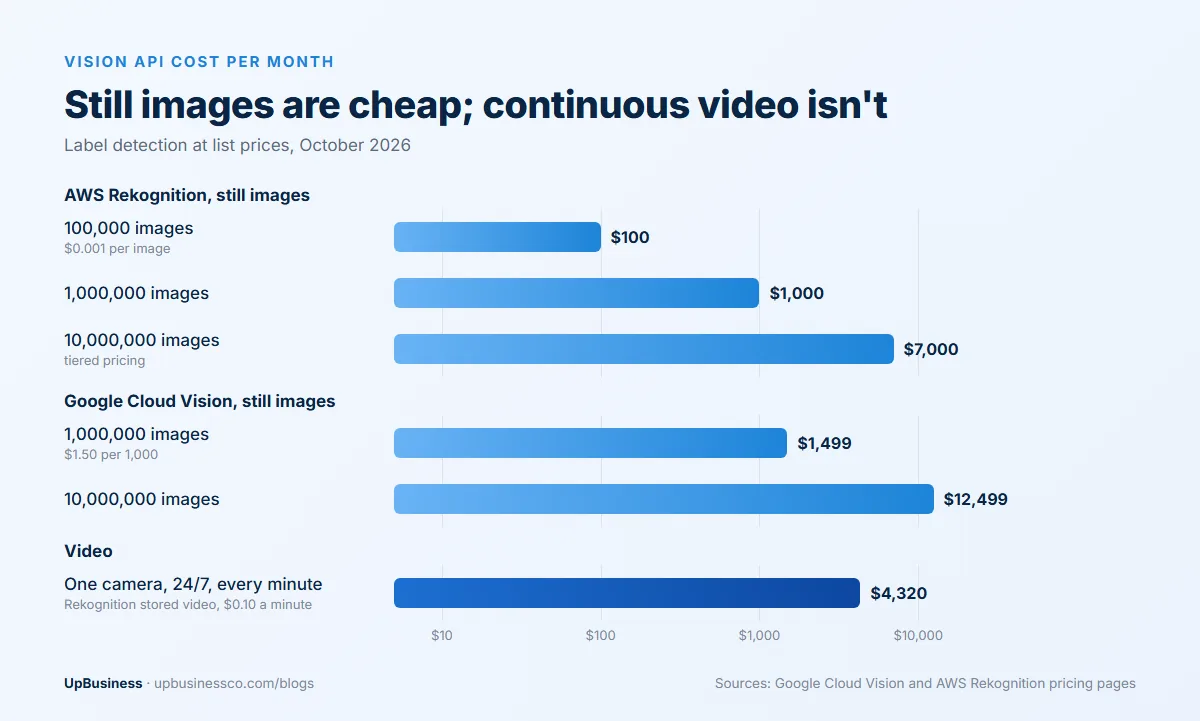
Video changes the picture. Rekognition's label detection on stored video costs $0.10 a minute[2]. A single camera recorded 24 hours a day produces about 43,200 minutes a month, or roughly $4,320 if every minute is analysed. Most production video systems either sample frames, analyse only motion events, or run the model on a device next to the camera.
How Much Does Image Labelling Cost per Image, Box and Polygon?
Labelling, also called annotation, means marking what's in each training image. Its cost depends on the type of label, because the time per label varies enormously.
| Label type | Time per label in published research | Published price example |
|---|---|---|
| Image classification (one tag per image) | A few seconds | From $0.05 per classification[7] |
| Bounding box | 35 seconds for a careful box; 7 seconds with a faster clicking method[8] | From $0.10 per box[7] |
| Polygon or instance mask | About 79 seconds per object in the COCO dataset[9] | From $0.20 per polygon[7] |
| Fine pixel-level segmentation | More than 1.5 hours per image in Cityscapes[10] | Usually quoted per project |
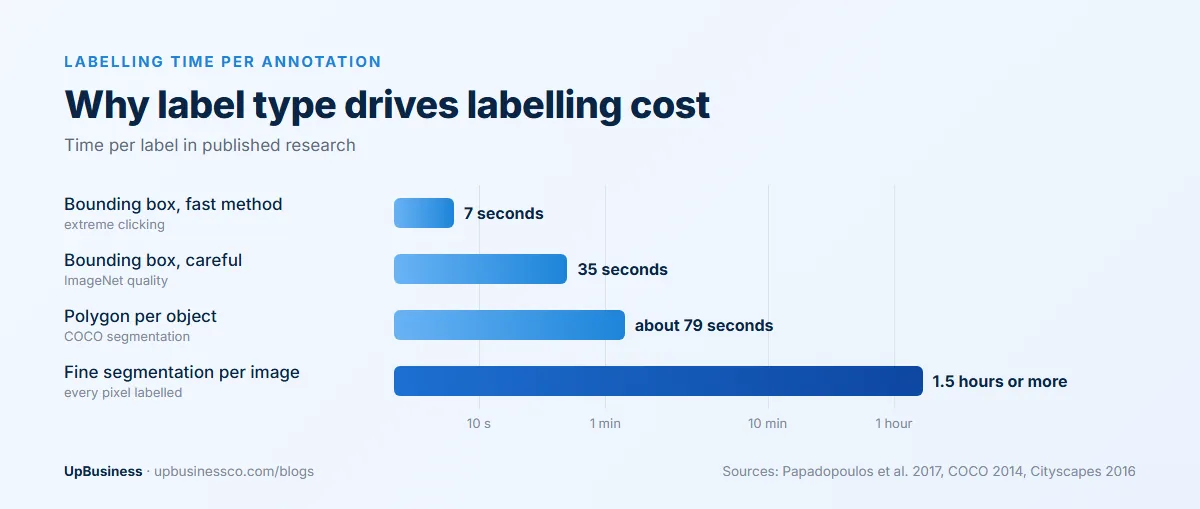
A worked example: 10,000 images with an average of five objects each is 50,000 labels. At $0.10 per box that's about $5,000, and at $0.20 per polygon about $10,000, before quality checks. Review passes, where a second person checks labels, add to that, and they're worth paying for. In the Cityscapes project, two annotators agreed on 96% of pixels[10], which shows that even careful labellers disagree at the edges.
One change to note if a proposal mentions it: AWS says SageMaker Ground Truth, a labelling service many older guides recommend, is no longer open to new customers[11]. Ask which labelling tool and workforce the partner company will actually use, and who checks quality.
How Many Images Do You Need?
It depends on how varied your images are and how rare the cases you care about are. A pretrained model fine-tuned for one narrow, consistent task, such as one product on a fixed conveyor, may work with a few hundred labelled images. Variable conditions, such as outdoor cameras, many product types or changing light, need thousands.
The rare cases set the real number. If the defect you most need to catch appears once in every 2,000 parts, you need enough examples of that defect, not just enough images overall. Ask the partner company how many examples of each class they need, how they'll collect rare cases, and whether they'll use augmented or synthetic images to fill gaps.
Cloud or Edge: Where Should the Model Run?
Running the model in the cloud is simpler to build and update. Running it on a small computer next to the camera, called edge deployment, avoids per-minute fees, works without a reliable internet connection and keeps video on site.
| Option | Price | Suits |
|---|---|---|
| Cloud API on still images | From $0.001 per image | Occasional images, such as uploads, documents or periodic snapshots |
| Cloud video analysis | $0.10 per minute of stored video on Rekognition | Short clips and event-triggered video |
| NVIDIA Jetson Orin Nano Super developer kit | $399 after July 2026, up from $249[4] | One to a few camera streams; 67 trillion operations per second[12] |
| NVIDIA Jetson AGX Orin developer kit | $3,499 after July 2026, up from $1,999[4] | Many streams or heavy models at one site |
For continuous video, edge hardware usually pays for itself within weeks compared with analysing every minute in the cloud. The trade-off is maintenance: devices need updates, monitoring and replacements, and production units often cost more than developer kits once you add enclosures, cooling and industrial-grade storage. Note that NVIDIA raised prices across its Jetson range by up to 101% in July 2026[4], so older quotes may understate hardware cost.
What Hardware Does a Computer Vision Deployment Need?
Beyond the computer that runs the model, budget for:
- Cameras: resolution, frame rate and lens must suit the smallest detail you need to see and the speed of the scene.
- Lighting: controlled lighting often improves accuracy more than a better model, especially for inspection.
- Mounting and enclosures: dust, heat, vibration and water ratings for factory or outdoor sites.
- Network and power: cabling, switches and power at each camera position.
- Integration: connections to the line controller, warehouse system or alerting tool that acts on the result.
Prices vary widely by environment, so ask for hardware to be quoted as its own line, with part numbers. A site survey before the quote is a good sign: it means the partner company has seen the real camera positions and lighting.
What Changes the Cost by Use Case?
The same engineering budget goes much further on some problems than others. This table shows where the effort usually goes for common projects.
| Use case | Where most of the cost goes | What to check in the quote |
|---|---|---|
| Defect inspection on a production line | Collecting rare defect images, lighting, line speed | Recall on each defect type and the false reject rate |
| People or vehicle counting | Camera placement, crowded scenes, privacy handling | Accuracy at peak times and how video is stored |
| Safety gear and zone monitoring | Many camera angles, night conditions, alert rules | False alarms per camera per hour |
| Retail shelf and stock checks | Thousands of product types and frequent packaging changes | How new products are added and labelled |
| Reading text, labels or meters | Image quality and unusual fonts; often an API is enough | Whether a cloud text API was tested first |
| Medical or scientific imaging | Expert labelling, regulation and validation | Who labels the data and how results are validated |
Text reading is usually the cheapest place to start, because cloud APIs already do it well. Defect inspection and medical imaging are usually the most expensive, because the cases that matter are rare and the cost of a miss is high.
How Long Does a Computer Vision Project Take?
A proof of concept usually takes four to eight weeks once images are available. A pilot at one site often takes three to six months, because it includes installing cameras, collecting more images from real conditions and tuning the model against live results. A multi-site rollout depends mostly on hardware installation and integrations.
The step that most often runs late is collecting enough examples of the rare cases. If a defect appears once in thousands of parts, it can take weeks of production just to gather enough images, so ask the partner company how they'll handle that before agreeing a timeline.
What Would an In-House Computer Vision Team Cost?
The BLS puts the median wage for computer and information research scientists, the category that includes many computer vision specialists, at $140,300 a year, with jobs projected to grow 22% over the decade to 2035[13]. With benefits at about 30% of total employer cost[6], one specialist costs roughly $200,000 a year. A small in-house team of a vision specialist, a software developer and part-time labelling support can easily pass $400,000 a year before hardware. For a first project, many companies hire a partner company and keep one internal owner who learns the system.
What Drives Computer Vision Cost Up?
- Accuracy targets: each step up in required accuracy, especially on rare classes, needs more labelled data and more testing.
- Variable conditions: changing light, weather, angles and product types multiply the data needed.
- Speed requirements: real-time decisions on a fast line need smaller models, better hardware or both.
- Number of sites: every new site brings different cameras, light and backgrounds, and often a round of extra labelling.
- Integrations: connecting to controllers, ERPs or alerting systems is often a large share of production work.
- Privacy rules: video of people may need blurring, short retention and on-site processing.
What Does It Cost to Run and Retrain a Computer Vision Model?
After launch, budget for cloud fees or device maintenance, storage for images you keep for retraining, monitoring, and periodic relabelling and retraining when conditions change, such as new products, new packaging or a moved camera. Ask the partner company for a monthly support quote with these items listed separately, plus what triggers a retraining cycle and what it costs. Our custom AI development guide covers monitoring, drift and model ownership in more depth.
How Do You Set Accuracy and Acceptance Criteria?
A single overall accuracy figure hides the cases that matter. Agree these before work starts:
- A hidden test set: images from your real cameras, labelled by your staff or a third party, that the partner company never trains on.
- Precision and recall per class: how many alerts are correct, and how many real cases are caught, for each object or defect type.
- False alarms per camera per hour: the number operators will tolerate before they start ignoring alerts.
- Speed: maximum time from frame to decision, and the frame rate the system must keep up with.
- Conditions covered: day and night, each product type, each site, each camera position.
- Retest rule: the same tests repeated after every model update, with results shared in writing.
Deployment Checklist: What Must Be in Place Before Go-Live?
- Acceptance tests passed on the hidden test set, at production frame rates
- Cameras, lighting and devices installed and documented, with spare units
- Alerts connected to the people or systems that act on them, with an escalation path
- A fallback if the model or device fails, such as manual inspection
- Monitoring of accuracy, device health and false alarms from day one
- Data retention and privacy settings agreed for stored images and video
- Model files, training code, labelled data and documentation handed over to you
What UpBusiness Partner Data Shows
We looked at the 7 partner companies on our computer vision consulting page in October 2026. All are based in India, with TrustScores from 70 to 74 and a median of 72. Five have 11 to 50 staff and two have 51 to 200.
The median average project size they report is $25,000, ranging from $10,000 to $50,000, which sits between the proof of concept and pilot figures in our US wage table. None of the seven lists computer vision as one of its three main specialisations; most list broader AI solutions or custom software. That's common for this kind of work, so ask each company for a computer vision project of similar scope that is running in production, and for the accuracy figures it achieved.
How to Compare Computer Vision Quotes
- Check that engineering, labelling, hardware, cloud fees and support are separate lines.
- Check the approach: API, fine-tuned pretrained model or custom, and why.
- Compare the number of labelled images and labels each quote assumes.
- Compare acceptance criteria, not headline accuracy.
- Ask who owns the labelled data, the model and the training code at the end.
- Start with a fixed-price proof of concept on your own images before committing to a pilot.
For how a project runs from discovery to launch, see our AI development services guide.
The Bottom Line
Computer vision development cost is set by data, devices and accuracy targets as much as by engineering. Price labelling per label, cloud video per minute and hardware per site, compare edge against cloud for any continuous video, and write per-class accuracy and false-alarm limits into the contract. Start with a small proof of concept on your own images.
When you're ready, compare verified computer vision companies, browse all artificial intelligence partner companies or post your project on UpBusiness to get matched.