


Browse our curated list of UI/UX Website Design Companies
Many lists of web design trends 2026 are written for designers. They cover kinetic type, bento grids and glassy layers, with screenshots to match. If you're the person paying for a new website, the more useful question is which of these trends will change what you ask for, what you sign and how you judge the finished site.
This guide looks at website design trends from the buyer's side and answers that question with measured data rather than taste. We've used the 2026 WebAIM Million accessibility scan, the HTTP Archive's 2025 Web Almanac, Baymard Institute's checkout research, the new accessibility rules in the EU and US, and the browser features agreed for Interop 2026. We've also looked at the 7 UI/UX website design companies listed on UpBusiness. Where a trend is mostly opinion, we say so.
Key takeaways
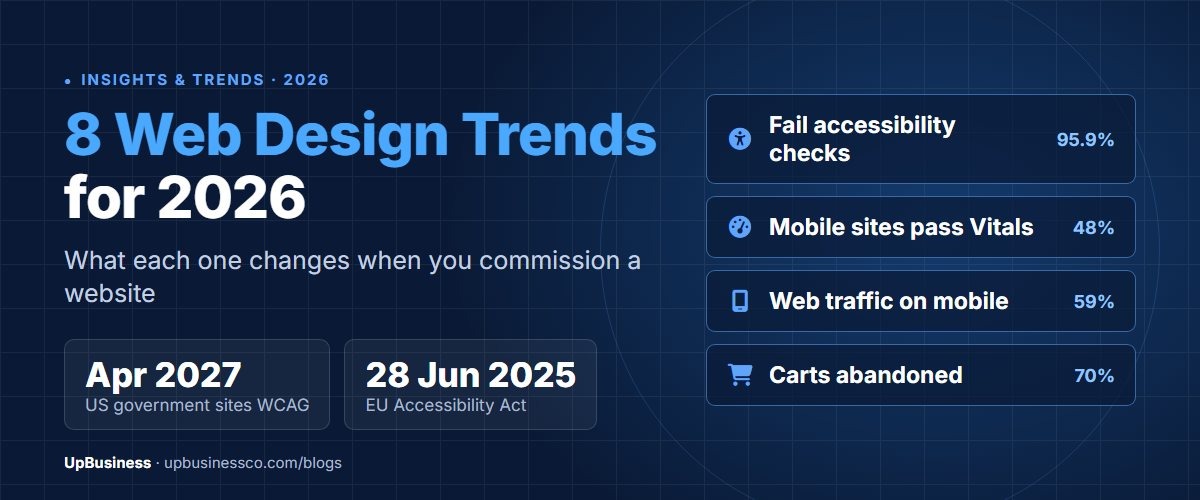
- 95.9% of the top 1 million home pages failed automated accessibility checks in February 2026, up from 94.8% a year earlier, with an average of 56.1 errors per page.
- Only 48% of mobile websites passed all three Core Web Vitals in the 2025 Web Almanac, and the median mobile home page weighed about 2.6 MB.
- Accessibility now has legal dates attached: the European Accessibility Act has applied to e-commerce services since 28 June 2025, and US state and local governments must meet WCAG 2.1 AA from April 2027.
- Bold visual trends are fine, but low contrast text already appears on 83.9% of home pages, so ask for contrast checks before you approve a colour palette.
Web Design Trends 2026 at a Glance
Here are the eight trends we think matter for anyone commissioning or reviewing a website this year. The first column is the trend, the second is the evidence behind it and the third is what it should change in your brief.
| Trend | Evidence | What to ask your design partner |
|---|---|---|
| Accessibility as a contract term | 95.9% of home pages fail automated checks; EU and US deadlines | Which WCAG level will you test against, and how? |
| Performance inside the design | 48% of mobile sites pass Core Web Vitals | What page weight and INP targets will the design meet? |
| Mobile first, for real | About 59% of worldwide traffic is mobile | Which screens were designed for mobile first? |
| AI in the design process | Errors and page complexity rose in 2026 | Where do you use AI, and who checks the output? |
| Native motion in the browser | View transitions and scroll animations in Interop 2026 | Does motion respect reduced-motion settings? |
| Expressive type and colour | Low contrast text on 83.9% of home pages | Have the brand colours passed contrast checks? |
| Sites that AI agents can use | WebMCP in early preview in Chrome | Are forms labelled and usable without a mouse? |
| Simpler forms and checkout | 70.22% average cart abandonment | How many fields and steps does checkout have? |
1. Accessibility Moves From a Nice Extra to a Contract Term
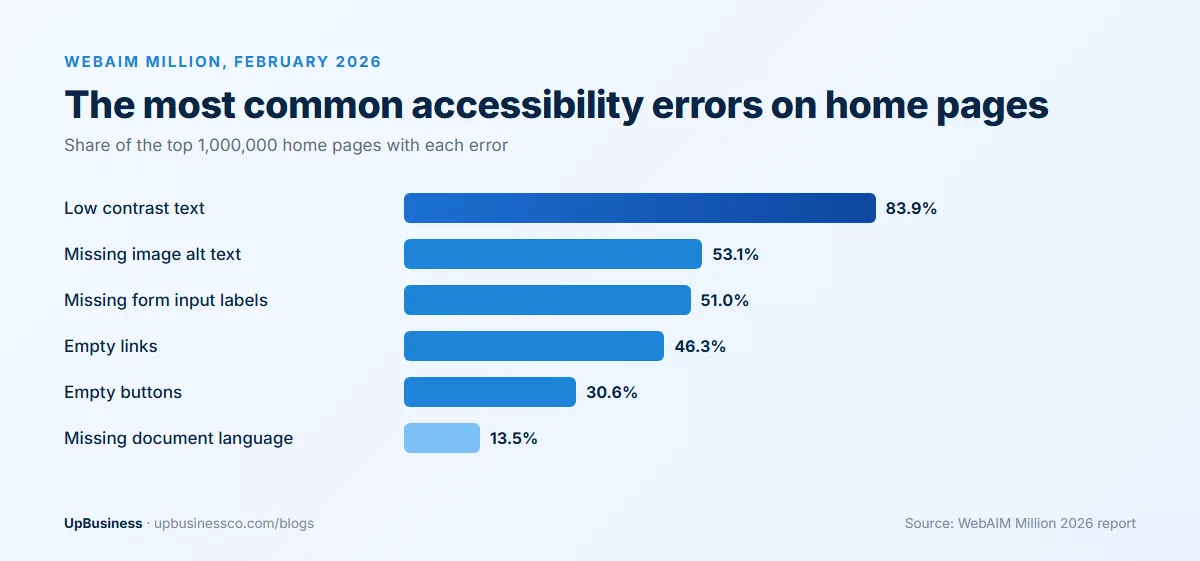
Accessibility is the trend with the clearest data behind it, and the data isn't good. WebAIM scanned the home pages of the top 1 million websites in February 2026 and found detectable WCAG 2 failures on 95.9% of them, up from 94.8% in 2025. The average page had 56.1 errors, about 10% more than a year earlier, and the first rise after several years of small improvements[1].
The same six problems have led the list for seven years. Low contrast text appeared on 83.9% of pages, missing image alt text on 53.1% and unlabelled form fields on 51%[1]. None of these needs specialist tools to fix. They come from design and build habits, and a brief can name each of them as a check before sign-off.
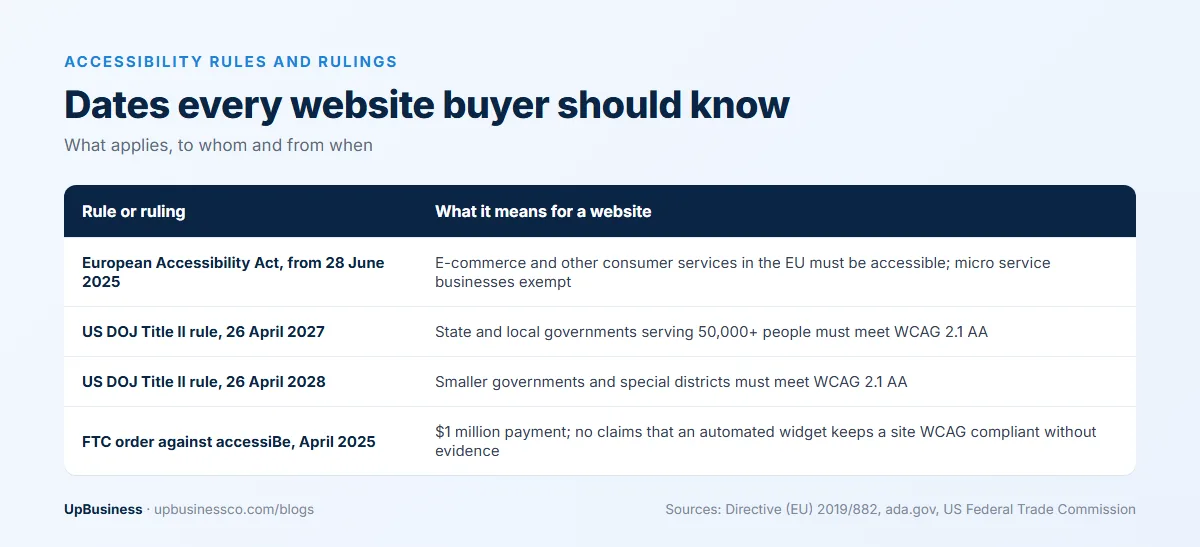
Two rule changes make this more than good practice. The European Accessibility Act covers e-commerce services provided to consumers after 28 June 2025, along with banking, e-books and several other services[2]. A business outside the EU that sells to EU consumers can fall within it.
Microenterprises providing services are exempt from the accessibility requirements[2]. The directive defines a microenterprise as a business with fewer than 10 staff and turnover or a balance sheet total of no more than EUR 2 million. For a test checklist, many teams use EN 301 549, the European standard that includes WCAG 2.1 Level AA word for word for web content[3].
In the US, the Department of Justice rule for state and local governments sets WCAG 2.1 Level AA as the standard. An interim rule in April 2026 moved the compliance dates to 26 April 2027 for entities serving 50,000 or more people and 26 April 2028 for smaller ones[4]. Private businesses aren't covered by that rule.
One shortcut to be careful with is the accessibility overlay, a script that adds a toolbar and claims to fix a site automatically. In April 2025 the US Federal Trade Commission approved a final order requiring accessiBe to pay $1 million.
The order bars the company from claiming its automated product can keep any website WCAG compliant unless it has evidence to support that claim[5]. In WebAIM's 2021 survey of 758 accessibility practitioners, 67% rated overlays as not at all or not very effective, and the figure rose to 72% among respondents with disabilities[6].
Accessibility work is cheapest in the design phase. Fixing contrast in a style guide takes an afternoon. Fixing it across 60 finished templates takes much longer, and someone has to pay for that time.
2. Performance Becomes Part of the Design Brief
Speed used to be a developer's problem that showed up after launch. In 2026 it's a design decision, because the heaviest parts of a page are usually the images, video and scripts the design asks for.
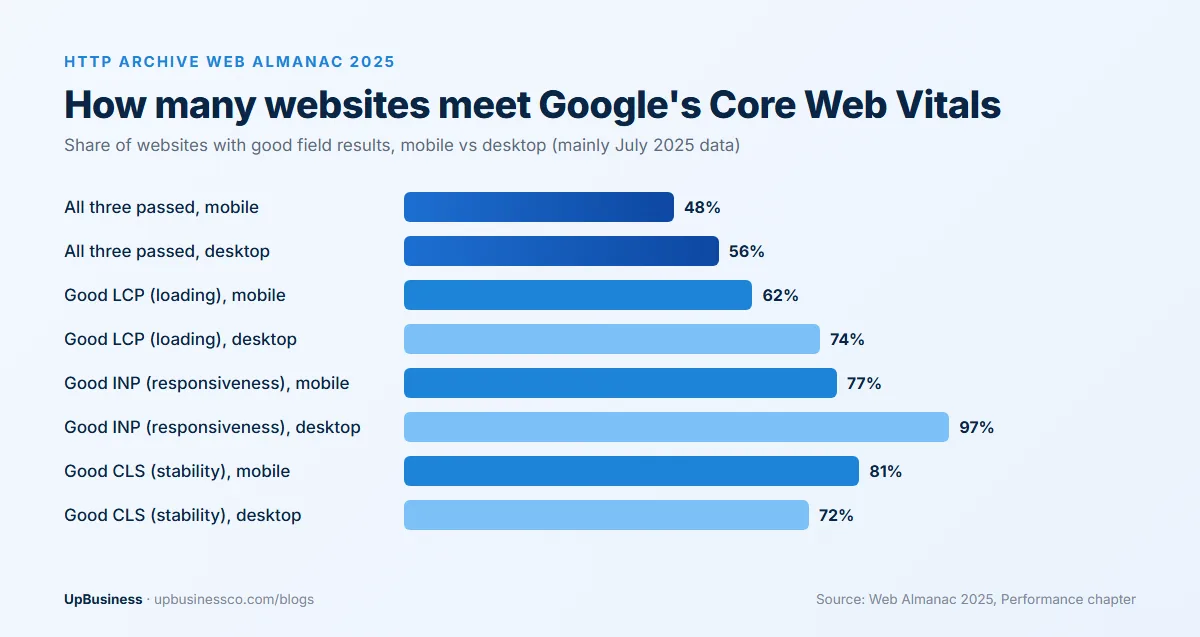
The 2025 Web Almanac, based mainly on July 2025 Chrome user data, found that 48% of mobile websites and 56% of desktop websites passed all three Core Web Vitals[7]. Loading speed is the weakest of the three on mobile: only 62% of mobile sites had a good Largest Contentful Paint[7].
Pages keep getting heavier. The median mobile home page weighed 2,559 KB in 2025, up 8.4% on 2024, and the median desktop page reached 2,862 KB. Images were the largest part, at 911 KB on mobile, with JavaScript at 632 KB[8].
Google's targets haven't moved. A good page loads its main content (LCP) within 2.5 seconds and responds to input (INP) within 200 milliseconds. Layout shift (CLS) should stay at 0.1 or less, all measured at the 75th percentile of real visits[9]. These are the numbers to write into a contract. A promise that the site will be "fast" can't be checked; an LCP under 2.5 seconds on mobile, measured on real visits, can.
A rough example shows why this matters at the design stage. Picture a home page with a full-screen hero video, three large photos and a carousel. Its media alone can easily weigh more than the 911 KB image median, before any tracking scripts are added. A designer who knows the budget will choose a still hero image, or a short compressed clip that loads after the main content. That choice is far cheaper to make in a mock-up than to undo after launch.
3. Mobile First Is Still the Default, and Still Often Skipped
StatCounter puts mobile at 58.99% of worldwide web traffic in September 2026, against 39.26% for desktop and 1.76% for tablets[10]. The split varies a lot by market and by industry. Some B2B sites still get most of their visits from office desktops, so check your own analytics before you decide which screen comes first.
Even so, many designs are still approved as wide desktop mock-ups, with mobile treated as a squeezed version afterwards. The Web Almanac numbers above show where that leads: mobile pages pass Core Web Vitals less often than desktop ones. Ask to see the mobile designs for your key pages in the first review, not the last. Menus, forms, tables and pricing grids tend to break first on a small screen.
4. AI in the Design Process: Faster Drafts, More Checking
AI tools can now draft layouts, copy, images and front-end code in minutes. Many design partner companies use them somewhere in the process. That isn't a problem in itself. The risk is that a quick draft looks finished when it isn't.
The WebAIM data gives a hint of the cost. Home pages had about 1,437 elements on average in 2026, 14.3% more than a year earlier, and use of ARIA attributes (code meant to help assistive technology) rose 27% in a year.
Pages that used ARIA averaged 59.1 errors, against 42 on pages without it[1]. WebAIM suggests that automated or AI-assisted coding practices, which it calls "vibe coding", may be one reason for the rise in errors[1]. That's a suggestion rather than a proven cause, but it matches what you'd expect when code is generated faster than it's reviewed.
AI isn't removing the need for people who can do this checking. The US Bureau of Labor Statistics projects employment of web developers and digital designers to grow 5% from 2025 to 2035, with about 13,600 openings a year[11].
When you hire a design partner, ask where AI is used and who checks the output. A good answer is specific. For example, AI may be used for early layout ideas or placeholder copy, with a person testing every template with a keyboard and a screen reader before sign-off. Also ask who owns AI-generated images and fonts, and whether any of them come with licence limits.
5. Native Motion: View Transitions and Scroll Animations
Motion is one of the more visible trends on design gallery sites. What's changing in 2026 is how it's built. Browser makers chose view transitions and scroll-driven animations as focus areas for Interop 2026, their joint project to make features work the same way across browsers[12]. Same-document view transitions already reached Baseline through Interop 2025, and the 2026 work covers transitions between separate pages too[12].
For a buyer, this means smooth page changes and scroll effects no longer need heavy animation libraries. Because they're built into the browser, they usually add less code to the page. Interop 2026 also includes anchor positioning, container style queries and native dialogs and popovers[12], which cover tooltips, menus and pop-ups that used to need extra JavaScript.
Motion still needs limits. WCAG 2.2 success criterion 2.3.3 (level AAA) says animation triggered by interaction should be possible to turn off, unless the animation is essential to the content. The reason is that unnecessary movement can cause dizziness, nausea and headaches for people with vestibular disorders[13]. Windows, macOS, iOS and Android all let users ask for less motion, and a well-built site follows that setting. Supporting it takes a few lines of CSS.
6. Expressive Type, Colour and Layout, Within Limits
After several years of very similar templates, many 2026 trend lists point to bolder typography, saturated colour, looser layouts and hand-made illustration. This is mostly a matter of taste rather than measurement, and no study we found shows that any one style converts better across industries.
Here are the styles that appear in many of this year's trend lists, with what each one means for a business site and what it can cost in speed or accessibility.
| Style | When it suits a business site | What to watch |
|---|---|---|
| Bento grids (content in tiles of different sizes) | Feature pages and product overviews with several short points | Tiles must stack in a sensible order on mobile |
| Kinetic and variable typography | Brand-led home pages and campaign pages | Moving text needs a reduced-motion fallback; one variable font file can replace several weights |
| Glassmorphism (frosted, see-through panels) | Menus, cards and overlays on simple backgrounds | Text over busy images often fails contrast |
| Dark mode | Software products, developer tools and media sites | Every colour needs checking twice, once per theme |
| 3D and WebGL scenes | Product viewers where shape or fit matters | Heavy scripts can hurt mobile loading and responsiveness |
| Organic, off-grid layouts | Creative studios, fashion and lifestyle brands | Screen readers and small screens still need a clear reading order |
| Neo-brutalism (raw borders, loud colour blocks) | Young brands that want to stand out | Can look unfinished to cautious B2B buyers |
What the data does show is where expressive design goes wrong. Low contrast text was the most common accessibility error in 2026, found on 83.9% of home pages with an average of 34 instances each, 15% more than in 2025[1]. Common causes include pale grey text on white, white text over photos and light brand colours on light backgrounds.
Colour shows how mixed the signals are. Many trend lists push saturated colour, while Pantone's Colour of the Year for 2026 is Cloud Dancer (PANTONE 11-4201), a white[14]. Either direction can work. What doesn't change is the WCAG minimum at level AA: a contrast ratio of at least 4.5:1 for normal text and 3:1 for large text[15].
A sensible approach is to let your brand decide the style and let testing decide the details. Bold headings and strong colour work well when body text keeps a clear contrast ratio and the layout still reads in a predictable order on mobile. If a designer proposes a look that fails contrast checks, ask for a version that passes before you approve it, not after the site is built.
7. Websites That AI Agents and AI Search Can Use
A newer trend is designing for visitors who aren't people. In February 2026 Chrome opened an early preview of WebMCP, a proposed standard that lets websites offer structured actions to AI agents. It has a declarative API for standard actions defined in HTML forms and an imperative API for more complex actions that need JavaScript[16]. For now it's open only to early preview participants, and no site needs to budget for it yet.
The useful part for now is simpler. An AI agent filling in a form relies on the same structure a screen reader does: labelled fields, real buttons and a logical order. Half of the top million home pages still have unlabelled form inputs[1], so fixing that helps disabled visitors, ordinary visitors and automated ones at once.
For AI search, Google's guide says you don't need special files, markup or a special writing style to appear in its AI features[17]. Clear pages that load properly are what counts. Our SEO trends 2026 guide covers what AI Overviews mean for search traffic in more detail.
8. Simpler Forms and Checkout Pages
Form and checkout design rarely appears in trend lists, yet it's where design touches revenue very directly. Baymard Institute's average documented cart abandonment rate is 70.22%, based on 50 studies[18].
Some of that can't be designed away: 42% of US shoppers in Baymard's research abandoned because they were only browsing. Among the rest, 40% left because of extra costs, 19% didn't trust the site with their card details, 18% were asked to create an account and 17% found checkout too long or complicated[18].
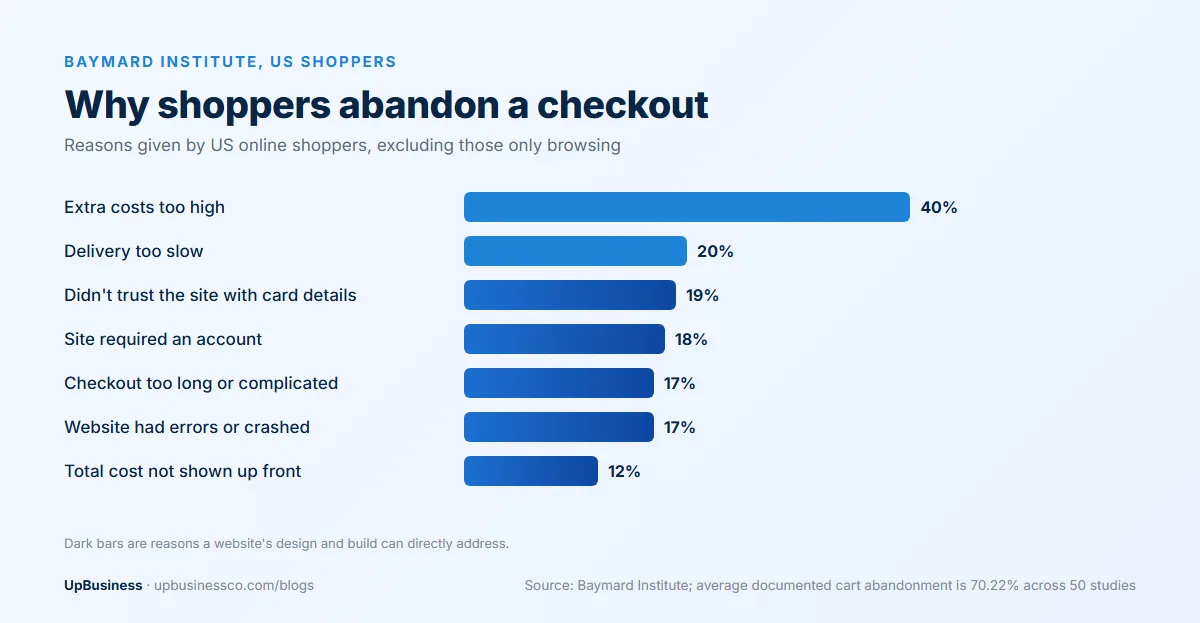
Several of these are design problems. Show the total cost early, offer guest checkout, cut fields you don't need and put trust signals (payment logos, return policy, contact details) next to the payment step rather than in the footer. The same thinking applies to B2B lead forms: every extra field you ask for costs some enquiries, so keep only the ones your sales team really uses.
What These Trends Mean for Your Website Brief
The trends above should show up in the brief you send and the proposals you get back. Use this table to check a proposal before you sign.
| Part of the brief | What a current proposal includes | Question to ask |
|---|---|---|
| Accessibility | A named WCAG level, with manual keyboard and screen reader testing | Which WCAG level, which tools, and who tests by hand? |
| Performance | LCP, INP and CLS targets, plus a page weight budget | What will the mobile LCP be, measured how? |
| Mobile | Mobile designs for key pages in the first review | Can we see mobile first for the home and service pages? |
| AI use | Where AI is used and who reviews the output | Who owns the rights to AI-made images and copy? |
| Motion | Native browser animation that follows reduced-motion settings | What happens when a visitor turns motion off? |
| Forms and checkout | Fewest fields needed, guest checkout, costs shown early | How many steps and fields will the checkout have? |
| Handover | Design system, source files and a style guide | Will we get editable source files and a component library? |
Watch for these warning signs in a web design proposal:
- an overlay or widget offered as the whole accessibility plan
- no performance targets at all, or only a lab test score for the home page
- desktop-only mock-ups at the first review
- heavy video or animation libraries with no mention of mobile load time
- a quote that arrives within hours, with no questions about your users, content or integrations
If you're still deciding between a custom design and a ready-made theme, our comparison of custom websites vs template websites sets out the trade-offs. For budgets, our website development cost guide breaks prices down by site type, and our web development services guide explains what each type of build includes. A clear project brief also makes proposals much easier to compare.
UpBusiness Data: UI/UX Website Design Companies (October 2026)
Our analysis of the 7 verified UI/UX website design companies on UpBusiness gives a snapshot of who does this work. Four are based in Noida, with one each in Ahmedabad, Lucknow and Mumbai. Team sizes range from a small studio of 1 to 10 people to one company with 201 to 500 staff; three have 11 to 50 people and two have 51 to 200.
Their average project sizes, as they report them, run from $100 to $25,000, with a median of $10,000. Founding years range from 2004 to 2024. TrustScores sit between 70.2 and 75.9. For all seven, design is one of several services, listed next to work such as app development, software testing or e-commerce builds.
That can suit a buyer who wants one team for design and development, but ask to see design-specific work in the portfolio. These are self-reported figures in a small group, so use them to shortlist and to sense-check quotes rather than as a market average.
Find a Web Design Partner Company on UpBusiness
You can browse verified UI/UX website design companies on UpBusiness and compare team size, location, project sizes and TrustScore before you contact anyone. If you need a visual refresh more than a rebuild, see our website design companies, and for full builds our website development companies. Or post your project once and let matching partner companies come to you.