


Browse our curated list of Website Development Companies
A website redesign can lift sales and still wipe out the search traffic that brought those buyers in. Website redesign SEO is the set of steps that stops that from happening: benchmarking before work starts, keeping or redirecting every URL, carrying content across, hiding the staging site properly and checking everything on launch day. This guide is for business owners and marketing leads hiring a partner company for a redesign. It covers what to ask for, who should do each task and what belongs in the contract.
The risk is real but avoidable. Google says to expect temporary ranking changes during a site move, and that a medium-sized site can take a few weeks or more to settle[1]. A redesign done carelessly can take far longer to recover.
Key takeaways
- Keeping the same URLs is the single biggest way to reduce risk. If URLs must change, map every old URL to its closest new page with a permanent redirect and keep it for at least a year[1].
- Hide the staging site with a password. A noindex tag doesn't work if robots.txt also blocks the page, because Google never sees the tag[2].
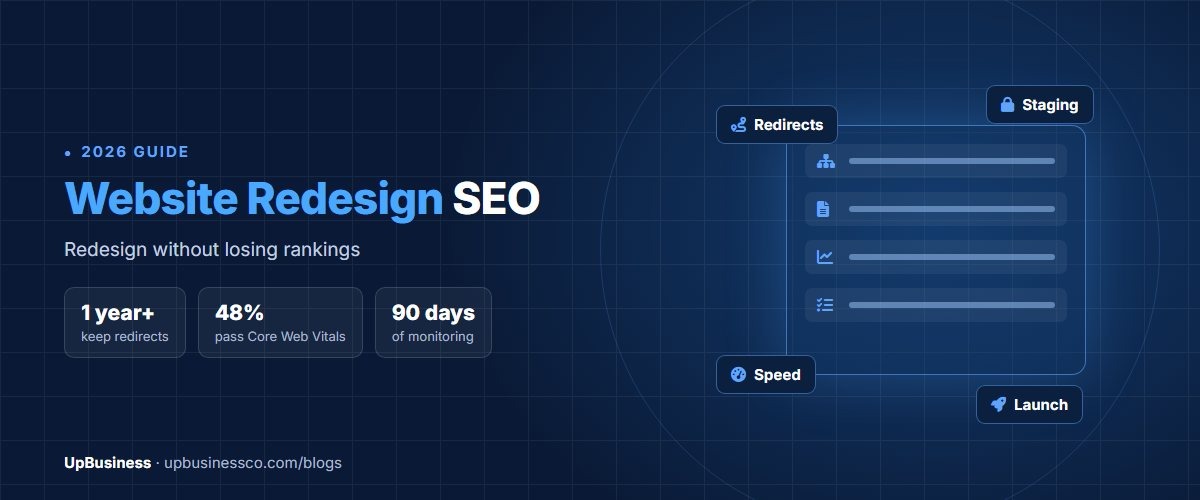
- Set a speed budget before design starts. Only 48% of sites pass all Core Web Vitals on mobile[3].
- Put SEO tasks, a redirect file and a 90-day fix window in the contract, and keep your analytics and Search Console accounts in your company's name.
Does a Website Redesign Hurt SEO?
A redesign doesn't hurt SEO by itself. The damage comes from changes made along the way that nobody checked. These are the usual causes:
- Changed URLs without redirects: pages that had rankings and links now return errors.
- Lost content: long service pages become short design blocks, and the text Google ranked is gone.
- Broken internal links: new menus drop links to pages that used to be one click from the homepage.
- Indexing blocks left in place: the noindex tag or robots.txt rule used on staging goes live with the site.
- Slower pages: heavy images, video backgrounds and scripts push load times up.
- Lost tracking: analytics tags or conversion events are missing, so nobody notices the drop for weeks.
Done well, a redesign can help SEO: faster pages, clearer structure and better content on the pages that matter. The rest of this guide is about getting that outcome.
Same URLs or New URLs? The Decision That Sets the Risk
Before any design work, agree what kind of change this is. The risk rises with every layer you change at once.
| Type of change | SEO risk | What it needs |
|---|---|---|
| New design, same URLs and content | Low | Content and internal link checks, speed testing, launch checks |
| New design and rewritten content, same URLs | Medium | Keep the topics and headings that rank; compare before and after |
| New design and new URL structure | High | A full redirect map tested before launch |
| New design and a new CMS or platform | High | Redirect map plus checks on how the new platform builds URLs, titles and tags |
| New design, new platform and a new domain | Highest | Everything above plus Google's Change of Address tool; better split into separate projects |
Google's Change of Address tool is only for moving from one domain or subdomain to another. It isn't needed for a redesign on the same domain, a move to HTTPS or a change of hosting[4]. If a partner company proposes a new platform, new URLs and a new domain in one launch, ask whether the steps can be split. When traffic drops after a combined launch, it's very hard to tell which change caused it.
What Should You Benchmark Before the Redesign Starts?
You can't prove a redesign worked, or find what broke, without a record of how the old site performed. Export these before any work begins:
- Search Console performance data: clicks, impressions and positions by page and by query. Search Console keeps 16 months of data[5], so export it now if you want a longer history.
- Analytics data: sessions, leads and sales by landing page for at least the last 12 months.
- A full crawl of the old site: every URL, title, meta description, H1, canonical tag and status code.
- Your most valuable pages: the pages that bring most organic clicks, leads or sales, and the pages with the most links from other sites.
- Speed scores: Core Web Vitals for your main page templates, on mobile and desktop.
The list of most valuable pages is the one to guard. On most sites a small share of pages earns most of the organic traffic, and those pages need the closest checks through every stage.
How to Build a URL Inventory and Redirect Map
A redirect map is a spreadsheet that lists every old URL and where it goes on the new site. Ask your partner company to deliver it as a file before launch, not as a promise. A simple version looks like this:
| Old URL | Organic clicks (12 months) | New URL | Match type | Redirect |
|---|---|---|---|---|
| /services/seo-audit/ | 4,200 | /services/seo-audit/ | Kept the same | None needed |
| /blog/seo-tips-2023/ and /blog/seo-tips-2024/ | 1,100 | /blog/seo-tips/ | Two pages merged | 301 from both |
| /products/old-widget/ | 300 | /products/widgets/ | Retired, nearest category | 301 |
| /downloads/price-list.pdf | 150 | /pricing/ | File replaced by a page | 301 |
| /about-us/team-old/ | 0 | None | Removed, no value | 404 or 410 |
Google's rules for the map are clear. Use permanent redirects, either 301 or 308, which Google treats as a strong signal that the new URL should replace the old one, and avoid temporary 302 or 307 redirects for pages that have moved for good[6]. Point each old URL to the most relevant new page rather than sending many to the homepage, avoid chains where one redirect leads to another, and keep the redirects for as long as possible, generally at least a year[1].
Include images, PDFs and old campaign landing pages in the map. They often have links from other sites that are easy to forget.
Which Content Must Survive the Rebuild?
Designers often work from mock-ups with placeholder text, and the real content gets cut to fit the new layout. For every valuable page, check that the new version keeps:
- The page title and meta description, or improved versions of them
- The main heading and the subheadings that match what people search for
- The body text that answers the searcher's question, including FAQs
- Image alt text and file names on important images
- Structured data, such as product, FAQ, review or local business markup
- Internal links to and from the page, especially from menus and the homepage
- Canonical tags and, for multi-language sites, hreflang tags
Cutting text to make a page look cleaner is one of the most common causes of lost rankings after a redesign. If the design needs less text, use tabs or expandable sections and keep the content on the page.
How Should the Staging Site Be Hidden From Google?
A staging site that Google indexes can compete with your live site, and the fixes used to hide it often go live by mistake. The safest option is password protection. Google says password-protected content stays private and will eventually drop out of search results if it was ever indexed[7].
A common mistake is using both a noindex tag and a robots.txt block. Google explains that for noindex to work, the page must not be blocked by robots.txt, because a blocked crawler never sees the noindex rule[2]. Whatever method is used, add "remove staging protection and noindex tags" to the launch checklist, and check it again the day after launch.
Will the New Design Pass Core Web Vitals?
Core Web Vitals are Google's measures of loading speed, responsiveness and visual stability. A page passes when Largest Contentful Paint is within 2.5 seconds, Interaction to Next Paint is 200 milliseconds or less and Cumulative Layout Shift is 0.1 or less, measured at the 75th percentile of real visits[8].
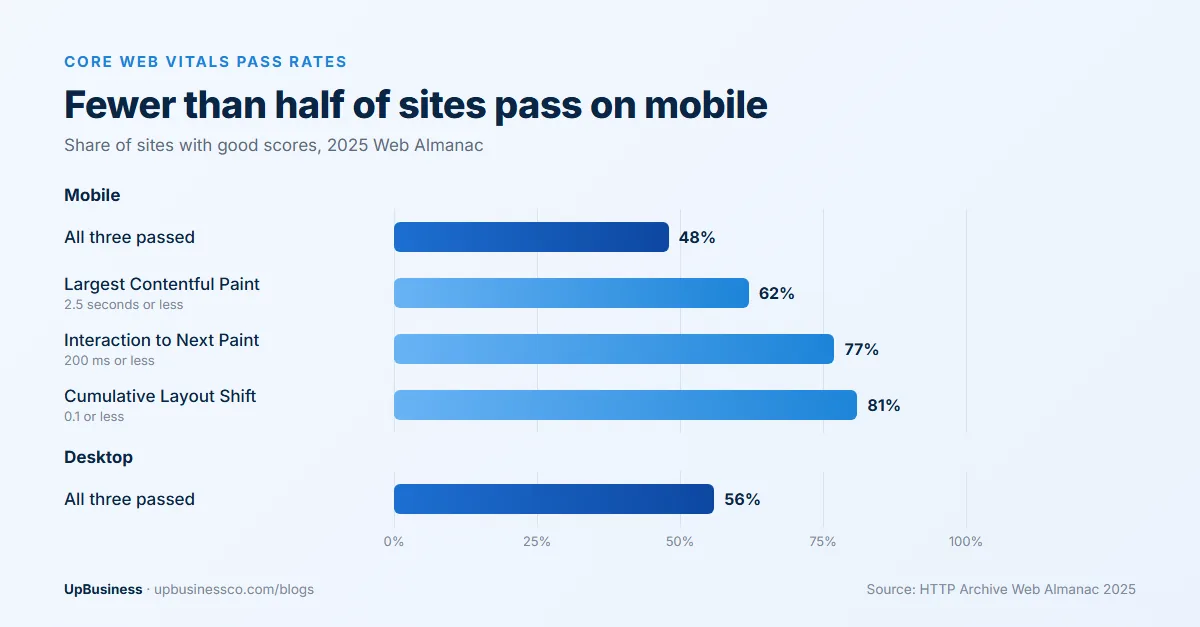
Many sites fail. The 2025 Web Almanac found only 48% of sites passed all three on mobile and 56% on desktop, with Largest Contentful Paint the most common failure on mobile[3]. Speed also affects revenue. In a Deloitte study for Google of 37 brand sites, a 0.1-second faster mobile site lifted retail conversions by 8.4% and travel conversions by 10.1%[9].
Ask the partner company to agree a speed budget before design starts, for example a maximum page weight and the three Core Web Vitals targets above for each main template, and to test the staging site against it before launch. For current design styles and what they do to speed, see our guide to web design trends 2026.
Website Redesign SEO Checklist: What to Check on Launch Day
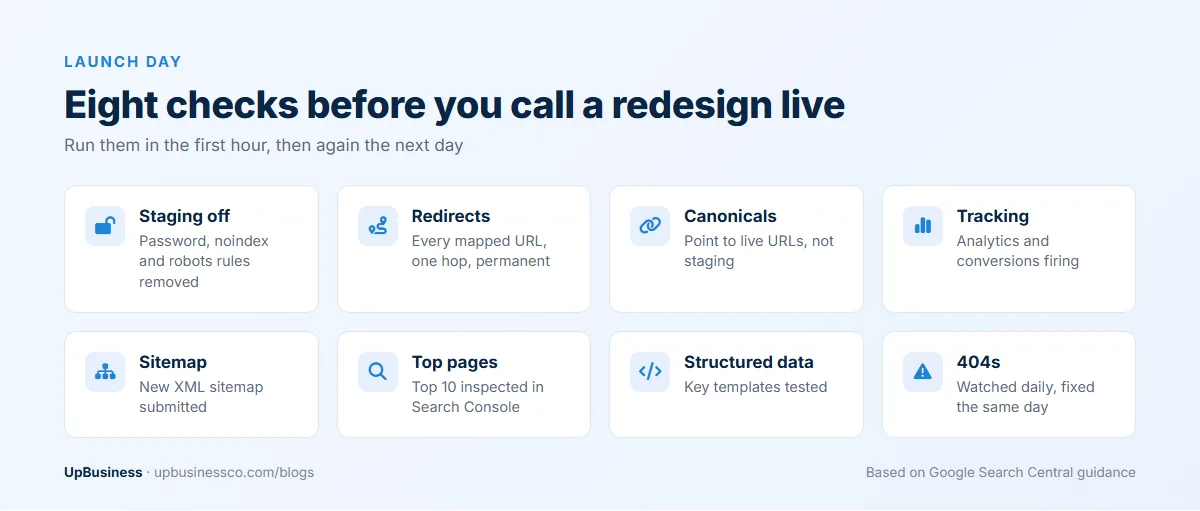
- The day before: freeze content changes, and crawl the staging site against the redirect map.
- At launch: remove the password, noindex tags and any staging robots.txt rules, then confirm robots.txt loads and allows crawling.
- Redirects: test every mapped URL in bulk. Each should reach a working page in one step, with no chains and no temporary redirects.
- Tags: check canonical tags point to live URLs, not staging, and that the site loads on one version (HTTPS, with or without www).
- Tracking: confirm the analytics tag fires and that form and checkout conversions are recorded.
- Search Console: confirm the property is still verified, submit the new XML sitemap and inspect your top 10 pages.
- Structured data: test key templates with Google's Rich Results Test.
- The next three days: watch the Search Console page indexing report and 404 errors, and fix any missed redirects the same day.
Agree in advance what would trigger a rollback to the old site. A practical rule from Shopify's guidance is that redirect problems on more than 1% of URLs point to a mapping error that needs fixing at once[10].
What Should You Monitor in the 90 Days After Launch?
| When | What to check | Who acts |
|---|---|---|
| Days 1 to 7 | 404 errors, redirect errors, indexing report, conversions recorded | Developer fixes, SEO reports daily |
| Weeks 2 to 4 | Clicks and positions for the most valuable pages against the benchmark | SEO reviews weekly |
| Months 2 to 3 | Organic traffic, leads and sales against the same period last year; Core Web Vitals from real visits | SEO and you review monthly |
| Day 90 | A written review with remaining fixes and whether the redesign met its goals | You sign off |
Search Console can compare the last three months with the previous period or with the same period last year, which is the fastest way to see which pages and queries lost ground[5].
How Long Do Rankings Take to Recover After a Redesign?
For a same-domain redesign with good redirects, Google's guidance points to a few weeks or more for a medium site to settle, and longer for large sites[1]. Shopify's guidance treats a change of up to about 20% in organic traffic in the first month as common after a relaunch[10].
Bigger moves take much longer. A Search Engine Journal study of 892 domain migrations found they took an average of 523 days to regain their previous organic traffic, and 17% hadn't recovered after 1,000 days[11]. Those were changes of domain, not redesigns, but they show why it's worth avoiding a domain change unless you need one.
Should You Launch the Redesign All at Once or in Stages?
A single launch is simpler to manage, but it puts every change live on the same day. Launching in stages, one section or template at a time, makes problems easier to trace. If traffic to the blog drops after only the blog template changed, you know where to look.
Stages work well for large sites, sites with a lot of organic traffic and sites where the content team needs time to move pages across. A common order is to launch low-risk sections first, such as the about pages, then the blog, then category or service pages, and the highest-traffic templates last, once the process is proven. Agree with the partner company how old and new templates will share navigation during the changeover, so visitors and Google don't hit broken menus.
Whichever route you choose, avoid launching just before your busiest season. A redesign that goes live in the quiet weeks gives you time to fix problems before they cost the most.
Who Does What: Designer, Developer, SEO and You
Many redesign problems come from tasks nobody owned. Agree this split in writing before the project starts.
| Task | Designer | Developer | SEO specialist | You |
|---|---|---|---|---|
| Benchmark export | Leads | Gives account access | ||
| URL structure | Agrees | Builds | Signs off | Approves |
| Redirect map | Implements | Writes and tests | Reviews top pages | |
| Content carry-over | Lays out | Builds | Checks | Approves |
| Staging protection | Sets up and removes | Checks | ||
| Speed budget | Designs to it | Builds to it | Tests | |
| Analytics and Search Console | Installs | Checks | Owns the accounts | |
| Launch checks and 90-day monitoring | Fixes | Leads and reports | Signs off |
If the partner company has no SEO specialist, hire one separately for the benchmark, redirect map and launch checks. That is usually a small cost next to the traffic at risk. Our guide to professional SEO services explains what to expect from one, and you can compare SEO companies on UpBusiness.
What SEO Responsibilities Belong in the Contract?
- A list of SEO deliverables: benchmark export, URL inventory, redirect map file, content carry-over check and launch checklist
- Delivery of the redirect map before launch, for your review
- Core Web Vitals targets for each main template, tested before launch
- No launch without written SEO sign-off
- A 90-day period in which SEO problems caused by the redesign are fixed at no extra cost
- Confirmation that you own the domain, hosting account, CMS, analytics and Search Console
Our software development contract checklist covers the wider terms, such as payment milestones and code ownership.
Red Flags That a Redesign Company Will Ignore SEO
- The proposal doesn't mention redirects or a URL inventory.
- They plan to change every URL to make them "cleaner" without a reason tied to search.
- The staging site is public, or hidden only with robots.txt.
- Mock-ups use placeholder text, with no plan for the existing content.
- They want to change domain, platform and design in one launch.
- Analytics and Search Console would sit in their accounts, not yours.
- There's no speed target and no support period after launch.
What UpBusiness Partner Data Shows
We looked at the 17 partner companies on our website development page in October 2026. All are based in India, with TrustScores from 70 to 76 and a median of 72. Seven have 10 or fewer staff, five have 11 to 50 and five have more than 50.
The median average project size they report is $1,000, with the middle half between $500 and $17,500. That spread covers both small template refreshes and full rebuilds, so ask early whether the quote includes the SEO tasks above or treats them as extras. Smaller teams in particular may not have an SEO specialist on staff. For budgeting the build itself, see our website development cost guide, and if you're weighing a template against a custom design, see custom website vs template website.
The Bottom Line
Website redesign SEO comes down to a few disciplines: benchmark first, keep URLs where you can, redirect the rest one to one, carry content across, hide staging with a password, set a speed budget and check everything on launch day. Write those tasks and a 90-day fix window into the contract, and keep every account in your name.
When you're ready, compare verified website development companies, see website redesign companies or post your project on UpBusiness to get matched.