


Browse our curated list of Shopify Development Companies
Shopify migration services move an online store from another platform, such as WooCommerce, Magento, BigCommerce, Wix or Squarespace, onto Shopify without losing products, customers, order history or search traffic. The import itself is the easy part. The risk sits in what Shopify handles differently: fixed URL formats, customer passwords that can't be moved, gift cards, subscriptions and a checkout that has to be rebuilt. This guide is for store owners and ecommerce managers hiring a partner company for a migration, and covers what moves, what doesn't, how to protect SEO and what to check before go-live.
If you're still choosing a platform, our Shopify vs WooCommerce comparison covers that decision. This guide assumes the move to Shopify is agreed.
Key takeaways
- Customer passwords can't be imported into Shopify by CSV, so every customer has to set a new password[1]. Plan the invitation email before launch.
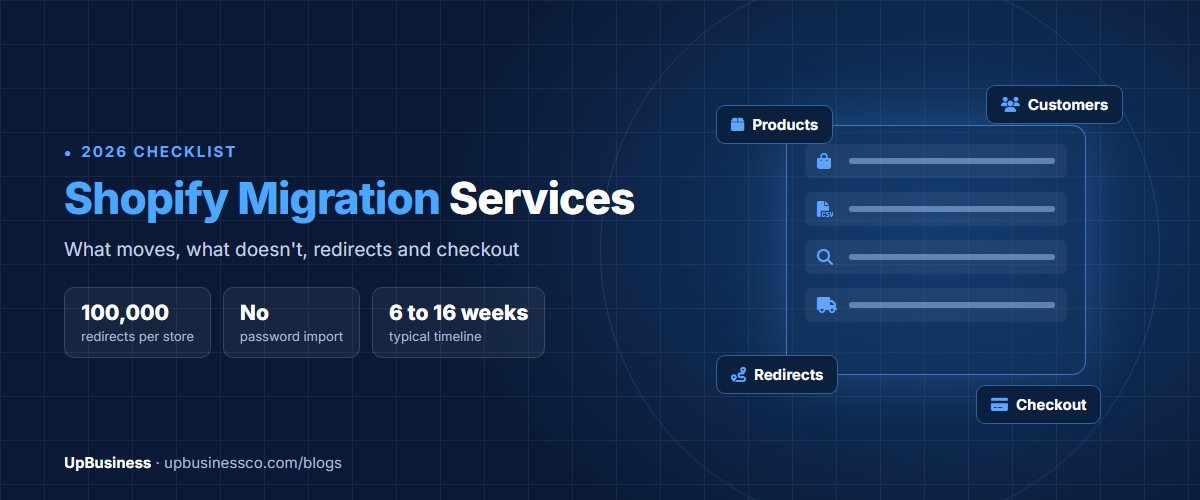
- Shopify product, collection, page and blog URLs follow fixed formats, so most old URLs change. A store can have up to 100,000 redirects, and redirects only work from URLs that no longer load a page[2].
- Import products first, then customers, then historical orders, and turn off order notifications before importing orders[3].
- Adobe Commerce 2.4.6 left standard support on 11 August 2026[4], which is why many Magento stores are moving now.
What Do Shopify Migration Services Include?
A full migration project usually covers these parts. Check each one against a proposal, because cheaper quotes often cover only the data import.
| Part of the work | What it involves | Often left out |
|---|---|---|
| Discovery and audit | Inventory of products, customers, orders, apps, integrations and URLs | A list of features with no Shopify equivalent |
| Data migration | Products, variants, customers, orders, blog posts and pages | Gift cards, reviews, subscriptions, loyalty points |
| Theme and design | A new Shopify theme or a rebuild of the current design | Content checks against the old pages |
| Apps and integrations | Replacing plugins with Shopify apps; connecting ERP, stock and shipping | Testing that apps do what the plugins did |
| SEO protection | Redirect map, page titles, meta descriptions, structured data | Redirects for images, PDFs and old campaign pages |
| Checkout, payments and tax | Payment providers, tax settings, shipping rates, checkout customisations | Test orders for every payment and shipping combination |
| Launch and support | Domain switch, final data sync, post-launch fixes | A defined support period with response times |
What Changes Depending on the Platform You're Leaving?
| Moving from | Typical old product URL | Shopify product URL | Main extra work |
|---|---|---|---|
| WooCommerce | /product/blue-mug/ | /products/blue-mug | Replacing WordPress plugins; moving blog content |
| Magento or Adobe Commerce | /blue-mug.html | /products/blue-mug | Configurable products, custom attributes and layered navigation |
| BigCommerce | /blue-mug/ | /products/blue-mug | Category structure, which Shopify can't nest |
| Wix | /product-page/blue-mug | /products/blue-mug | Pages and blog posts rebuilt in the new theme |
| Squarespace | /shop/p/blue-mug | /products/blue-mug | Product options and member areas |
Magento stores need the most planning. Shopify's own Magento guide lists data that doesn't move cleanly, including customer passwords, configurable products, custom attributes, tier pricing and CMS blocks[5]. Shopify now allows up to 2,048 variants per product, but still only three options, so products with more option types need restructuring.
The timing pressure for Magento is real. Adobe's lifecycle policy shows Adobe Commerce 2.4.6 left standard support on 11 August 2026, and versions 2.4.4 and 2.4.5 are in a final security-only period that ends on 31 May 2027[4].
What Data Moves to Shopify, and What Doesn't?
| Data | How it moves | What to watch |
|---|---|---|
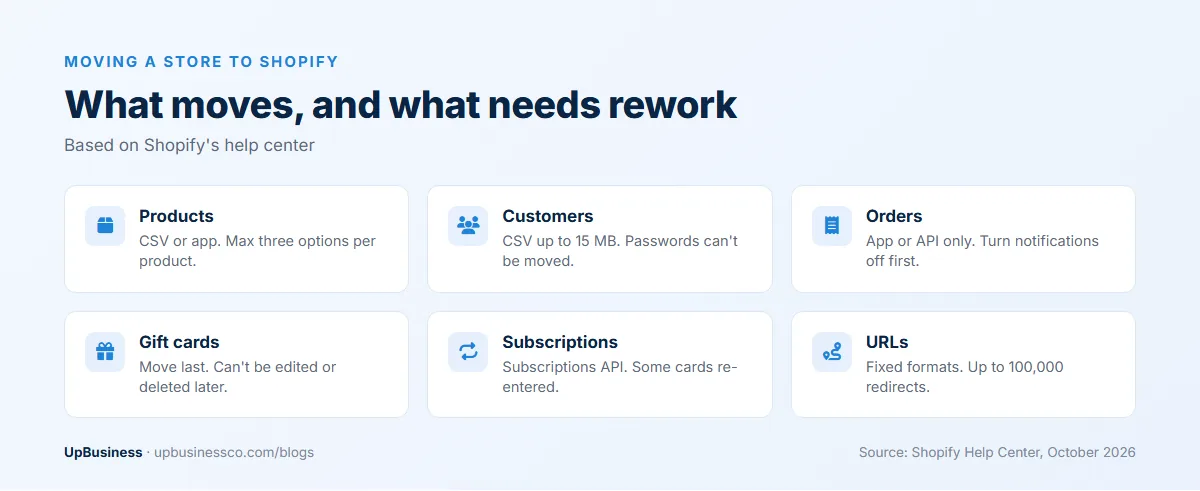
| Products and variants | CSV file or migration app | Three options per product; attributes may become metafields |
| Collections and categories | Migration app or API | No nested collections, so category trees flatten |
| Customers | CSV file up to 15 MB, or an app[1] | Passwords can't be moved; customers must be invited to set new ones |
| Historical orders | App or API only, not CSV[3] | Turn off notifications first; order numbers may change |
| Gift cards and store credit | App or API | Move them last, just before launch; they can't be edited or deleted in Shopify[6] |
| Subscriptions | Shopify's Subscriptions API[7] | Customers may need to re-enter payment details if their card can't be carried over |
| Product reviews | Import into your chosen review app | Depends entirely on the review app |
| Blog posts and pages | App or API, not CSV[3] | URLs move under /blogs/ and /pages/ |
| Loyalty points, custom checkout code, B2B price rules | Usually rebuilt | Needs its own scope and testing |
Shopify's recommended import order is products first, then customers, then historical orders[3]. Imported orders can trigger an order email for every order, so make sure notifications are off before the import runs. For a store that keeps trading during the build, plan a final "delta" sync of new orders and customers just before launch.
Can Customer Passwords Be Migrated to Shopify?
Not by Shopify's standard import. Shopify states that you can't migrate customer passwords from another store using a CSV, and that customers must be invited to create new passwords[1]. Some migration apps sell password add-ons, so ask any partner company that offers one exactly how it works and test it before relying on it.
The practical answer is a clear account invitation. Send it from your own domain at launch, explain why customers need a new password, and offer a small incentive to return. Expect some customers to check out as guests instead.
How Do You Build a Redirect Map That Protects Rankings?
Shopify sets the start of every product, collection, page and blog URL, and you can only edit the last part, called the handle. That's why most stores moving from another platform end up with new URLs. Each old URL that had traffic or links needs a permanent redirect to its closest new page.
Shopify's rules shape the map. A store can have up to 100,000 URL redirects, imported by CSV, and a redirect only works from a URL that no longer loads a page[2]. Google's site move guidance adds that every old URL should be mapped to its new one, redirects should be permanent, and they should stay in place for as long as possible, generally at least a year[8].
| Old URL | New Shopify URL | Notes |
|---|---|---|
| /product/blue-mug/ | /products/blue-mug | Keep the same handle where possible |
| /product-category/mugs/ | /collections/mugs | Category becomes a collection |
| /product-category/mugs/ceramic/ | /collections/ceramic-mugs | Nested category flattened into its own collection |
| /blog/how-to-clean-mugs/ | /blogs/news/how-to-clean-mugs | Blog posts move under a named blog |
| /about/ | /pages/about | Pages move under /pages/ |
| /wp-content/uploads/size-guide.pdf | /pages/size-guide | Replace old files with a page or re-upload them |
Ask the partner company to deliver the redirect map as a spreadsheet before launch, and check your 20 highest-traffic pages yourself. Include product images and downloadable files that other sites link to, since they're easy to miss.
Will You Lose SEO Traffic After Moving to Shopify?
Some movement is normal; a sustained drop is not. Shopify's Magento migration guide treats a dip of 5% to 10% in the first week as common, and says a drop of more than 20% that lasts needs investigating[5]. Google also says to expect temporary ranking changes while a site moves, with most pages on a small or medium site moving within a few weeks[8].
Most lasting losses come from missed redirects, page titles and descriptions left blank, content cut from category pages, and collections that no longer match what people search for. Keep the same domain if you can; changing platform and domain at the same time makes recovery slower and the cause harder to find. If you need ongoing help after launch, you can compare Shopify SEO companies on UpBusiness.
What Has to Be Rebuilt: Checkout, Payments, Tax and Apps?
- Checkout customisations: Shopify has retired checkout.liquid, and custom checkout logic now has to use Checkout Extensibility and Shopify Functions[9]. Old checkout code can't be copied across.
- Payments: each payment method has to be set up again. Shopify adds a fee per sale if you use a third-party payment provider instead of Shopify Payments: 2% on Basic, 1% on Grow and 0.6% on Advanced[10].
- Tax and shipping: rates, zones and rules are configured again and should be tested with real addresses.
- Apps: every plugin needs a Shopify app or a custom build. List them all in discovery, with what each one does, so nothing is forgotten.
Shopify's own migration checklist ends with placing test orders before launch[11]. Test every payment method, shipping zone, discount type and tax case, not just one card payment.
How Long Does a Shopify Migration Take by Store Size?
| Store size | Typical approach | Typical timeline |
|---|---|---|
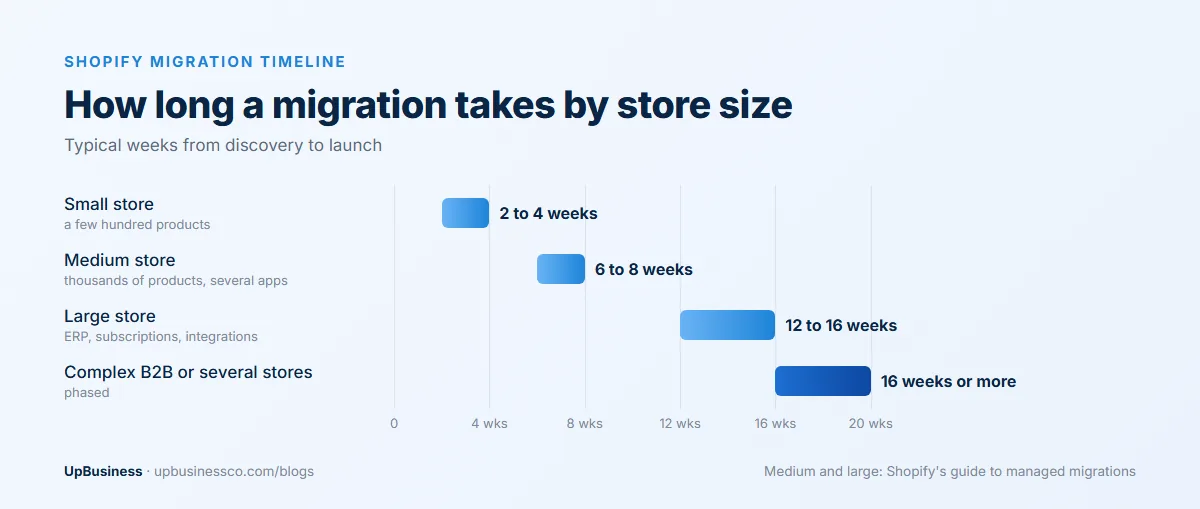
| Small: a few hundred products, few apps | Migration app plus a ready-made theme | 2 to 4 weeks |
| Medium: thousands of products, several apps | Partner company with an import tool | 6 to 8 weeks[12] |
| Large: ERP, subscriptions, many integrations | Partner-managed migration | 12 to 16 weeks[12] |
| Complex B2B or several stores | Partner-managed, in phases | 16 weeks or more |
Shopify's guide to managed migrations puts discovery at one to two weeks, simple stores at six to eight weeks and enterprise stores at 12 to 16 weeks, with a content freeze of 24 to 48 hours before switching over and a support period of 7 to 14 days after[12]. About a week before launch, lower your domain's DNS time-to-live setting so the switch takes effect quickly[6].
How Much Does a Shopify Migration Cost?
The project fee varies most with the number of products, integrations and custom features, so compare quotes line by line. These are the published costs you'll pay regardless of who does the work:
| Cost | Published price | Source |
|---|---|---|
| Shopify Basic, Grow or Advanced plan | $29, $79 or $299 a month billed yearly | Shopify pricing |
| Shopify Plus | From $2,300 a month on a three-year term | Shopify Plus pricing |
| Matrixify import tool | $20, $50 or $200 for 30 days, by data volume | Matrixify pricing |
Matrixify's $50 plan, for example, covers up to 50,000 products, 20,000 customers, 10,000 orders and 100,000 redirects for 30 days[13]. Theme, app and development costs on top of the migration are covered in our Shopify development cost guide.
Should You Migrate to Shopify Plus or a Standard Plan?
Most small and medium stores migrate to one of the standard plans, which cost $29, $79 or $299 a month when billed yearly[10]. Shopify Plus starts at $2,300 a month on a three-year term[14], and is aimed at high-volume stores that need features such as more staff accounts, B2B selling, several stores under one organisation and more control over checkout.
The payment fee matters as much as the plan price. If you keep a payment provider other than Shopify Payments, Shopify adds a fee on every sale: 2% on Basic, 1% on Grow and 0.6% on Advanced[10]. On $1 million a year in sales, that's $20,000, $10,000 or $6,000. Work out which plan is cheapest at your sales volume before the migration is scoped, because the plan affects which features the partner company can use.
How Should You Tell Customers About the Move?
Customers notice three things after a migration: they need a new password, their order history may look different, and saved payment details may need to be added again. Plan the messages before launch:
- An account invitation email on launch day, explaining why a new password is needed
- A note to subscribers if any of them must update their payment method, sent before their next renewal
- Updated help pages on accounts, returns and gift cards
- A short banner on the new store for the first few weeks
Common Shopify Migration Mistakes
- Importing orders with notifications switched on, so customers receive emails for old orders
- Moving gift cards early, then missing balances spent on the old store before launch
- Redirecting every old URL to the homepage instead of its closest new page
- Leaving collection pages without the text that helped the old category pages rank
- Forgetting old plugins that did something quietly, such as tax rules or feed exports
- Switching the domain before test orders have passed
Should You Use a Migration App or Hire a Partner Company?
A migration app suits a small store with standard products, few plugins and a simple checkout, where the owner can check the redirects and test orders themselves. A partner company is worth paying for when the store has many integrations, subscriptions, B2B pricing, custom checkout logic or a lot of search traffic to protect. Many partner companies use the same import apps; what you're paying for is the planning, the redirect map, the rebuild of what doesn't migrate and the testing. A sensible middle route for a medium store is to run the import with an app yourself and pay a partner company only for the redirect map, the checkout and app rebuild, and the launch checks. Ask for those parts to be quoted separately so you can compare.
What Should Be on Your Go-Live Checklist?
- Final delta sync of new orders and customers, with notifications off
- Gift cards migrated last, and checked against the old store's balances
- Redirect file imported, and the top 50 old URLs tested by hand
- Titles, meta descriptions and structured data checked on key templates
- Test orders placed for every payment method, shipping zone and tax case
- Analytics, conversion tracking and ad platform pixels firing on the new store
- Domain connected, the new sitemap submitted in Search Console
- Customer account invitation ready to send
- A rollback plan if a critical problem appears in the first hours
What Should You Monitor in the First 90 Days?
For the first two weeks, check Search Console daily for 404 errors and fix missing redirects the same day. Through the first month, compare clicks and positions for your top pages with the old store's figures, and watch checkout conversion and revenue by landing page. At 90 days, review traffic, conversion and average order value against the same period last year, and confirm every open issue from launch is closed.
Questions to Ask a Shopify Migration Partner
- Which stores have you migrated from our platform, and what happened to their organic traffic?
- Will you deliver the redirect map as a file before launch?
- How will you handle customer passwords, gift cards, subscriptions and reviews?
- Which of our plugins have no direct Shopify app, and what's your plan for each?
- What test orders will you run before launch?
- What's included in post-launch support, and for how long?
What UpBusiness Partner Data Shows
We looked at the 7 partner companies on our Shopify development page in October 2026. All are based in India, with TrustScores from 70 to 76 and a median of 72, and team sizes from 1 to 10 people up to 201 to 500. Their median average project size is $10,000, ranging from $250 to $25,000.
Only one of the seven lists Shopify development among its three main specialisations; most are broader web, app or software companies. For a migration, that makes the first question above the most important one: ask for stores they've migrated to Shopify, from your platform, and what happened to traffic afterwards. For larger ecommerce builds, see our guide to ecommerce web development services.
The Bottom Line
Shopify migration services are mostly about what doesn't move on its own: URLs, passwords, gift cards, subscriptions, checkout logic and apps. Get a full inventory first, a redirect map before launch, a tested checkout and a clear customer invitation, and keep the same domain if you can.
When you're ready, compare Shopify development companies or post your project on UpBusiness to get matched.