


Browse our curated list of AI Integration Companies
AI integration services connect artificial intelligence to the software a business already runs, such as its CRM, ERP, helpdesk, ecommerce store and internal documents. Instead of buying a new standalone AI tool, you get AI that works inside the systems your teams already use. It might draft replies inside the helpdesk, update deals in the CRM, or answer staff questions from company policies, with the right access controls in place.
This guide is for CTOs, IT and operations heads and founders deciding whether to switch on the AI built into their existing software or hire a partner company to build a custom integration. It covers the four common types of AI integration and what each costs to build in the US, UK, Germany and India. It also shows what AI models cost to run each month, explains how the Model Context Protocol (MCP) changes integration work, and lists the security points and partner questions to settle before you sign. Prices come from official pricing pages checked on 19 October 2026.
Key takeaways
- 88% of organisations use AI in at least one business function, but about two-thirds have not started scaling it across the company, according to McKinsey's 2025 survey of 1,993 participants.
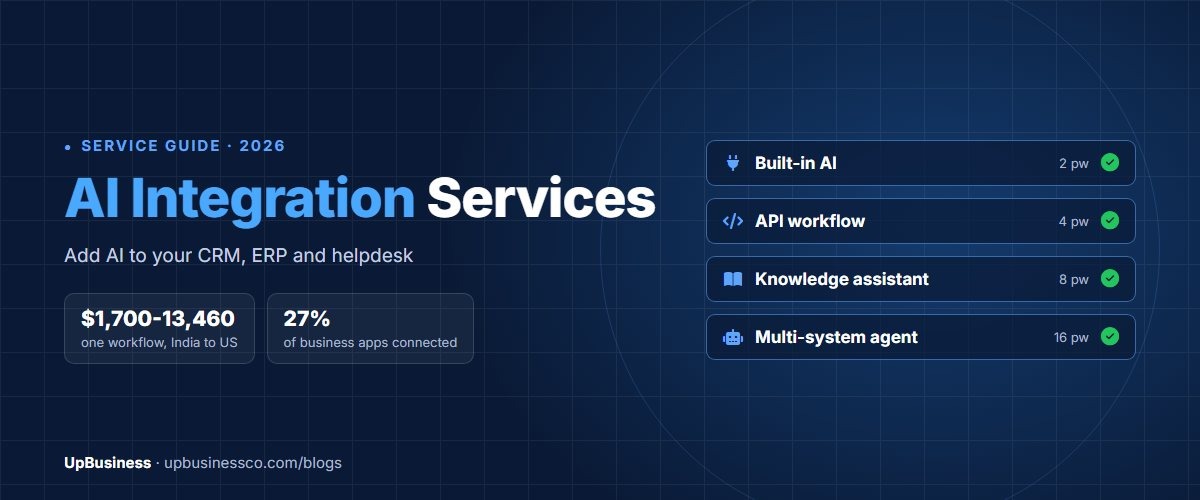
- Integration is the usual blocker. MuleSoft's 2026 benchmark found the average large organisation runs 957 applications and only 27% of them are connected.
- A single-workflow AI integration takes about 4 person-weeks, which works out at roughly $13,460 in US developer salary, $8,380 in the UK, $6,690 in Germany and $1,700 in India, before a partner's overheads.
- Model costs are often the smallest line. 10,000 support conversations a month cost about $110 in tokens on a mid-tier model, while per-resolution pricing in built-in helpdesk AI can run into thousands.
What Are AI Integration Services?
AI integration services are the design, build and support work needed to connect AI models or AI agents to a company's existing systems and data. A partner company maps the workflow, connects the AI to the right systems through their APIs, controls what data it can see and change, tests the results and monitors them after launch.
A typical engagement includes:
- A short discovery phase to pick one workflow with a clear business measure, such as response time or hours saved.
- Connections to the systems involved, with permissions limited to what the workflow needs.
- Prompt design, retrieval from company documents where needed, and an evaluation set of real examples to test against.
- Approval steps for any action the AI takes in a live system, such as updating a record or sending an email.
- Logging, monitoring, cost tracking and a handover so your team can run it.
Why AI Projects Stall at Integration
Trying AI is no longer the hard part. McKinsey's 2025 State of AI survey found 88% of organisations use it regularly in at least one business function, up from 78% a year earlier [1]. Yet about two-thirds have not begun scaling it across the enterprise, and only 39% report any effect on EBIT from AI. The gap between a demo and a working system is mostly integration.
MuleSoft's 2026 Connectivity Benchmark, a survey of 1,050 IT leaders at organisations with more than 1,000 staff in nine countries, found the average organisation runs 957 applications and only 27% of them are integrated [2]. In the same study, 96% said they face barriers to using their data for AI. The top hurdles were risk, compliance and security (42%), a lack of AI design skills (41%), old systems that are hard to connect (37%) and data stuck in separate apps (35%).
Gartner expects more than 40% of agentic AI projects to be cancelled by the end of 2027 because of rising costs, unclear business value or weak risk controls [3]. It also expects 40% of enterprise applications to include task-specific AI agents by the end of 2026, up from less than 5% in 2025 [4]. Both point the same way: AI is arriving inside business software, and the projects that last are the ones connected properly to data and processes.
Four Ways to Add AI to Your Existing Software
AI integration projects fall into four broad types. The effort figures are UpBusiness estimates for a partner company working on one workflow, and your own scope may be larger or smaller.
| Type of integration | Example | Typical effort | Best for |
|---|---|---|---|
| 1. Built-in AI, configured | Switching on and setting up Microsoft 365 Copilot, Salesforce Agentforce or Zendesk AI agents | About 2 person-weeks | Common tasks inside one platform you already pay for |
| 2. Single-workflow API integration | AI summarises each support ticket and writes the summary and category back to the CRM | About 4 person-weeks | One repetitive task across one or two systems |
| 3. Assistant over company knowledge | Staff ask questions and get answers from policies, contracts and manuals, limited to what each person may see | About 8 person-weeks | Teams that search documents all day |
| 4. AI agent across several systems | An agent reads the helpdesk, checks orders in the ERP, drafts a refund and waits for approval | About 16 person-weeks | Multi-step work that crosses CRM, ERP and helpdesk |
Start with the simplest type that solves the problem. Many teams begin with type 1 or 2, prove the value, and only then fund an agent. For document assistants, our guide to evaluating RAG chatbot proposals explains what a good retrieval setup should include, and our build vs buy AI guide covers when custom work beats an off-the-shelf tool.
How Much Do AI Integration Services Cost?
Build cost depends on the type of integration and on where the team is based. The table multiplies the typical effort above by the 2025 median back-end developer salary in each country from the Stack Overflow Developer Survey [5]. These are salary floors. Partner companies add project management, testing, infrastructure and margin on top.
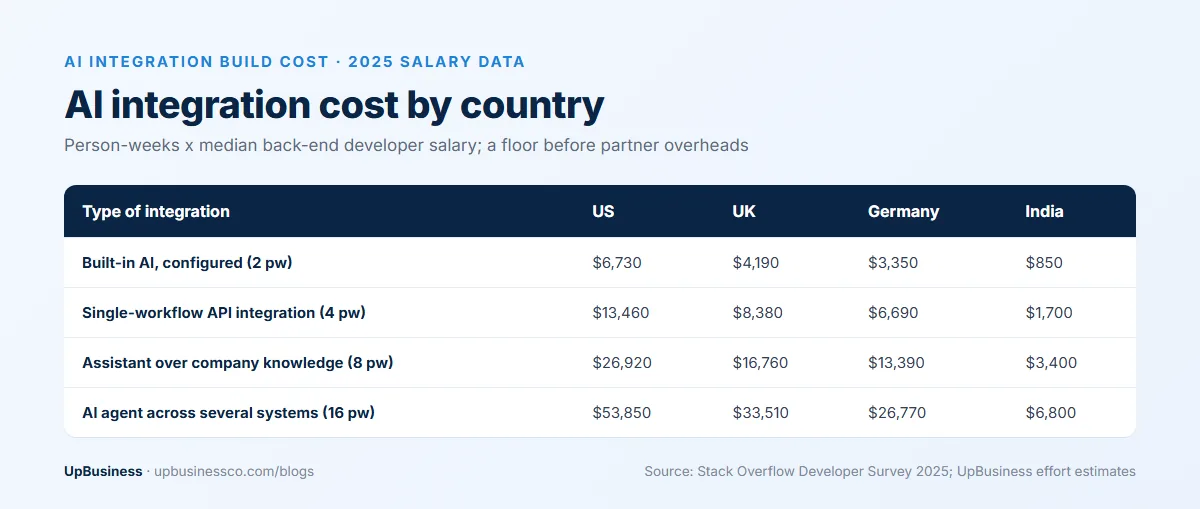
| Type of integration | US | UK | Germany | India |
|---|---|---|---|---|
| Built-in AI, configured (2 person-weeks) | $6,730 | $4,190 | $3,350 | $850 |
| Single-workflow API integration (4 person-weeks) | $13,460 | $8,380 | $6,690 | $1,700 |
| Assistant over company knowledge (8 person-weeks) | $26,920 | $16,760 | $13,390 | $3,400 |
| AI agent across several systems (16 person-weeks) | $53,850 | $33,510 | $26,770 | $6,800 |
The salaries behind the table are $175,000 in the US, $108,913 in the UK, $87,011 in Germany and $22,086 in India, which works out at about $84, $52, $42 and $11 an hour across 2,080 working hours a year. Specialists cost more: the same survey puts the median AI and Machine Learning engineer at $189,500 in the US and $149,756 in the UK [5]. For comparison, the US Bureau of Labor Statistics gives a median wage of $135,980 for all software developers in May 2025 [6]. Our guide to AI developer rates breaks down hourly and monthly rates in more detail.
Built-in AI vs Custom Integration: What Each Costs to Run
Many business platforms now sell their own AI. It is quicker to start with, but it is usually priced per user or per outcome, and that changes the maths at volume.
| Product | List price | Source |
|---|---|---|
| Microsoft 365 Copilot | $30 per user per month, paid yearly | Microsoft [7] |
| Microsoft Copilot Studio | $200 a month for 25,000 credits | Microsoft [7] |
| Salesforce Agentforce | $2 per conversation, or Flex Credits at $0.10 per action | Salesforce [8] |
| Salesforce Agentforce add-ons | $125 per user per month for Sales or Service | Salesforce [8] |
| Zendesk AI agents | $2.00 per automated resolution, pay as you go, beyond the resolutions included in the plan | Zendesk [9] |
Take a support team handling 10,000 conversations a month. If the AI resolves 6,000 of them, per-resolution pricing at $2.00 comes to about $12,000 a month. A custom integration that calls a model directly pays for tokens instead. With about 3,000 input and 500 output tokens per conversation, 10,000 conversations cost roughly $110 a month on a mid-tier model and $5.50 on a small one, at the prices in the next section.
That comparison leaves out the build, hosting, monitoring and the people who maintain a custom system, and built-in AI includes all of those. Below a few hundred conversations a month, built-in AI usually wins on total cost. At high volume, or when the workflow crosses several systems the platform cannot reach, a custom integration usually costs less to run.
AI Model API Prices in 2026
Custom integrations pay for AI models by the token, roughly three-quarters of a word. These are list prices per million tokens on 19 October 2026.
| Model | Input per million tokens | Output per million tokens | Source |
|---|---|---|---|
| Anthropic Claude Sonnet 5.5 | $2.00 | $10.00 | Anthropic [10] |
| Anthropic Claude Haiku 5.5 | $0.10 | $0.50 | Anthropic [10] |
| OpenAI gpt-6.1-sol | $2.00 | $10.00 | OpenAI [11] |
| OpenAI gpt-6-luna | $0.10 | $0.50 | OpenAI [11] |
| Google Gemini 3.8 Flash | $0.75 | $3.75 | Google [12] |
All three providers offer batch processing at about half price for work that does not need an instant answer, and cached input, where the same instructions or documents are sent repeatedly, costs a fraction of the normal rate. Prices also move. Google has announced that Gemini 3.8 Flash will rise to $1.50 per million input tokens and $7.50 per million output tokens on 1 January 2027 [12]. The same workload would then cost twice as much. Ask your partner to keep the model choice in one setting so you can switch when prices or quality change.
MCP: The Standard Connector for AI Integrations
The Model Context Protocol (MCP) is an open standard that lets AI applications connect to business systems in one consistent way. Anthropic released it in November 2024 and, in December 2025, donated it to the Agentic AI Foundation under the Linux Foundation, co-founded with Block and OpenAI. By then there were more than 10,000 active public MCP servers, and MCP was supported in ChatGPT, Gemini, Microsoft Copilot, Visual Studio Code and Cursor [13].
An MCP server sits in front of a system such as your CRM or document store. It describes what an AI may do there, including the records it can read, the actions it can take and the permissions that apply. A regular API integration is written for one application; an MCP server can be reused by any AI tool that supports the standard. For buyers, that means less custom code per connection, an easier switch between AI models, and one place to control access. It does not remove the need for careful permissions, logging and approval steps.
Integrating AI With Your CRM, ERP and Helpdesk
Each system brings its own limits. Before you approve a plan, check these points with your partner:
- Permissions. The AI should act with the same access as the person using it, or a service account limited to the workflow. It should never see records a user is not allowed to see.
- Read vs write. Reading data is low risk. Writing back, such as changing a deal stage or issuing a refund, needs approval rules and an audit log.
- API limits. CRMs, ERPs and helpdesks cap how many API calls you can make. High-volume workflows may need queues or a higher plan.
- Data quality. AI repeats whatever is in your records. Duplicate customers, old prices and missing fields show up in its answers.
- Fallback. Decide what happens when the AI is unsure or a system is down. A handover to a person is better than a wrong answer.
Data, Security and Compliance
AI integrations move company data to model providers and back, so settle these points in writing:
- A data processing agreement with each model provider, and confirmation that your data is not used to train their models.
- Where data is processed and stored, if you have data residency rules.
- Encryption, secrets management for API keys, and removal of personal data that the workflow does not need.
- Logs of every prompt, answer and action, kept long enough for audits.
Regulation is also moving. In the EU, the AI Act's obligations for general-purpose AI providers have applied since August 2025. The Digital Omnibus on AI, in force since 27 July 2026, moved the main rules for high-risk systems listed in Annex III, such as AI used in hiring or education, to 2 December 2027 [14]. In the US, Colorado replaced its 2024 AI Act with a narrower law taking effect on 1 January 2027, focused on disclosure and human review of automated decisions [15]. If your integration makes or supports decisions about people, ask your partner how it records those decisions and allows a human review.
How Long Does AI Integration Take?
Calendar time is longer than effort, because it includes access requests, security reviews and testing with real users. As a rough guide, a configured built-in AI can go live in two to four weeks and a single-workflow integration in four to eight weeks. A knowledge assistant usually takes two to three months, and an agent across several systems four to six months. System access and security approval can take weeks in larger companies, so request both in the first week.
Questions to Ask an AI Integration Partner
- Which workflow would you start with, and how will we measure whether it worked?
- Which of our systems will the AI read from, and which will it write to?
- How do you make sure the AI only sees data each user is allowed to see?
- Which actions need human approval, and where is every action logged?
- How do you test quality before launch, and how many real examples will you use?
- Which model will you use, and how hard is it to switch to another one?
- Will you use MCP or direct API connections, and why?
- What will it cost per month to run at our volume, including tokens, hosting and monitoring?
- What happens when the AI is unsure or a connected system is unavailable?
- What do we own at the end, and what support do you provide after launch?
Our list of questions to ask an AI development company covers broader points on team, contracts and delivery.
When to Hire a Partner vs Build In-House
An in-house team makes sense when AI is central to your product, you already employ engineers who know your systems, and you expect a steady stream of AI work. A partner company makes sense when you need one or two integrations, want to move in weeks rather than wait for hiring, or need skills your team lacks, such as retrieval, evaluation or MCP servers.
Many companies combine the two. A partner builds the first integration and documents it, and an internal developer takes over day-to-day changes. If you plan to do this, write the handover into the contract: code in your repository, a runbook, a recorded walkthrough and a few weeks of support while your team takes over.
Who Owns What: Keys, Prompts, Code and Data
Agree ownership before work starts. Model provider accounts and API keys should be in your company's name and billed to you. That way you see the real token cost. The prompts, evaluation sets, connector code and MCP server configuration should be delivered to your code repository. Logs and data stay in your systems. If a partner insists on running everything in its own accounts, ask how you would move the system if you changed partners.
What UpBusiness Partner Data Shows
On UpBusiness, 13 verified companies list AI integration among their services. The average project sizes they report run from $1,000 to $50,000, with a median of $25,000, and their TrustScores sit between 70 and 75. Team sizes range from under 10 people to more than 50. All 13 are based in India and work with clients worldwide. The $25,000 median sits well above the India salary floors in our cost table. That gap is expected, because project sizes include design, project management, testing and margin, and many projects cover more than one workflow. The figures are self-reported by a small group of companies, so treat them as a reference point.
Find an AI Integration Partner on UpBusiness
You can compare verified AI integration companies on UpBusiness by TrustScore, team size, location and project size. For related work, see partners for AI agent development, AI automation, AI chatbots and LLM consulting. Or post your project once, with the workflow, the systems involved and the questions above, and compare the replies side by side.
The Bottom Line
AI integration services turn AI from a separate tool into part of the software your business already runs. Start with one workflow and a clear measure. Choose between built-in AI and a custom integration based on volume and on how many systems the work touches, and get permissions, approvals and logging right from the start. Keep the model accounts, code and prompts in your name, and compare partners on how they test and run the system as well as on the build price.