


Managed cloud services hand the daily running of your AWS, Azure or Google Cloud setup to an outside team. That team watches your systems, patches servers, runs backups, fixes security settings, keeps costs in check and takes the 3 a.m. incident call. This guide is for the founder, CTO or IT head deciding whether to hire one, and if so, what to pay and what to put in the contract.
Below we cover what a provider actually runs and how the main pricing models work. We also translate uptime figures into minutes of downtime and list the contract clauses that decide whether an SLA protects you or only looks good in the proposal. Figures come from the cloud providers' own SLA and support pages, published price ranges and our analysis of verified cloud partner companies on UpBusiness.
Key takeaways
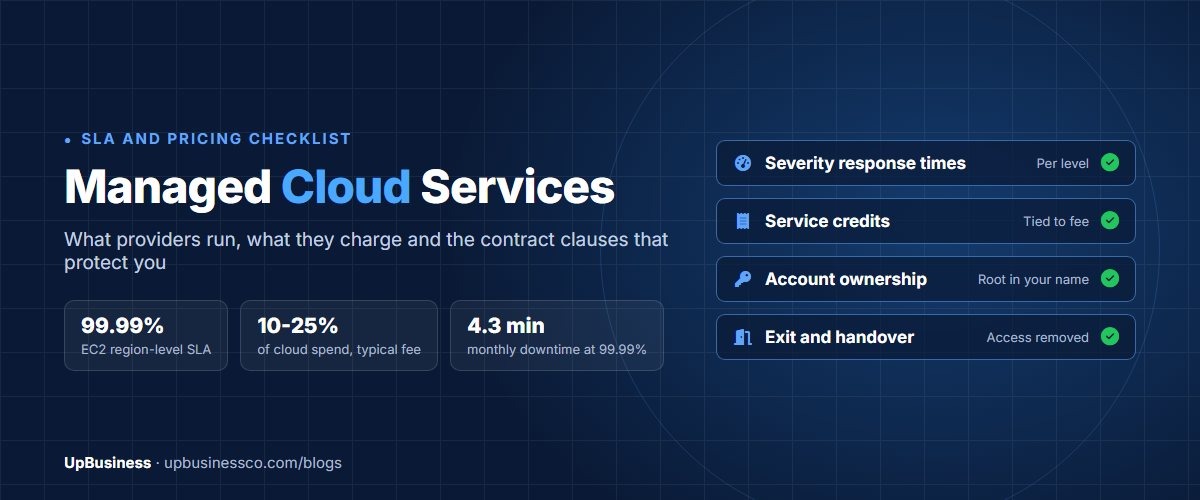
- One AWS partner's published pricing starts at $3,000 to $8,000 a month for a small single-account setup and reaches $25,000 to $100,000 or more for enterprise estates. Percentage-of-spend fees typically run 10% to 25% of the cloud bill.
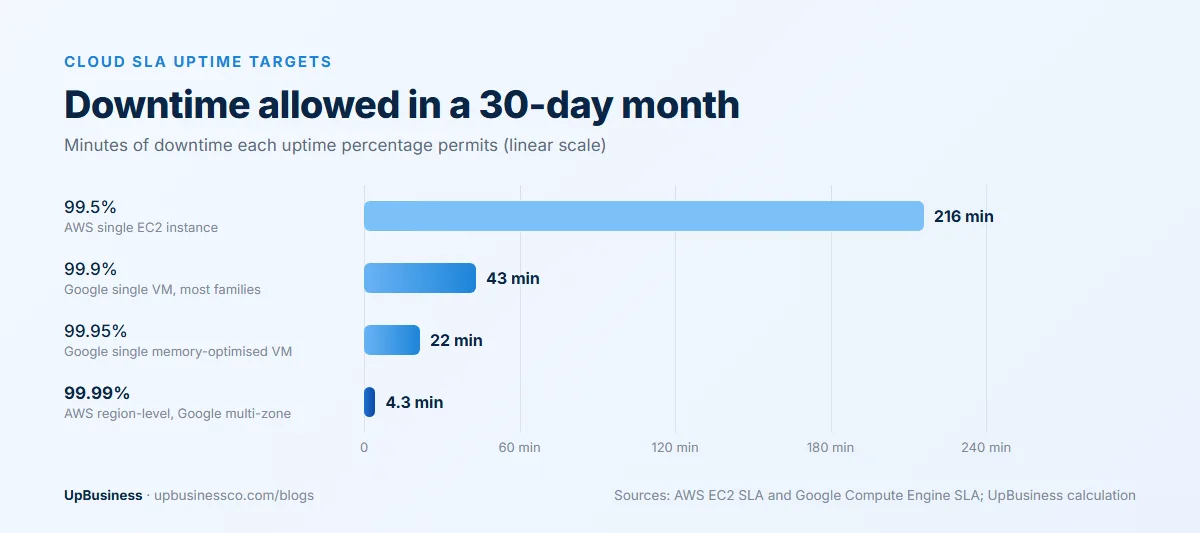
- Uptime targets are tighter than they sound. A 99.9% target allows about 43 minutes of downtime in a 30-day month, while 99.99% allows about 4.3 minutes.
- Cloud provider service credits are paid against future cloud bills, not lost revenue. AWS pays 10% of the affected monthly EC2 bill when region-level uptime falls below 99.99%.
- Running 24/7 cover in-house takes at least 4.2 full-time engineers just to keep one person on duty every hour of the week, before leave and training.
What Are Managed Cloud Services?
In short, it's an ongoing contract in which an outside company operates your cloud environment for a monthly fee, against written service levels. It monitors systems around the clock, responds to incidents, patches servers, runs and tests backups, manages access and security settings, and reports on cost and performance.
The key word is ongoing. A migration partner moves you to the cloud and leaves; a consultant reviews your setup and hands over a report. The managed cloud provider stays, and when something breaks at night, its engineers take the call under a response time you agreed in advance.
Scope varies a lot. Some contracts cover only monitoring and backups. Others cover the full stack up to the application layer, plus cost management and quarterly architecture reviews. Two quotes for "managed cloud" can describe very different services, which is why the scope list below matters more than the headline price.
What a Managed Cloud Provider Runs Day to Day
A full-scope contract usually covers the areas in this table. Cheaper plans drop the lower rows first, so check each line against the proposal you receive.
| Area | What the provider does | What to check in the proposal |
|---|---|---|
| Monitoring and alerting | Watches servers, databases, networks and key application health checks around the clock | Which systems are monitored, and who gets alerted at what threshold |
| Incident response | Triage, fix or escalate when something breaks, then write up the cause | Response and resolution times for each severity level |
| Patching and updates | Operating system and middleware patches, version upgrades before end of support | Patch window, testing steps and how quickly critical security patches go in |
| Backup and recovery | Scheduled backups, restore tests and disaster recovery runbooks | Recovery time and recovery point targets, and how often restores are tested |
| Security operations | Access reviews, security group rules, vulnerability scans, log retention | Which security tasks are included and which are sold as a separate service |
| Cost management | Rightsizing, removing idle resources, commitment and discount planning | Whether cost work is included or billed on top |
| Change management | Planned changes, approvals, infrastructure as code, change records | How many change requests a month are included |
| Architecture reviews | Regular reviews against the provider's well-architected guidance | How often, who attends, and what you receive afterwards |
Security is where scope gaps often cause trouble. A basic plan may include patching and access reviews but leave threat detection and incident forensics to a separate security provider. If you need that cover, ask for it by name and check our list of cloud security companies.
Who Is Responsible for What: Cloud Provider, Managed Partner and You
Hiring an outside operations team doesn't remove your own responsibilities. It moves some daily tasks to the partner company, and the contract has to say which ones.
The cloud platforms describe their side through a shared responsibility model. AWS states that it protects the infrastructure that runs its services. Customers running EC2 servers are responsible for the guest operating system, including updates and security patches, any software they install and the configuration of security group firewalls[1]. For services such as Amazon S3, AWS runs the operating system and platform, and you remain responsible for your data, its encryption settings and access permissions.
Your managed partner takes over much of the customer side of that model. A typical split looks like this:
| Task | Cloud platform | Managed partner | Your company |
|---|---|---|---|
| Data centres, hardware, hypervisor | Yes | No | No |
| Guest operating system patches | No (on servers you run) | Yes, under contract | Approves timing |
| Firewall and network rules | No | Configures and reviews | Approves changes |
| Backups and restore tests | Provides the tools | Runs them | Sets recovery targets |
| User access and permissions | Provides the tools | Administers | Decides who gets access |
| Your data and its classification | No | Handles as instructed | Owns it |
| Compliance evidence for auditors | Shares platform reports | Collects operational evidence | Accountable to the auditor |
The last column stays filled. Even with a full-scope contract, someone in your company should own the relationship, approve risky changes and read the monthly report.
Managed vs Unmanaged Cloud Services
Unmanaged, or self-managed, cloud means you buy capacity from AWS, Azure or Google Cloud and your own team runs everything above the platform layer. The managed model adds an operations team on a contract. Here's how the two compare:
| Unmanaged (self-managed) | Managed cloud services | |
|---|---|---|
| Who runs daily operations | Your engineers | The provider's engineers, under an SLA |
| Out-of-hours incidents | Your on-call rota, if you have one | Provider's 24/7 team, if your plan includes it |
| Cost | Cloud bill plus your staff time | Cloud bill plus a management fee |
| Control | Full control of tools and changes | Changes go through the provider's process |
| Knowledge | Stays in your team | Partly sits with the provider, so documentation rights matter |
| Good fit | Strong in-house operations team, or a small simple setup | Production systems with no dedicated operations staff |
There's a middle option too. Many companies keep a small internal platform team and buy managed cover only for nights, weekends and patching. That hybrid often costs less than full outsourcing and keeps architecture decisions in-house.
How Managed Cloud Services Pricing Works
You'll pay two separate bills. One goes to AWS, Microsoft or Google for the cloud itself, and the other goes to the provider as a management fee. Apps4Rent, which sells Azure management, points out that the consumption bill exists with or without a provider[2]. The fee is what you pay on top for the people and tools that look after it. Judge any quote on the total of both, because good cost management should shrink the first bill.
Fees follow one of a handful of models, or a mix of two.
| Pricing model | How it works | Watch for |
|---|---|---|
| Percentage of cloud spend[3] | Typically 10% to 25% of the monthly cloud bill | The provider earns more when your bill grows |
| Per resource[2] | A set monthly rate per server, database, firewall or account | What one managed unit includes, and how containers and serverless are counted |
| Tiered flat fee[2] | Fixed monthly plans by service level and size band | Price jumps at tier edges, and re-pricing when your setup grows |
| Time and materials or retainer[2] | Hourly rates or prepaid blocks of hours | Nobody watching the systems between tickets |
| Performance or value based[4] | Fees linked to uptime, savings or other agreed results | How the result is measured, and who checks the numbers |
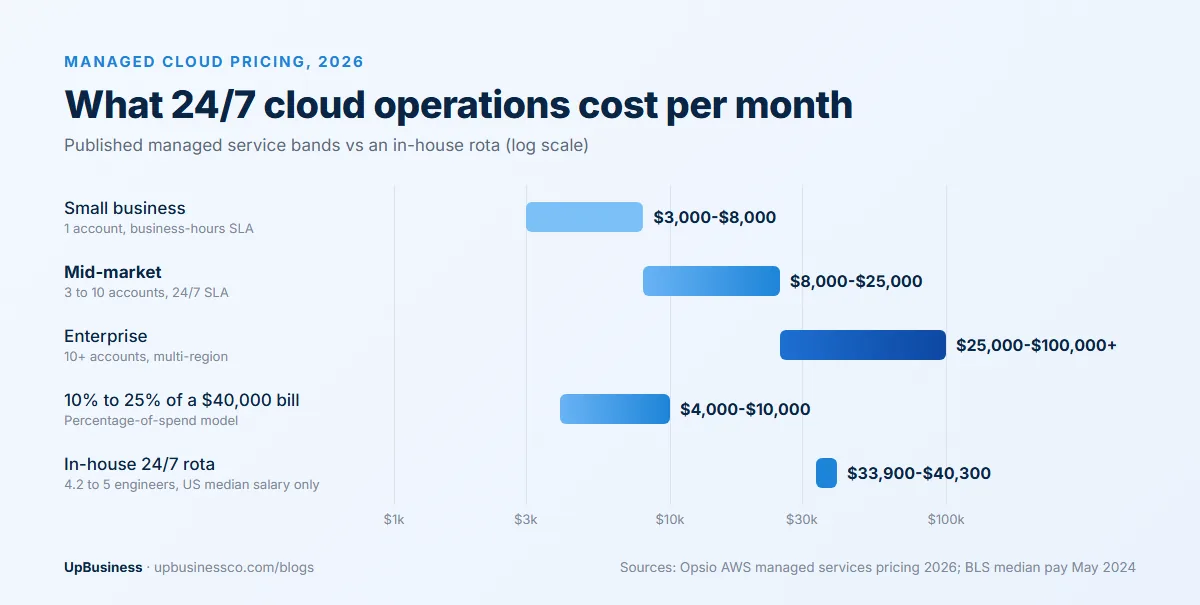
Opsio, an AWS partner, publishes three monthly bands for AWS managed services in 2026[3]. A small business with one account and a business-hours SLA pays $3,000 to $8,000. Mid-market setups with 3 to 10 accounts and a 24/7 SLA pay $8,000 to $25,000. Enterprise estates with 10+ accounts across regions and compliance work pay $25,000 to $100,000 or more. Treat these as one provider's ranges rather than a market survey, but they're useful for checking whether a quote is in the right territory.
CloudBolt, which sells tools to managed service providers, lists flat-rate, pay-as-you-go, tiered, percentage, performance-based and value-based models, and notes that a value-based deal can include gain-sharing on savings[4]. If cost reduction is a big reason for hiring, our guide to cloud cost optimization services explains how savings-based fees are measured.
A worked example: a $40,000 monthly AWS bill
Take a company spending $40,000 a month on AWS, with five production accounts and customers who expect the service to be up at night. Using the published figures above:
- A percentage-of-spend quote at 10% to 25% comes to $4,000 to $10,000 a month.
- Opsio's mid-market band for 3 to 10 accounts with 24/7 cover is $8,000 to $25,000 a month.
- So a fee between roughly $8,000 and $10,000 sits inside both ranges, and a quote far below $4,000 for round-the-clock cover deserves questions about what's left out.
Now the in-house comparison. A week has 168 hours. Keeping one engineer on duty every hour at 40 hours each needs 4.2 full-time people, before holidays, sick days and training push the real number to about five. The US median pay for network and computer systems administrators was $96,800 in May 2024[5]. At that rate, 4.2 people cost about $406,600 a year, or roughly $33,900 a month, in salary alone, and five people cost about $40,300 a month. Salaries are lower in India and many other countries, and the same sum works with your local rates. Benefits, tools and hiring time come on top.
For this example, an outside team at $8,000 to $25,000 a month is cheaper than building a dedicated rota. The picture changes when you already have operations engineers who can share on-call duty, or when your platform is the product you sell and operations skill is part of your edge.
Outsourced Operations vs an In-House Team
Cost is one input. Buyers also tend to weigh the following:
| Factor | In-house team | Managed provider |
|---|---|---|
| Hiring | Months to fill each cloud role, plus retention risk | Team already in place |
| 24/7 cover | Needs about five people for one-person cover at all hours | Shared rota across many clients |
| Breadth of experience | Limited to your own systems | Engineers have seen the same failures at other clients |
| Speed of change | Direct and quick | Goes through tickets and change approvals |
| Knowledge retention | Stays with you, unless people leave | Depends on runbooks and documentation you own |
| Cost visibility | Salaries plus tools | One fee, but scope gaps can add extra charges |
Flexera's 2026 State of the Cloud report found that 85% of organisations still name managing cloud spend as a top challenge, and that 73% run hybrid environments[6]. Both trends add operational work, which is why more companies outsource at least part of it. Companies that already run DevOps work with a partner should check whether a DevOps consulting company can extend into ongoing operations before adding a second provider.
What Uptime Numbers in a Cloud SLA Actually Mean
Uptime percentages read as almost identical, yet the downtime they allow differs by a factor of 50. In a 30-day month of 43,200 minutes:
| Uptime target | Downtime allowed per 30-day month | Where you'll see it |
|---|---|---|
| 99.5% | About 3.6 hours (216 minutes) | AWS instance-level SLA for a single EC2 server[7] |
| 99.9% | About 43 minutes | Single Google Cloud VM, non-memory-optimised families[8] |
| 99.95% | About 22 minutes | Single memory-optimised Google Cloud VM |
| 99.99% | About 4.3 minutes | AWS EC2 region-level SLA, and Google Cloud VMs across multiple zones[7] |
Two details catch buyers out. First, the high figures only apply to setups built for them. AWS's 99.99% region-level SLA requires instances running across two or more Availability Zones; a single EC2 server is covered at 99.5%[7]. A managed provider can't promise 99.99% on an application that runs on one server.
Second, service credits are small. If EC2 region-level uptime falls below 99.99% but stays at or above 99.0%, AWS credits 10% of that month's EC2 bill in the affected region, rising to 30% below 99.0% and 100% below 95.0%. Credits apply only against future EC2 payments and are not a refund[7]. Google pays 10%, 25% or 100% of the affected monthly bill on a similar scale[8]. On a $10,000 monthly EC2 bill, a bad month at 99.5% region uptime earns a $1,000 credit, whatever the outage cost your business.
For that reason the provider's own SLA matters more than the platform's. Your managed partner's contract should set its own targets and its own penalties, linked to its fee.
Response times: what the cloud platforms promise
The platforms' paid support plans give a useful benchmark for the response times a managed provider should match or beat.
| Support plan | Most urgent case | Lower-severity cases |
|---|---|---|
| AWS Business Support+[9] | Under 30 minutes (critical system down) | Under 1 hour (production down), under 12 hours (system impaired) |
| AWS Enterprise Support[9] | Under 15 minutes (critical system down) | Under 1 hour (production down), under 12 hours (system impaired) |
| Azure Standard[10] | Within 1 hour (critical business impact) | Within 4 hours (moderate impact), within 8 business hours (minimal impact) |
All of these are first-response times, the moment an engineer engages. Resolution can take far longer. A provider that quotes only response times, with no target for restoring service or updating you during an incident, has left out the part you'll care about at 2 a.m.
Contract Checklist: 12 Clauses to Agree Before Signing
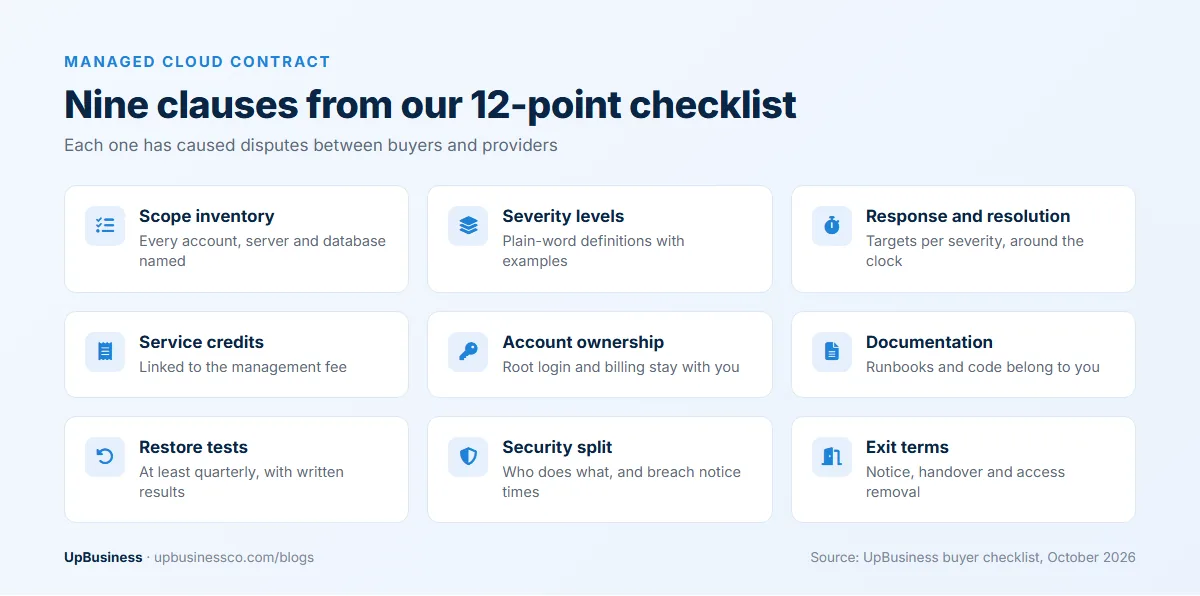
Use these points when you compare proposals and again when the contract arrives. Each one has caused real disputes between buyers and providers.
- A written inventory of the accounts, servers, databases, environments and applications in scope. Anything not on the list isn't managed.
- Severity definitions in plain words, with examples, that both sides read the same way.
- Response, update and resolution targets for each severity, measured around the clock if you pay for 24/7 cover.
- Service credits linked to the management fee, with a cap you can live with and a right to terminate after repeated misses.
- Account ownership. Your company should own the cloud accounts, the root or global administrator login and the billing relationship, with the provider working through named, revocable access.
- Ownership of runbooks, diagrams, scripts and infrastructure code written during the contract.
- Backup and recovery targets, with at least one restore test a quarter and a written result.
- A security split showing which tasks the provider runs and which stay with you, plus how fast it must tell you about a security incident.
- Data location and the countries from which the provider's staff can access your systems.
- How the fee changes when your cloud spend or resource count moves up or down.
- Change limits: how many requests a month are included and what extra work costs.
- Exit terms covering the notice period and a handover plan, with the provider's access removed on the last day.
Our software development contract checklist covers intellectual property, payment and liability clauses in more detail, and much of it carries over to a managed services agreement.
Warning Signs in a Managed Cloud Proposal
Watch for these during sales calls and in the paperwork:
- A 99.99% uptime promise for systems that run in a single zone, or on one server.
- "Unlimited support" with no response times written down.
- A request to move your cloud accounts into the provider's own billing account, with no clause on how you get them back.
- A percentage-of-spend fee with no commitment to cost reviews. Nobody is then paid to shrink your bill.
- A three-year auto-renewing term for a first contract.
- No named escalation contact above the help desk.
- Reluctance to share a sample monthly report or an anonymised incident write-up.
Any one of these can be negotiated. A provider that refuses to change two or three of them is telling you how the relationship will run.
How to Shortlist Managed Cloud Service Providers in India and Elsewhere
Buyers in the US, UK, Europe and the Middle East often look at managed cloud service providers in India. Engineering rates are lower, and a team there is awake during the night hours of a Western business day. The checks are the same wherever the provider sits.
Start with platform credentials. AWS validates managed service partners through its MSP Partner Program, which requires a third-party audit of technical skills and business health[11]. Microsoft and Google run their own partner programmes. A credential confirms capability on that cloud, though it says little about how the team will treat a company your size, so ask for references from clients with a similar setup and spend.
Then test the operation itself. Ask where the on-call engineers sit, how many there are on a night shift, and who covers holidays. Ask for the last three incident reports they wrote, with client names removed. If the provider is in a different time zone, agree in writing which hours count as business hours for lower-severity tickets.
Finally, run a paid pilot where you can. A month on a non-critical environment shows how the team handles tickets, changes and reporting far better than any proposal.
For companies not yet on the cloud, the order matters: our guides to cloud migration services and choosing an AWS consulting partner cover the steps that come before ongoing management. AWS and Azure specialists are listed under AWS consulting and Azure consulting.
Cloud Partner Companies on UpBusiness: October 2026 Data
Our analysis of the 6 verified partner companies listed for cloud services on UpBusiness in October 2026 shows:
- Average project sizes they report range from $500 to $25,000, with a median of $10,000. These are one-off project figures, not monthly management fees.
- TrustScores range from 70.24 to 75.85, with a median of 71.63. Our verification requires a TrustScore of 70 or more before a company is listed.
- Team sizes run from 1 to 10 people up to 201 to 500, with two firms of 11 to 50 and two of 51 to 200.
- Four are based in Noida, one in Ahmedabad and one in Mumbai, and founding years run from 2004 to 2024.
All six are full-service software companies that list cloud work alongside app development, AI, SaaS, Salesforce or ERP projects. None of them lists round-the-clock cloud operations as its top specialisation. They're a good fit for cloud setup, migration and project-based infrastructure work, and some may offer ongoing support. For a 24/7 managed contract, ask each one directly about its on-call rota, monitoring tools and existing managed clients before you shortlist it.
Getting Quotes for Managed Cloud Services
Before you contact providers, write down your cloud accounts, monthly spend, the systems that must stay up at night, your recovery targets and the hours your team can cover itself. That one page gets you comparable quotes instead of five different interpretations of "managed".
You can post your project on UpBusiness to get matched with verified partner companies, or browse verified cloud companies and DevOps companies directly.