


Cloud cost optimization services help a business cut its AWS, Azure or Google Cloud bill without slowing anything down. A partner company finds idle and oversized resources, buys discounts the right way, fixes the architecture choices that waste money and sets up the reporting that stops waste coming back. The need is real: in Flexera's 2026 survey, organisations estimated that 29% of their cloud infrastructure and platform spend was wasted, the first rise in five years. This guide is for CTOs, finance leads and founders weighing whether to hire help. It covers what the work includes, how much it can save, how providers charge and, above all, how to check a savings claim before you sign.
Key takeaways
- Managing cloud spend is the top cloud challenge for 85% of organisations in Flexera's 2026 report, and estimated waste rose to 29% as AI workloads grew.
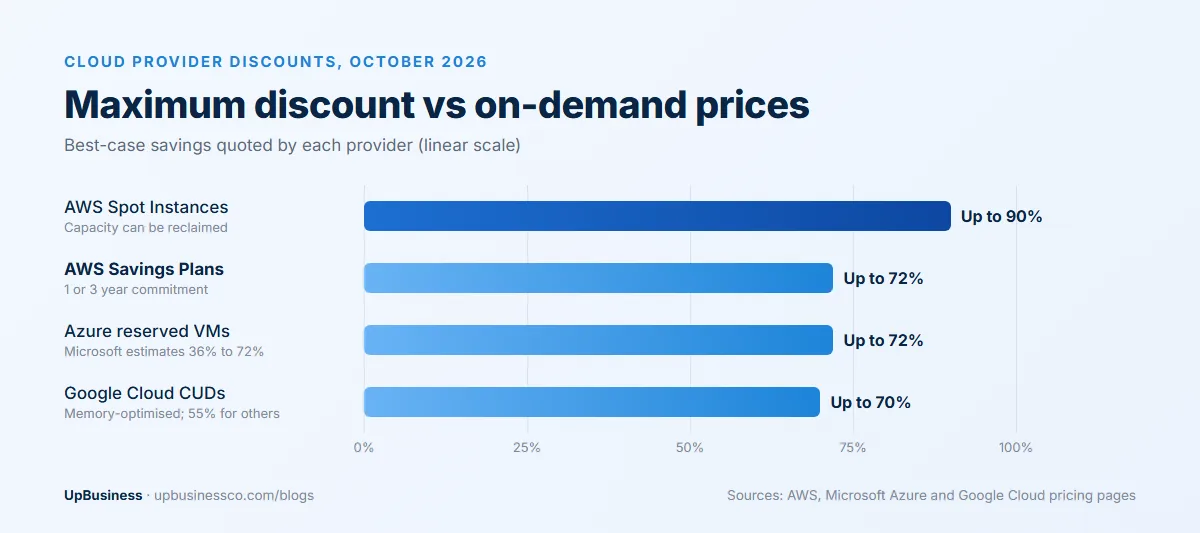
- The cloud providers' own discounts are large. AWS Savings Plans and Azure reservations save up to 72%, AWS Spot capacity up to 90%, and Google Cloud commitments up to 55% (70% for memory-optimised machines).
- Performance-based providers commonly take 15% to 30% of measured savings, or a small base fee plus 10% to 20%, so the definition of "savings" decides what you pay.
- The baseline is the clause to negotiate hardest. It sets how savings are measured, over what period, and whether discounts you'd have bought anyway count.
What Are Cloud Cost Optimization Services?
Cloud cost optimization services are outside experts who review your cloud spending, remove waste, buy discounts on the usage you'll keep, and set up the tagging, budgets and reports that keep costs under control. Some work as a one-off assessment, some as an ongoing managed service, and some are paid a share of the savings they find.
The work overlaps with FinOps, the practice of bringing engineering, finance and business teams together to manage cloud spend. Many larger companies now run their own FinOps teams; 63% of organisations in Flexera's survey had one[1]. Smaller companies usually hire the skills in, at least for the first round of savings.
How Much Can Cloud Cost Optimization Save?
Most of the savings come from two places: paying less per hour for what you use, and using less. The first is mostly about the providers' own discount programmes, which are larger than many buyers realise.
| Provider discount | Maximum saving | What you commit to |
|---|---|---|
| AWS Savings Plans[2] | Up to 72% | A dollar amount of hourly compute use for 1 or 3 years |
| AWS EC2 Spot Instances[3] | Up to 90% off On-Demand | Nothing, but AWS can reclaim the capacity at short notice |
| Azure Reserved VM Instances[4] | Up to 72% (Microsoft estimates 36% to 72%) | Specific virtual machines for 1 or 3 years |
| Google Cloud committed use discounts[5] | Up to 55%, or 70% for memory-optimised machines | Resources or spend for 1 or 3 years |
These are maximums, quoted by the providers for their best cases. Real savings depend on how steady your usage is, which is why commitment buying is a skill. Commit too little and you leave money on the table. Commit too much and you pay for capacity you no longer use for up to three years.
The second source, using less, is where waste sits. Providers selling these services typically claim reductions of 10% to 30%; CloudKeeper, for example, quotes an average 10% to 30% cut within the first 90 days[6]. Treat any figure like that as a sales claim until it's measured on your own bill, using the method in the section on assessing savings claims below.
Signs Your Business Needs Cloud Cost Optimization
You don't need a huge bill to benefit. These are the usual signs that money is leaking:
- The cloud bill is growing faster than your users, customers or revenue.
- Nobody can say which team or product a large part of the bill belongs to.
- Development and test environments run around the clock, every day of the week.
- You pay on-demand prices for servers that have run steadily for a year or more.
- Storage keeps growing and nobody has deleted old backups or snapshots.
- AI or GPU costs appeared in the last year and nobody tracks them separately.
- Finance learns about cost spikes from the invoice, weeks after they happened.
Two or three of these usually mean a short assessment will pay for itself. If most apply, ongoing help is likely worth considering.
What Cloud Cost Optimization Services Include
A full engagement covers most of these areas. A cheaper one may only do the first few, which is fine if your bill is small, but you should know what you're getting.
| Area | What the work involves | Typical effort |
|---|---|---|
| Visibility and tagging | Tagging resources by team, product and environment so every dollar has an owner | Days to weeks; ongoing discipline |
| Idle and orphaned resources | Deleting unattached disks, old snapshots, unused IP addresses and forgotten test environments | Quick wins in the first weeks |
| Rightsizing | Moving servers and databases to smaller or newer types that match real usage | Weeks, with testing |
| Scheduling | Switching off development and test environments at night and weekends | Days |
| Commitments | Buying Savings Plans, reservations or committed use discounts for steady usage | Ongoing, reviewed monthly |
| Spot and preemptible capacity | Running interruptible workloads, such as batch jobs, on discounted spare capacity | Weeks; needs engineering changes |
| Storage and data transfer | Moving old data to cheaper tiers, setting lifecycle rules, cutting cross-region traffic | Weeks |
| Architecture | Changing how services are built, such as moving to managed or serverless services | Months; highest effort |
| Governance | Budgets, alerts, cost reports and approval rules so waste doesn't return | Ongoing |
AI and GPU spend is the new problem area
Flexera links the 2026 rise in waste to the surge in AI workloads; 81% of its respondents now use generative AI[1]. The FinOps Foundation reports that 98% of FinOps teams now manage AI spend, up from 31% two years earlier, and that FinOps for AI is the top forward-looking priority[7]. If your bill includes GPU instances or AI model APIs, ask any provider how it tracks and reduces those costs specifically, because the usual rightsizing playbook doesn't cover them well. Useful steps include tagging every AI workload by product, tracking cost per request or per user, switching off idle GPU instances, and routing simple tasks to cheaper models instead of the most capable one.
How Cloud Cost Optimization Services Are Priced
There's no standard price list. Providers use several models, and comparing them directly is harder than it looks.
| Pricing model | How it works | Suits |
|---|---|---|
| Fixed-fee assessment | A one-off review with a written list of savings and an action plan | A first look, or companies that will implement changes themselves |
| Monthly retainer or managed FinOps | A set monthly fee for ongoing optimisation, reporting and commitment management | Steady, growing cloud bills |
| Pure gainshare[8] | 15% to 30% of measured savings, nothing if nothing is saved | Large environments with obvious waste |
| Base fee plus gainshare[8] | A small fixed fee plus 10% to 20% of savings | Moderate savings potential |
| Percentage of cloud spend | A small share of your total bill, regardless of savings | Companies wanting predictable fees |
| Software subscription | A cost management platform, sometimes with expert support | Teams with their own engineers to act on findings |
Usage.ai, which sells optimisation software itself, makes a fair point. A fee based on total cloud spend can't be compared directly with a percentage of savings, so compare the net result after fees, effort and commitment risk[9].
A worked example
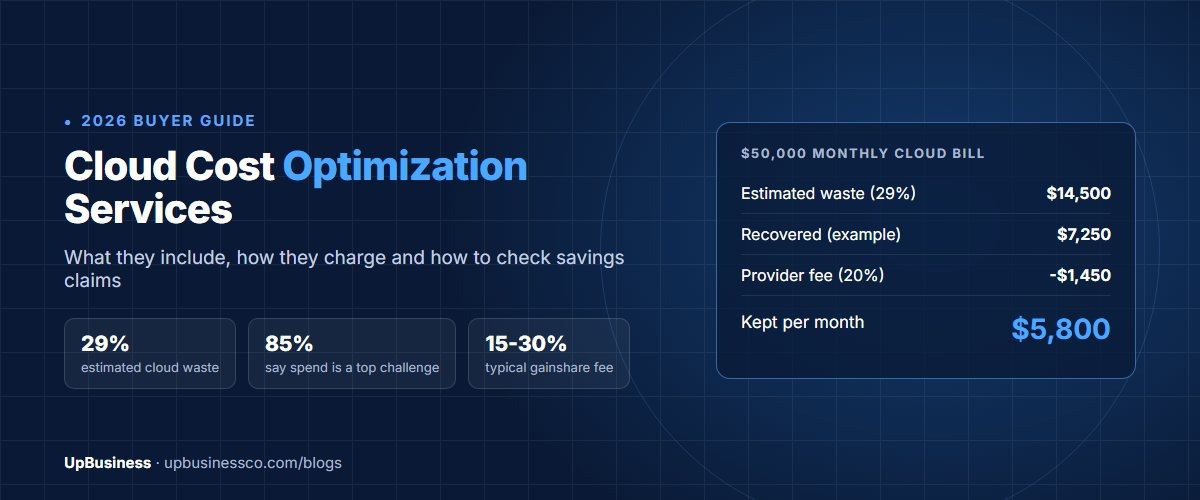
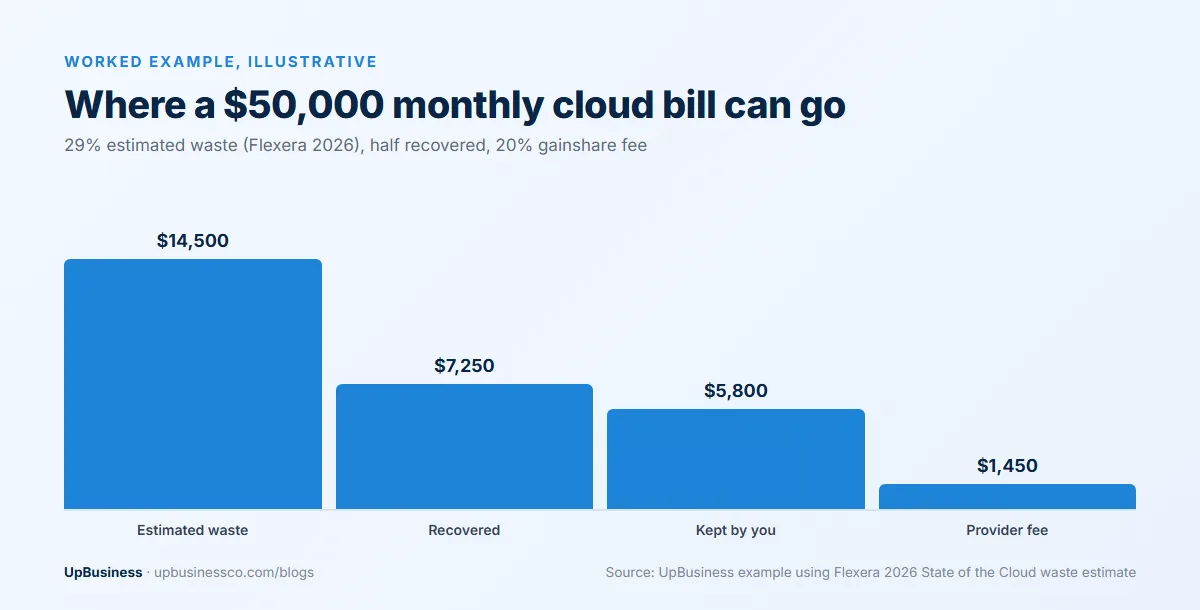
Take a company spending $50,000 a month on cloud. If its waste matches Flexera's 29% average, about $14,500 a month is wasted. Say a provider recovers half of that, $7,250 a month. On a 20% gainshare, the provider earns $1,450 a month and the company keeps $5,800, or roughly $69,600 a year. Those are illustrative numbers, but the structure shows why the baseline matters: every dollar counted as "saved" also raises the fee.
A 90-Day Cloud Cost Optimization Plan
A typical first engagement follows this order, from cheap and safe changes to ones that need more testing.
| Timing | Work | What you should receive |
|---|---|---|
| Weeks 1 to 2 | Read-only access, billing export, tagging review, baseline agreed | A written baseline and a list of the biggest cost drivers |
| Weeks 3 to 4 | Delete idle resources, schedule test environments, set budgets and alerts | First savings visible on the bill, with a list of every change |
| Weeks 5 to 8 | Rightsizing with performance testing, storage tiering, data transfer fixes | Before-and-after costs and performance for each change |
| Weeks 9 to 12 | Commitment plan sized from real usage, architecture recommendations, monthly reporting | A commitment proposal for sign-off and a roadmap for larger changes |
What an assessment report should contain
Whether you pay for a one-off review or it's the first step of a longer contract, the report should be specific enough for your own engineers to act on. Expect the agreed baseline, a breakdown of spend by service and team, and a list of recommendations with the estimated monthly saving, effort and risk of each. It should separate quick wins from changes that need testing, show the commitment purchases it suggests and the usage data behind them, and flag any security or reliability issues found along the way. A report that gives only a total savings figure, without the line items behind it, is hard to check and harder to act on.
What to expect after the first year
Savings are usually largest at the start, when the obvious waste goes. The FinOps Foundation's 2026 findings say practitioners report diminishing returns from optimisation alone once the big items are handled, and that forecasting, governance and aligning teams around cost now matter as much[7]. Plan the contract with that in mind. A gainshare that made sense while idle servers were being switched off can become expensive once the remaining savings are small and the fee keeps running. Many companies move to a lower fixed retainer, or bring the work in-house, after the first 12 months. Ask for that option in writing before you sign, together with a handover of reports, scripts and commitment schedules if you end the contract.
How to Assess Savings Claims Before You Sign
A savings figure means little until you know how it was measured. Ask every provider to answer these points in writing:
- What is the baseline? Agree the starting monthly cost, the period it covers and how it adjusts as your usage grows. A growing business can "save" nothing on paper while cutting its cost per customer sharply.
- Gross or net? Is the figure before or after the provider's fee, new tool costs and the engineering time your team spends making changes?
- Would you have got it anyway? Discounts you'd have bought yourself, or price cuts the cloud provider announced, shouldn't count as the provider's savings.
- How long do savings count for? A gainshare that pays on savings for 36 months is very different from one that pays for 12.
- Who carries commitment risk? If the provider buys three-year commitments in your name and your usage drops, you keep paying.
- Is performance protected? Rightsizing that slows your application isn't a saving. Ask how changes are tested and rolled back.
- Can you see the evidence? Savings should be shown from your own billing data as well as the provider's dashboard.
A provider that answers these clearly and puts them in the contract is usually one you can trust with access to your accounts. One that won't define the baseline is telling you how the invoice will be calculated.
AWS, Azure and Google Cloud: Where the Savings Come From
The levers are similar across providers, but the names and rules differ, so experience on your specific cloud matters.
| AWS | Azure | Google Cloud | |
|---|---|---|---|
| Main commitment discount | Savings Plans and Reserved Instances, up to 72% | Reservations and savings plans, up to 72% on VMs | Committed use discounts, up to 55% (70% memory-optimised) |
| Spare capacity at a discount | Spot Instances, up to 90% off | Spot virtual machines | Spot VMs |
| Built-in cost tools | Cost Explorer, budgets, Compute Optimizer | Cost Management and Advisor | Billing reports, recommender |
| Common waste | Idle EC2 and RDS, old EBS snapshots, NAT gateway and data transfer charges | Idle VMs, unattached disks, oversized SQL databases | Idle VMs, persistent disks, BigQuery query costs |
If you're still planning a move to the cloud, build cost control into the migration rather than adding it later. Our cloud migration services guide and Azure migration partner guide cover that stage, and our AWS consulting partner guide explains what AWS specialists charge.
Do It Yourself or Hire a Partner Company?
| Option | Good when | Watch out for |
|---|---|---|
| Your own team with native tools | Cloud bill is small, engineers have time, usage is simple | Optimisation slips behind feature work |
| One-off assessment from a partner | You want a clear list of savings, then implement them yourself | Recommendations that never get done |
| Ongoing managed service or gainshare | Bill is large or growing fast, and nobody owns cost day to day | Fees that outlast the real savings |
| In-house FinOps team | Large, multi-cloud spend across many teams | Hiring time and cost |
A sensible route for many mid-size companies is a fixed-fee assessment first. It shows how much waste there is, and the report tells you whether a gainshare provider would earn its fee or whether your own engineers can capture most of it. Optimisation work often ties into deployment pipelines and infrastructure code, so our DevOps consulting services guide is useful background.
Questions to Ask a Cloud Cost Optimization Provider
- Which clouds do you work on, and can you show certified engineers or partner status for ours?
- What access do you need, and can it be read-only for the assessment?
- How will you define and report the savings baseline?
- Which changes will you make yourselves and which will our team need to make?
- How do you decide how much to commit to, and who signs off before you buy?
- How do you handle AI, GPU and data platform costs?
- What happens to commitments, tools and access when the contract ends?
Red flags
- A guaranteed percentage saving before anyone has looked at your bill.
- Requests for full administrator access on day one.
- A gainshare that counts savings for years after the work is done.
- Large three-year commitments recommended in the first week.
- No plan for testing changes or rolling them back.
- Savings shown only in the provider's own tool, never in your billing data.
Our software development contract checklist covers access, ownership and exit terms that apply here too.
What UpBusiness Cloud Partners Look Like
We looked at the 6 verified partner companies listed on our cloud services page on 22 October 2026. Their TrustScores run from 70.24 to 75.85 out of 100, and their average project sizes range from $500 to $25,000, with a median of $10,000.
To be clear about what that means: these are full-service software and cloud firms, and none of them lists cloud cost optimization as a separate specialisation on its profile. They suit companies that want the same team to run, fix and improve their cloud setup, including the changes an optimisation review recommends. If you need a dedicated FinOps specialist for a large multi-cloud bill, ask each company for examples of cost work it has done and how it measured the savings. The same six firms also appear on our AWS consulting page, and you'll find more under DevOps services and Azure consulting.
When you're ready, post your project with your cloud provider, monthly spend range and the main services you run, and verified partner companies can propose an assessment. Or compare verified cloud companies by TrustScore and project size.