


Browse our curated list of Intelligent Document Processing Companies
Intelligent document processing services turn the invoices, forms, claims, IDs and contracts your team keys in by hand into checked data that flows into your ERP, accounting or case system. If you need a primer on the technology itself, our guide to the types of AI development services explains what IDP is and which teams use it. This guide picks up where that one stops. It is written for finance, operations and IT leads who already know the paperwork problem is real. It covers how to buy the fix, what it costs per page and per project, how to test accuracy before signing, and which contract terms protect the documents you send.
Key takeaways
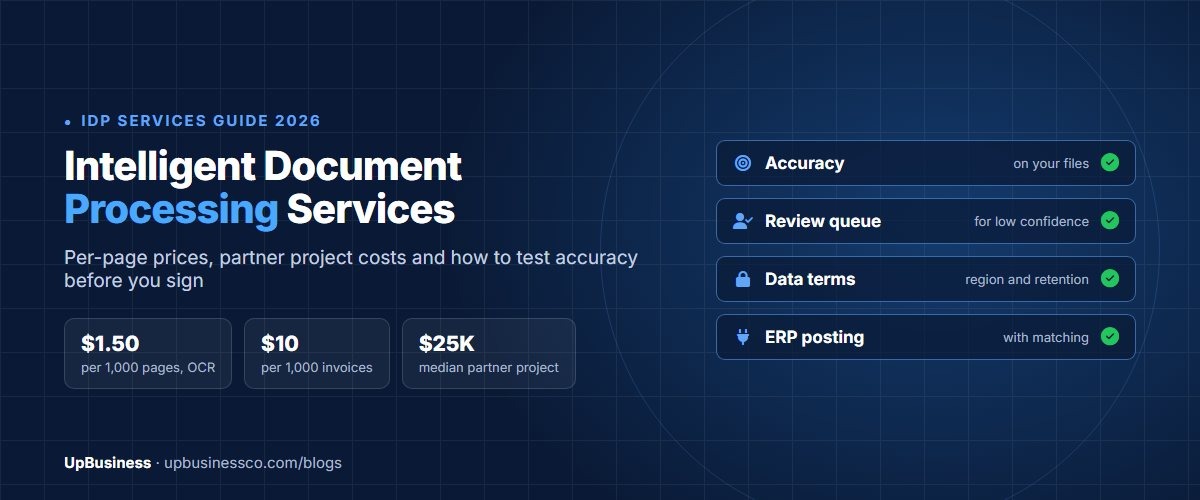
- Cloud APIs are cheap per page. Reading text costs $1.50 per 1,000 pages on AWS, Azure and Google, and invoice extraction costs about $10 per 1,000 pages on AWS and Azure.
- Human review costs more than the extraction itself. In our 20,000-invoice example, review labour costs 9 to 35 times the API bill, so the straight-through processing rate drives the budget.
- Published ranges for full builds run from $50,000 to $300,000. None of the 7 companies on our IDP listing names document processing as a service yet, so ask for proof.
- Below a few thousand documents a month, a self-serve IDP tool usually beats a custom build. A build's fixed hosting and support costs can exceed the cost of keying documents by hand.
- Read each provider's data terms. Amazon Textract may use your documents to improve its models unless you opt out, Azure deletes inputs after 24 hours, and Google says it never trains Document AI on customer data.
When Intelligent Document Processing Services Are Worth Buying
IDP pays off when the same kinds of documents arrive in volume and people pull the same fields from them every time. It pays off faster when a system is already waiting for that data. Accounts payable is the textbook case. Insurance claims intake, customer onboarding and KYC, freight paperwork such as bills of lading, and patient intake forms follow the same pattern.
It is a weak fit when documents are rare, wildly different from each other, or read once for judgement rather than for fields. A legal team reviewing ten one-off contracts a month needs search and summarisation, not field extraction. And if the real problem is moving data between apps after it has been read, a workflow tool may be all you need. Our guide to AI automation services covers that side.
One distinction saves a lot of confusion in proposals. Plain OCR turns an image into text. IDP sorts the document by type, finds the fields you asked for, checks them against your rules and records, and sends anything it is unsure about to a person. If a quote says "OCR" for a data capture project, ask what happens after the text comes out, because that is where most of the cost and value sit.
Four Ways to Buy: Cloud API, IDP Platform, Custom Build or Partner
Most buyers end up choosing between four routes. They differ less in what the software can read than in who sets it up, who fixes it when a supplier changes a layout, and how the bill grows with volume.
| Route | What you get | Typical cost (USD) | Best fit | Watch for |
|---|---|---|---|---|
| Cloud API (Textract, Azure Document Intelligence, Google Document AI) | Raw extraction with confidence scores; you build everything around it | $1.50 to $70 per 1,000 pages, plus your own engineering | Teams with developers and a clear schema | Review screens, validation and ERP posting are not included |
| Self-serve IDP platform | Upload, extraction, review screen and connectors in one tool | About $40 to $160 per 1,000 pages at 10,000 pages a month for most tools[1] | Under about 10,000 pages a month, standard documents | Per-document or per-step pricing that changes the real rate |
| Enterprise IDP platform | Workflow, human review at scale, on-premises options | Annual contract, often quote only | Regulated firms with high volume and many document types | Annual minimums and a separate implementation project |
| Implementation partner on a cloud API | Pipeline, validation rules, review queue and ERP integration built for you | $10,000 to $50,000 typical on UpBusiness, more for many document types | Mid-size firms with an ERP and messy documents | Who owns the code, prompts and labelled data at the end |
A custom build without a cloud API underneath is rarely worth it now. Training your own text recognition from scratch is slow and expensive, and the providers' models keep improving at no cost to you. The real custom work is the layer around the API, and that is what a partner should be quoting. It covers classification, business rules, the review screen and the integration. Our comparison of custom AI vs off-the-shelf AI sets out the general build-or-buy test.
Intelligent Document Processing Pricing on AWS, Azure and Google
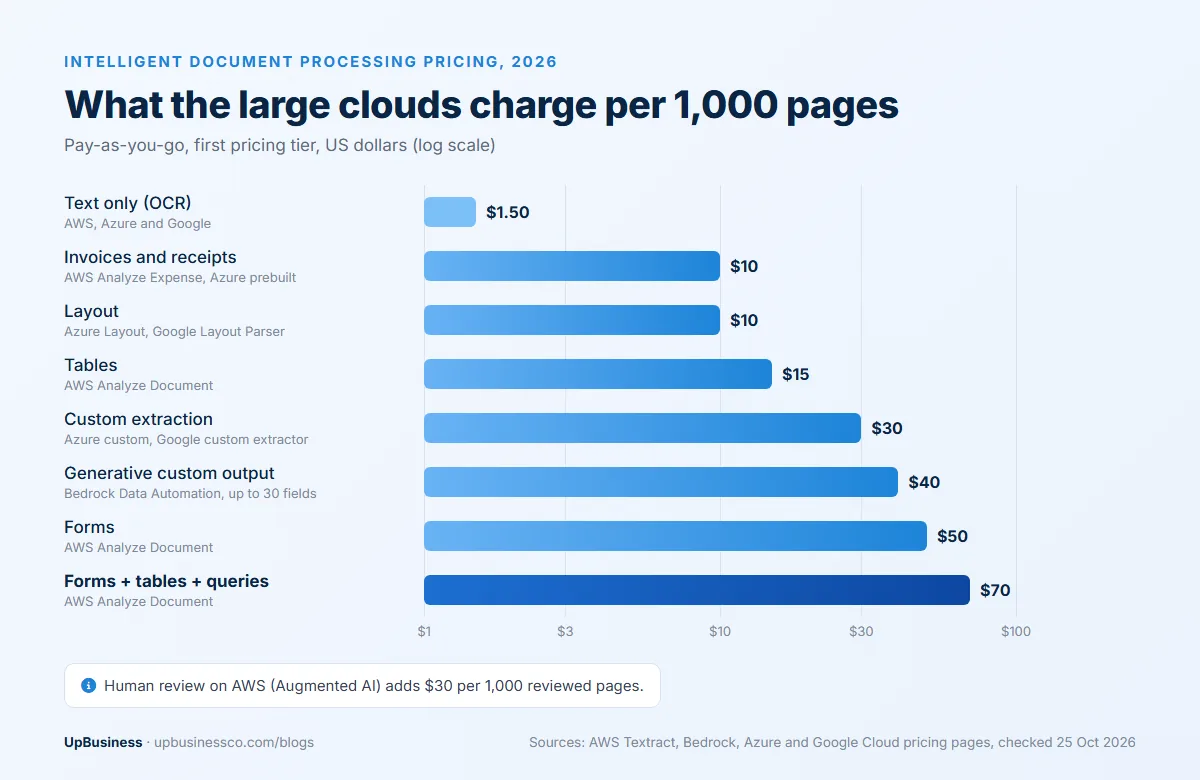
All three large clouds price by the page, and their headline rates are close. The table shows pay-as-you-go prices for the first pricing tier, checked on each provider's pricing page on 25 October 2026. Azure prices are for the East US region.
| What you need | AWS[2] | Azure[3] | Google Cloud[4] |
|---|---|---|---|
| Text only (OCR) | Detect Document Text: $1.50 per 1,000 pages, $0.60 after 1 million | Read: $1.50 per 1,000 pages, $0.60 after 1 million | Enterprise Document OCR: $1.50 per 1,000 pages, $0.60 after 5 million |
| Invoices and receipts | Analyze Expense: $10 per 1,000 pages | Prebuilt invoice or receipt: $10 per 1,000 pages | Form Parser or custom extractor: $30 per 1,000 pages |
| Tables and forms | Tables $15, Forms $50, Forms + Tables + Queries $70 per 1,000 pages | Layout: $10 per 1,000 pages | Layout Parser: $10 per 1,000 pages |
| Your own document types | Custom Queries adapters, priced per page | Custom extraction: $30 per 1,000 pages | Custom extractor: $30, $20 after 1 million |
| Sorting mixed files | Done in your own code or another service | Custom classification: $3 per 1,000 pages | Custom classifier or splitter: $5 per 1,000 pages |
| Free allowance | Free Tier for 3 months, for example 1,000 text pages a month | 500 pages a month | First 1,000 OCR pages a month |
Three details change the bill more than the headline rate. First, Textract charges each feature on the same page separately, so asking for forms and tables on one page costs $65 per 1,000 pages, not $15. Second, every rate is per page, so a 4-page invoice costs four times a 1-page one. Third, the generative options cost more. Amazon Bedrock Data Automation charges $0.04 a page for custom output with up to 30 fields, plus $0.0005 for each extra field[5], which is $40 per 1,000 pages. In return you describe the fields you want in a blueprint rather than training a model for each layout.
Volume discounts exist but come with commitments. Azure's prebuilt commitment tier, for example, costs $190 a month for 20,000 pages, against $200 at the pay-as-you-go rate[3]. That only helps if your volume is steady. Human review has its own meter on AWS: Amazon Augmented AI charges $0.03 for each page a person reviews, even when your own staff do the reviewing[6].
What an Implementation Partner Charges and What the Project Includes
The extraction API is the smallest line in most projects. Most of the money goes on the setup work around it. That means labelling sample documents, writing classification and validation rules, designing the review queue, connecting to your ERP or document store and testing on real files.
Published ranges vary widely because document variety varies widely. One AWS-focused firm prices a single document type with basic validation at $50,000 to $80,000 and enterprise programmes at $150,000 to $300,000 or more[7]. A Microsoft Azure partner quoted by Parseur lists IDP projects at $50,000 to $100,000 over one to three months[1]. Smaller first projects, covering one or two document types on a cloud API, cost less. Ask each partner company for a fixed-price pilot first.
| Line item | What it covers | Share of effort |
|---|---|---|
| Discovery and sample set | Collecting a few hundred real documents, including the worst scans, and labelling the fields | 10% to 15% |
| Extraction and classification | Configuring the API or models, custom fields, splitting mixed files | 15% to 25% |
| Validation rules | Totals add up, PO numbers exist, supplier matches the supplier master, dates make sense | 15% to 20% |
| Review queue | Screens for checking low-confidence fields, audit trail, user roles | 15% to 20% |
| Integration | Posting to the ERP or accounting system, returning statuses, error handling | 20% to 25% |
| Testing and handover | Accuracy test on held-out documents, runbook, training your team | 10% |
The shares above are a planning guide, not a quote, but they show where to push in negotiations. If a proposal spends most of its budget on extraction and little on validation and integration, it is pricing a demo, not a working system. For how IDP fits into a wider rollout across existing systems, see our guide to AI integration services.
Worked Example: 20,000 Invoices a Month
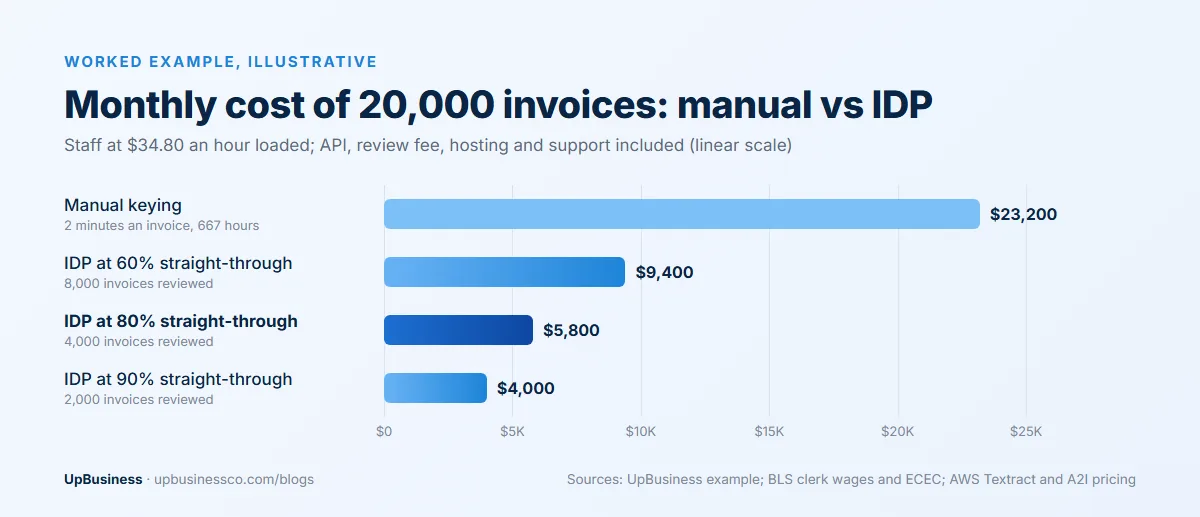
Here is an illustrative calculation for an accounts payable team that receives 20,000 one-page supplier invoices a month. The assumptions are stated so you can swap in your own.
- Labour: the median US bookkeeping, accounting and auditing clerk earns $24.36 an hour[8]. Wages make up 70.0% of total employer compensation[9], so the loaded cost is about $34.80 an hour.
- Manual keying takes 2 minutes an invoice. Checking a flagged invoice in a review screen takes 1.5 minutes.
- Extraction runs on Textract Analyze Expense at $0.01 a page, and review uses Augmented AI at $0.03 a reviewed page.
- Hosting and monitoring cost $500 a month, a partner support retainer costs $1,500 a month, and the build costs $25,000, an example figure for a first project.
| Monthly cost (USD) | Manual keying | IDP at 60% straight-through | IDP at 80% | IDP at 90% |
|---|---|---|---|---|
| Extraction API | 0 | 200 | 200 | 200 |
| Invoices sent to review | 20,000 keyed | 8,000 | 4,000 | 2,000 |
| Review charge ($0.03 a page) | 0 | 240 | 120 | 60 |
| Staff time | 23,200 (667 hours) | 6,960 (200 hours) | 3,480 (100 hours) | 1,740 (50 hours) |
| Hosting and support | 0 | 2,000 | 2,000 | 2,000 |
| Total a month | 23,200 | 9,400 | 5,800 | 4,000 |
At this volume the build pays for itself in under two months in every scenario: $25,000 divided by $17,400 of monthly savings is about 1.4 months at 80%. The more useful lesson is in the rows. The API costs $200 a month whichever way you go. Staff time on review costs $1,740 to $6,960. Moving from 60% to 90% straight-through processing saves more each month than the whole API bill for two years. So judge proposals on the straight-through rate they will commit to, not on the price per page.
Now run the same numbers for 1,000 invoices a month. Manual keying costs about $1,160. The custom pipeline at 80% costs about $2,190, because hosting and support are fixed. A self-serve tool at $99 per 1,000 pages[1] comes to roughly $270 with review time included. Small volumes favour a tool. Large or messy volumes favour a partner build.
How to Measure Accuracy Before You Sign
"99% accurate" means little until you know what was counted. Ask every bidder to report results on your documents, using these measures:
| Measure | What it tells you | How to use it |
|---|---|---|
| Field-level accuracy | Share of individual fields (invoice number, total, date) extracted correctly | Report per field; totals and tax lines matter more than addresses |
| Document-level accuracy | Share of documents with every required field correct | Always lower than field accuracy; this is what reaches your ERP untouched |
| Straight-through processing rate | Share of documents that pass all checks with no human touch | The number that drives your labour cost, as the worked example shows |
| Confidence threshold | The score below which a field goes to review | Set it with the partner; a higher bar means fewer errors but more review |
| Error escape rate | Wrong values that passed review or skipped it | Track from audit samples after launch; this is the risk number |
Every major API returns a confidence score with each field[10], and the review queue is built on that score. The test set needs to be big enough to trust. With 100 documents, a measured 95% accuracy could really be anywhere from about 91% to 99%. With 300 documents the margin narrows to about 2.5 points either way, and with 1,000 to about 1.4 points. Hold back a sample the partner never sees during setup. Put your worst files in it, such as faxes, phone photos, handwritten notes and long statements.
Documents, Volume and Integrations That Change the Scope
The documents you have decide the price more than the screens or dashboards. Describe your mix in the brief using this table. Then every partner quotes the same job.
| Document situation | Effect on scope | What to tell bidders |
|---|---|---|
| One layout from a few senders | Fast setup, high straight-through rates | Number of senders and sample files |
| Hundreds of supplier layouts | Needs prebuilt or generative extraction and more testing | Supplier count and how often layouts change |
| Scans, faxes and phone photos | Lower accuracy until image clean-up is added | Share of documents that are not born-digital |
| Handwriting | Lower accuracy and more review, varies by field | Which fields are handwritten |
| Line items and tables | Extra extraction features and matching logic | Average lines per document |
| Mixed packets (claims, loan files) | Needs classification and splitting first | Typical packet contents and page counts |
| Several languages or scripts | Check provider language support field by field | Languages and sample files for each |
Integration is where accuracy turns into savings. For invoices, the useful checks are matching against purchase orders and goods receipts (two-way or three-way matching), checking the supplier against your supplier master, and recalculating totals from line items. Ask whether the partner has posted documents into your specific system before, such as SAP, Oracle NetSuite, Microsoft Dynamics, Tally or QuickBooks, and how failed postings are retried and reported.
Data Privacy: Where Your Documents Go
Invoices, IDs, payslips and medical forms carry personal and commercial data, so read the provider's data terms before the partner picks a platform. The three large clouds handle inputs differently.
| Provider | What happens to your documents |
|---|---|
| Amazon Textract[10] | May store and use inputs to improve Amazon's AI services, and may store some content in another region, unless you set an AWS Organizations opt-out policy |
| Azure Document Intelligence[11] | Processed in the region you choose; inputs and results are deleted automatically after 24 hours, or sooner through the delete API |
| Google Document AI[12] | Google states it never uses customer data to train Document AI models |
Then match the contract to your market. Under the EU GDPR, a provider that processes personal data for you must work under a written processor contract that meets Article 28[13]. In US healthcare, a cloud service that stores protected health information is a business associate and needs a business associate agreement, even if it cannot read the encrypted data[14]. India's Digital Personal Data Protection Act lets a data fiduciary use a data processor only under a valid contract (Section 8)[15]. Your partner company sits in this chain too, so its contract should cover where files are stored, who can see them and when they are deleted.
An 8-Week Pilot Plan With a Pass Gate
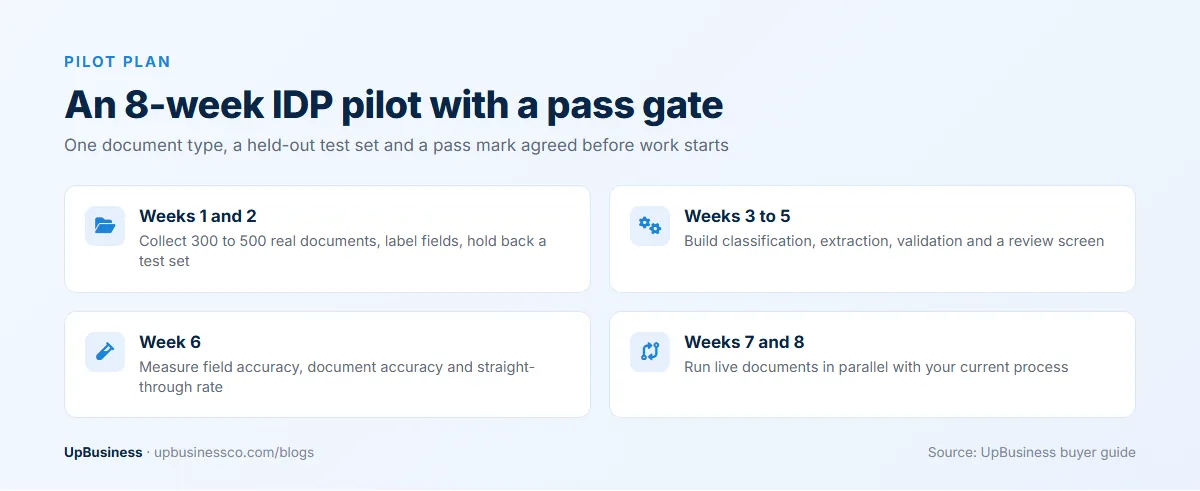
Do not buy on a demo. Buy a pilot on one document type, with a pass mark agreed before work starts.
- Weeks 1 and 2: collect 300 to 500 real documents, including the hard ones, and label the fields you need. Set aside a held-out test set.
- Weeks 3 to 5: build classification, extraction and validation, plus a basic review screen. Connect to a test copy of your ERP.
- Week 6: run the held-out set and report field accuracy, document accuracy and straight-through rate per document type.
- Weeks 7 and 8: run live documents in parallel with your current process and compare results and time spent.
Write the gate in numbers, for example "80% straight-through on supplier invoices with no wrong totals reaching the ERP in the parallel run". If the pilot misses, you have spent pilot money to learn that your documents need more work, not platform money. Price the pilot as a fixed fee.
Contract Terms to Agree Before You Sign
| Clause | What to ask for |
|---|---|
| Accuracy acceptance | The pass gate from the pilot, measured on a held-out set, with a fix-or-refund remedy |
| Ownership | Code, configuration, prompts, custom models and labelled data paid for are yours, in your cloud account |
| Cloud account | Extraction runs in your AWS, Azure or Google account so per-page fees are billed to you without markup |
| Data handling | Storage region, retention period, deletion on exit, provider opt-outs set, processor or BAA terms signed |
| Layout changes | How new supplier layouts are added, how fast, and whether it is in the support fee |
| Support and monitoring | Response times, monthly accuracy report, alerting when straight-through rate drops |
| Exit | Handover of code, documentation and labelled data, with 30 days of transition help |
Our software development contract checklist covers the general terms on IP, payment milestones and exit in more detail.
How to Choose an Intelligent Document Processing Partner
Send the same brief and sample set to two or three shortlisted partner companies. Strong bidders ask about your worst documents and your ERP before they talk about AI models. Useful questions:
- Which cloud API or platform would you use for our documents, and why that one rather than the alternatives?
- What straight-through rate will you commit to in the pilot, and how will you measure it?
- How does the review screen work, and who on our side will use it?
- Which ERP or accounting systems have you posted documents into, and can we speak to one of those clients?
- What happens when a supplier changes its invoice layout next quarter?
- Where will our documents be stored, and which provider data settings will you switch off?
Watch for accuracy claims with no test method, and for quotes that price extraction but leave out validation and integration. Demos run only on the bidder's own sample files are another warning sign. So is a partner that insists on running the pipeline in its own cloud account or can't say who owns the labelled data.
What UpBusiness Partner Data Shows
Our intelligent document processing companies page lists 7 verified partner companies as of October 2026. Five of the seven have 11 to 50 staff and two have 51 to 200. None of them names document processing as a service on its profile yet, so we don't quote their project sizes here.
The honest finding is that none of the seven lists document processing among its top three specialisations. They are general AI and software teams whose profiles lead with custom AI solutions, AI consulting, workflow automation and app development. For a first project on standard documents built on a cloud API, that is often fine. For high-stakes documents, such as loan files, claims or medical records, ask each team for a document processing project it has run in production and the accuracy figures from it.
If you would like proposals to compare, post your project on UpBusiness with your document types, monthly volume, sample files, target system and data rules, and compare the replies side by side.