

B2B ecommerce website development is a different job from building a store for shoppers. A business buyer logs in to a company account and sees its own prices. It reorders the same 40 items every month. A manager has to approve the order, and the buyer pays on 30-day terms. A shopper's store has none of that. It is built for a fast checkout instead. Picking the wrong model at the start is a costly mistake. Adding B2B features to a shopper's store later often means rebuilding the parts that matter most.
This guide is for business owners, sales and operations heads and founders. You may be planning an online store for trade buyers, retail shoppers or both. We explain how B2B and B2C ecommerce differ and which features B2B buyers expect. We show how the main platforms handle B2B and what each type of build costs in different countries. We also list what to ask a build partner. Our sources are platform docs from Shopify and Adobe, B2B buying research from McKinsey and Gartner, and checkout research from Baymard Institute. We also used data from verified ecommerce development companies on UpBusiness.
Key takeaways
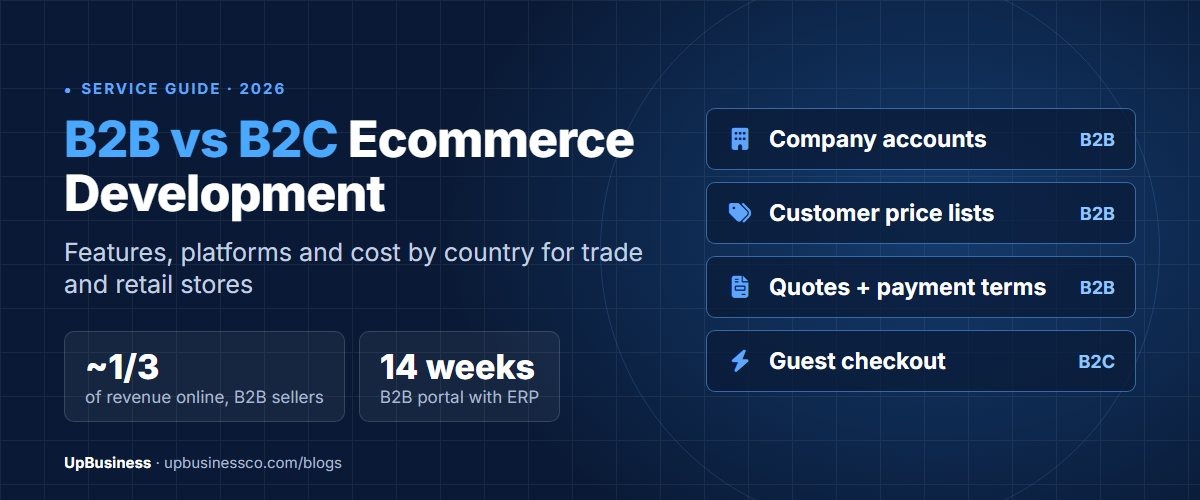
- B2B ecommerce is now mainstream. In McKinsey's 2024 B2B Pulse survey, e-commerce was the largest revenue channel for B2B firms that offer it. It made up about a third of their revenue.
- B2B buyers like to serve themselves. In a Gartner survey of 632 B2B buyers, 61% said they prefer buying without a sales rep. That is why account self-service matters more than a flashy storefront.
- You may not need a custom platform. Shopify B2B is on the Basic, Grow, Advanced and Plus plans. Adobe Commerce adds company accounts, quotes and purchase orders through its B2B add-on.
- ERP links tend to drive the B2B budget. An ERP is the core system that holds your stock, prices and invoices. On median 2025 pay, a B2B portal with ERP sync is about $15,000 of team time in India. It is about $148,600 in the US, before agency overheads.
B2B vs B2C Ecommerce: The Key Differences
B2B ecommerce sells to other firms through accounts, agreed prices and repeat orders. B2C ecommerce sells to single shoppers. They pay a fixed price and leave. The table shows how that changes what you build.
| B2B ecommerce | B2C ecommerce | |
|---|---|---|
| Who buys | A company, often several people with different roles | One shopper |
| Access | Most often behind a login, with approved accounts | Open to anyone, with guest checkout |
| Prices | Price lists per customer, volume tiers, agreed quotes | One public price, plus promotions |
| Ordering | Large, repeat orders by SKU, reorder lists and bulk forms | A few items, browsing and impulse buying |
| Payment | Purchase orders, credit limits and payment terms, plus cards | Cards, wallets and other instant payments |
| Approvals | Spending limits and manager approval before an order goes through | None |
| Product pages | Specs, documents, minimum quantities and pack sizes | Photos, video, reviews and storytelling |
| Integrations | ERP, stock, CRM and sometimes the buyer's buying system | Payments, shipping, marketing and analytics |
| Success measures | Reorder rate, order value, share of orders placed online | Conversion rate, average order value, repeat purchase |
Many firms need both. A maker may sell to distributors on trade terms and to shoppers at retail prices. One platform can do that. But the B2B needs should drive the design, because they are the harder ones to add later.
Features a B2B Ecommerce Website Needs
A B2B ecommerce website needs company accounts, prices set per customer, fast reordering, quotes and flexible payment terms. It also needs a link to the system that holds your stock and prices. Each of these replaces work that sales and service teams do by hand today.
| Feature | What it does | Why buyers care |
|---|---|---|
| Company accounts and roles | One company with several users, each with rights and spending limits | Buyers, approvers and finance can all use the same account |
| Catalogues and prices per customer | Each account sees its own products, prices and volume tiers | No need to ask a rep for the price |
| Quick order and reorder lists | Order by SKU, upload a list or repeat a past order | Saves time on the same order every month |
| Quotes | Buyers ask for a quote, the seller agrees terms and the buyer turns it into an order | Large or odd orders without email back and forth |
| Purchase orders and payment terms | PO numbers, credit limits and payment on 30 or 60-day terms | Matches how firms already pay suppliers |
| Approval steps | Orders above a limit wait for a manager's approval | Keeps spending under control |
| ERP and stock sync | Prices, stock, orders and invoices flow between the store and the ERP | Correct stock and no re-keying of orders |
| Rich product data | Specs, data sheets, certificates, pack sizes and minimum quantities | Technical buyers can check fit without calling |
Adobe's docs for its B2B add-on list the same building blocks. They include company accounts with divisions and role-based rights, and shared catalogues with custom prices. They also include quotes you can negotiate, saved lists for repeat orders, approval rules for purchase orders and payment on account against a credit line[1].
Say you are a small retailer or distributor. You need company accounts and wholesale prices, but nothing more complex. Start with the first three rows and payment terms. Quotes, approvals and deep ERP sync can come in a second phase, once trade buyers are ordering online.
What B2C Ecommerce Development Focuses On
B2C ecommerce development aims to get a shopper from first visit to paid order with as little friction as possible. Baymard Institute's average cart abandonment rate is 70.22% across 50 studies. Cart abandonment means a shopper leaves items in the cart without paying. Some US shoppers left for reasons other than just browsing. Of those, 18% left because the site made them create an account[2].
That is the opposite of B2B, where an account is the point. A shopper's store should offer guest checkout. It should show the full price, with delivery, early on. It should load fast on phones and make returns easy to understand. Product pages lean on photos, video and honest reviews, not data sheets.
Can One Store Serve B2B and B2C Buyers?
One store can serve both if the platform supports separate catalogues, prices and payment methods per customer. On Shopify, B2B buyers are set up as companies, with their own catalogues and prices. You can adjust each buyer's currency, products, payment and shipping methods[3]. Adobe Commerce handles the same split through shared catalogues tied to company accounts[1].
A joint store saves you running two platforms, but it needs careful testing. Trade prices must never show to retail shoppers. B2B accounts need approval before they can buy. Reports should keep the two channels apart. If your trade and retail buyers buy very different products, two storefronts on one backend can be simpler to run.
B2B Ecommerce Platforms Compared
The main choice is between three paths. You can use a hosted platform with B2B features, an open-source platform built out for B2B, or a custom build. Each suits a different size of firm and a different level of pricing detail.
| Option | B2B support | Best for |
|---|---|---|
| Shopify | B2B is on the Basic, Grow, Advanced and Plus plans, with features that depend on the plan | Brands that want B2B and retail on one hosted store |
| Adobe Commerce | B2B add-on with company accounts, shared catalogues, quotes, saved order lists, purchase orders and payment on account | Larger catalogues and complex pricing, with a tech team or partner |
| WooCommerce | B2B features come from add-ons on top of the free core | WordPress firms with modest B2B needs and a reliable hosting partner |
| Custom build | Anything you ask for, at the cost of building and running it | Unusual pricing, ordering or link needs |
Shopify's help centre says B2B isn't on its Starter or Retail plans. It also says the B2B features you get depend on your plan[3]. Check the plan details before you commit. Look hard at payment terms and the number of catalogues you need. For platform budgets, see our guides to Shopify development cost and Shopify vs WooCommerce. Use our WooCommerce proposal checklist when quotes arrive.
How Much Does B2B Ecommerce Website Development Cost?
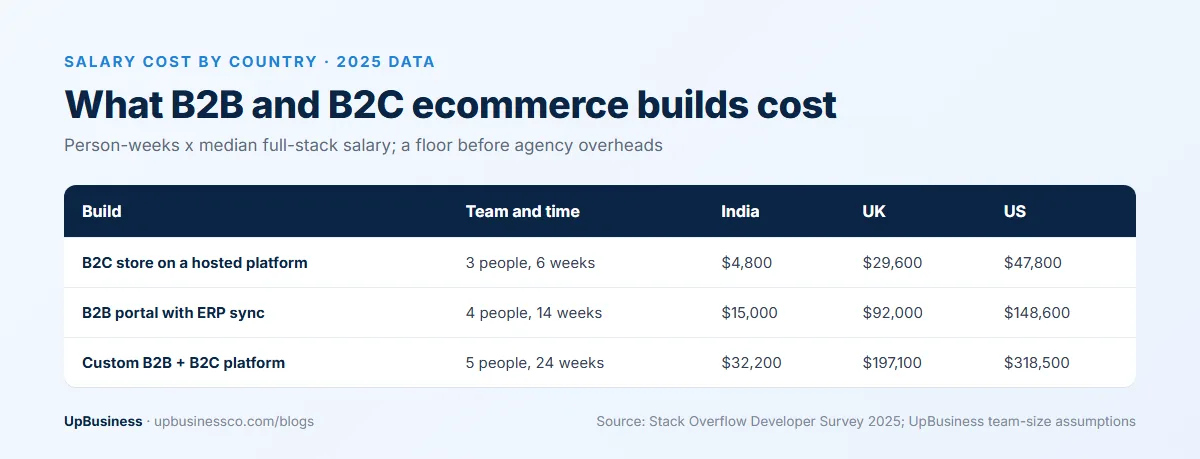
B2B ecommerce website development costs more than a shopper's store. Account logic, price rules and system links all add work. The table prices three common builds by the time a small team needs. It uses each country's 2025 median full-stack developer pay from the Stack Overflow Developer Survey. That is $13,949 in India, $75,410 in Germany, $85,429 in the UK and $138,000 in the US[4]. These are pay costs only. Agency quotes add project management, tools, overheads and profit. Read the figures as a floor.
| Build | Team and time | India | Germany | UK | US |
|---|---|---|---|---|---|
| B2C store on a hosted platform with a theme | 3 people, 6 weeks | $4,800 | $26,100 | $29,600 | $47,800 |
| B2B portal on a hosted platform with ERP sync | 4 people, 14 weeks | $15,000 | $81,200 | $92,000 | $148,600 |
| Custom B2B and B2C platform with quotes, approvals and ERP | 5 people, 24 weeks | $32,200 | $174,000 | $197,100 | $318,500 |
We use the same method in our MVP development cost guide. We multiply people by weeks and price them at median pay. Your own figure will move with the number of system links, the size of the catalogue and how many price rules you have. Running costs come on top. These include the platform fee, payment fees, hosting, add-ons and support.
Get three B2B ecommerce quotes from verified partner companies

Browse our curated list of B2B E-Commerce Development Companies
Share your catalogue, price rules, ERP and budget. We match you with three checked companies that build B2B stores. Buyers pay nothing.
Post your requirementWhy ERP Links Drive the B2B Budget
The ERP link tends to take more effort than any other part of a B2B build. The ERP holds the prices, stock, customer terms and invoices that the store has to show correctly. Every price, credit limit and stock level the buyer sees online has to come from it. Every order has to go back into it without anyone typing it in again.
Ask three questions before anyone quotes. Which way does each type of data flow, and how often? What happens when the ERP is down or a sync fails? Who owns the link once it's live? Your ERP may be old or heavily changed. If so, a short paid discovery phase to map the data is often cheaper than fixing a fixed-price build later. Our guide to ERP software development covers the ERP side in more depth.
How Long B2B Ecommerce Development Takes
We use the same planning numbers as the cost table. A B2C store on a hosted platform takes about 6 weeks. A B2B portal with ERP sync takes about 14 weeks. A custom B2B and B2C platform takes about 24 weeks. Data is a frequent cause of delay. Cleaning product data, agreeing price lists and mapping ERP fields often take longer than building the screens.
Launching B2B in phases helps. Start with your largest trade buyers, their price lists and reordering. Then add quotes, approvals and more buyers once orders are flowing. Each phase gives you real usage to plan the next one.
Why B2B Buyers Want to Order Online
B2B buyers now expect to research and order on their own. In a Gartner survey of 632 B2B buyers, 61% said they prefer a buying process without a sales rep[5]. McKinsey's 2024 B2B Pulse survey found e-commerce had become the largest revenue channel for B2B firms that offer it. It made up about a third of their revenue[6].
That doesn't remove the sales team. It changes its job. Reps move from taking routine orders to handling new accounts, large deals and problems. A good B2B site gives reps a view of each buyer's account, orders and quotes. That lets them help without starting from scratch.
B2B Ecommerce Examples by Industry
B2B ecommerce looks different in each industry, and the features that matter most change with it. These examples show where to focus first.
| Business type | Typical buyers | Features to put first |
|---|---|---|
| Distributor or wholesaler | Retailers and trade accounts reordering the same lines | Price lists per customer, quick order by SKU, reorder lists, credit terms |
| Manufacturer | Dealers, distributors and large end customers | Dealer catalogues, quotes for large orders, technical documents, ERP sync |
| Industrial and spare parts | Upkeep teams and buying departments | Search by part number, fit data, approvals, punch-out to buying systems |
| Wholesale fashion and consumer goods | Boutiques and chain stores | Size and pack grids, minimum quantities, seasonal pre-orders |
| Food and drink supply | Restaurants, cafes and caterers | Standing orders, delivery slots, credit limits |
Do you sell to both trade and retail buyers? Then list which of these features each group needs before you choose a platform. That list is the most useful page you can give a build partner.
Product Pages and SEO for a B2B Store
If you hide everything behind a login, your catalogue stays out of search results. Yet many B2B buyers start their research on Google. A common fix is to make product pages, specs and documents public, so search engines can list them. Show prices per customer, stock and ordering only after login.
Write product pages for the technical buyer. Give clear names and part numbers, full specs, fit details, pack sizes and minimum quantities. Add data sheets they can download. Category pages should explain who each range is for and link to related products. These pages also help your sales team. They can send a link instead of attaching a PDF to every email.
Common B2B Ecommerce Mistakes
- Building a shopper's store first and adding trade accounts later. This often means reworking prices and checkout.
- Launching with gaps in product data. Buyers then still have to call to check specs.
- Loading price lists by hand instead of syncing them from the ERP. This leads to wrong prices online.
- Putting every product behind a login. This keeps the catalogue out of search results.
- Launching to every buyer at once. It is better to start with a few large accounts and learn from them.
Questions to Ask a B2B Ecommerce Development Company
Ask every company on your shortlist the same questions. Then compare the answers side by side.
- Which B2B stores have you built that are live now? Can we log in to a test account?
- How have you handled prices and catalogues per customer on this platform?
- Which ERP have you linked to before? Which way did data flow, and what broke the first time?
- How will you handle payment terms, credit limits and purchase orders?
- How will you test that trade prices never show to the wrong buyer?
- Who will own the code, the store account, the domain and the ERP link once you hand it over?
- What does support cost after launch? How fast do you respond when orders stop syncing?
Send each company the same brief, using our software project brief template. Then compare the quotes line by line. Our guide to comparing software development proposals shows a simple way to do it. For a shopper's store or a general website budget, our website development cost guide breaks prices down by site type.
UpBusiness Data: Ecommerce Development Companies (October 2026)
Seven verified companies list ecommerce development among their services on UpBusiness. Their minimum project sizes range from $260 to $10,500. The typical project sizes they report range from $530 to $26,300. That range fits B2C stores and smaller B2B portals well. For a custom B2B and B2C platform with deep ERP links, ask each company for a similar live project before you shortlist it. These figures are self-reported by a small group. Use them to sense-check quotes, not as a market average.
Find a B2B Ecommerce Development Company on UpBusiness
You can browse verified ecommerce development companies on UpBusiness. Compare team size, location, project sizes and TrustScore before you contact anyone. For stores built around a website, see our ecommerce website development companies. Or post your project once. Matching partner companies will send you quotes you can compare with the questions above.
Browse our curated list of B2B E-Commerce Development Companies