


Browse our curated list of AI Integration Companies
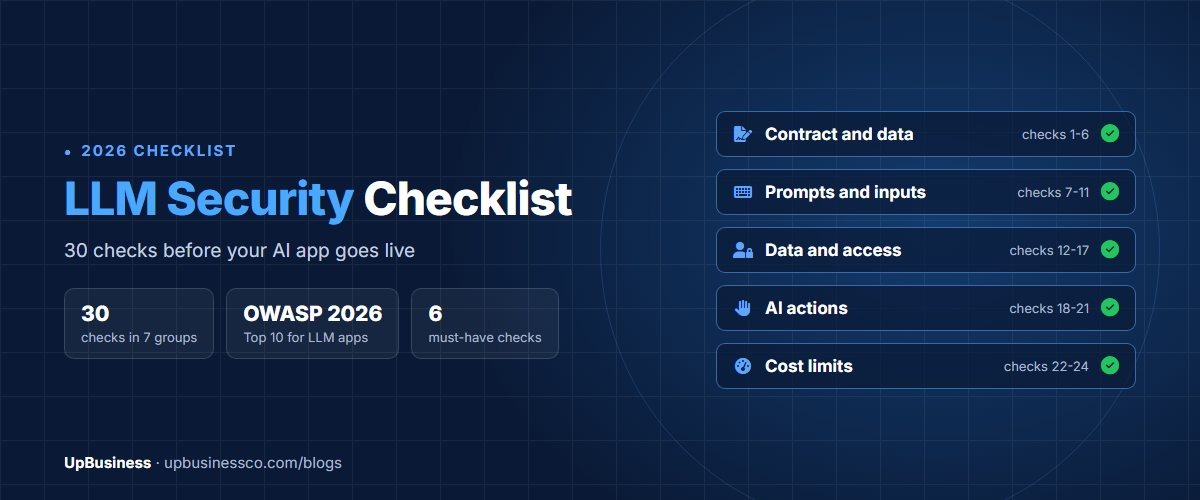
An LLM security checklist is a list of checks that an AI app must pass before real users and real data touch it. LLM stands for large language model, the type of AI behind ChatGPT, Claude and most business chatbots. This checklist turns the OWASP Top 10 for LLM Applications into 30 plain checks you can hand to the company building your app.
It's written for the buyer. That's the founder, product owner or IT head who is paying a partner company to build a chatbot, an AI assistant or an AI feature inside existing software. You don't need to be a security expert to use it. You need to know what to ask for, and what proof to expect.
Key takeaways
- OWASP's 2026 list ranks prompt injection first, sensitive information disclosure second and excessive agency third[1].
- Most LLM risks are fixed by design choices, not by filters. Limit what the AI can see and do, and keep a person in the loop for anything that matters.
- 46% of developers say they distrust the accuracy of AI tools[2]. Ask for a written accuracy test before launch, not a promise.
- You stay responsible for personal data even when a partner processes it for you. Put security duties in the contract.
What Is an LLM Security Checklist?
An LLM security checklist is a set of yes-or-no checks covering how an AI app handles prompts, data, tools, costs and answers. Each check maps to a known risk, mostly from the OWASP Top 10 for LLM Applications. You use it to agree the work with your partner company, test the app before launch and review it after major changes.
OWASP is a non-profit foundation known for its web security lists. Its LLM list is written by hundreds of security experts and was last updated in August 2026. It's the closest thing the industry has to a shared standard for AI app security.
A normal security test still matters. Your AI app is also a website or mobile app, with logins, servers and databases. But a standard test won't catch AI-specific problems, such as a customer tricking your chatbot into revealing another customer's order history.
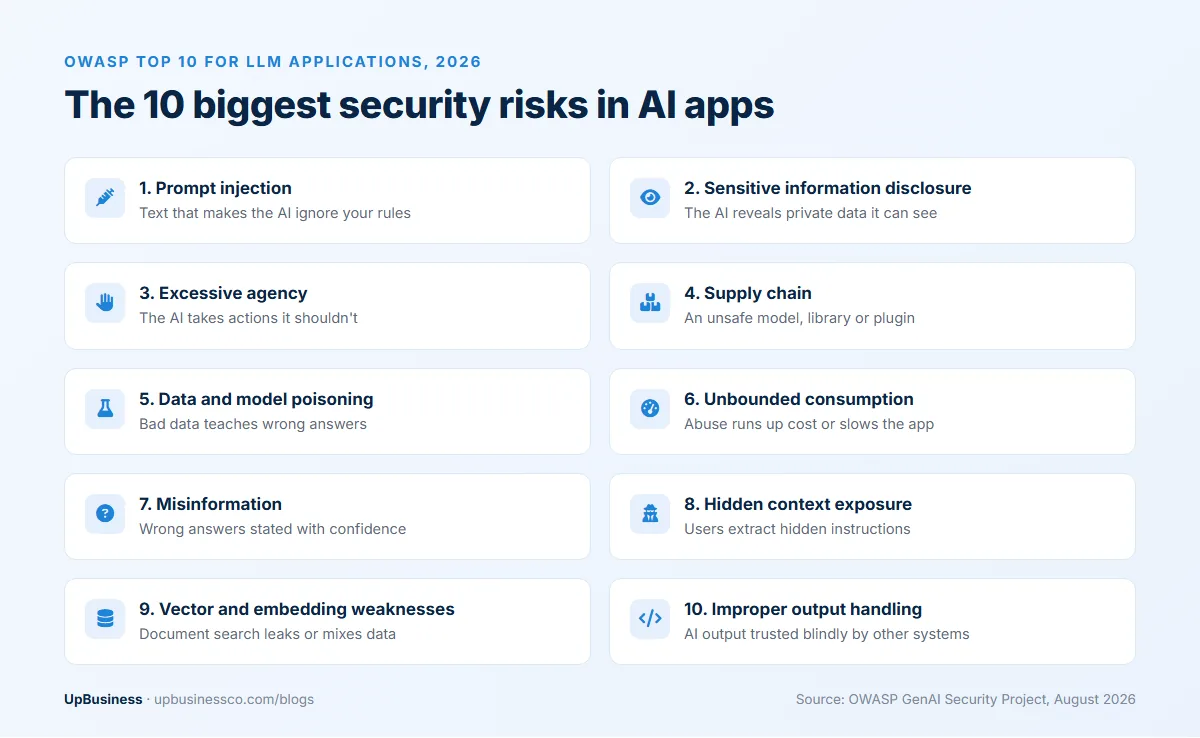
The OWASP Top 10 for LLM Applications in Plain English
Here are the 10 risks from the 2026 edition, with what each one means for a business and the question to ask your partner.
| Risk | What it means | Ask your partner |
|---|---|---|
| 1. Prompt injection | Someone writes text that makes the AI ignore your rules | How do you stop user input or documents from overriding our instructions? |
| 2. Sensitive information disclosure | The AI reveals private data it can see | Which data can the AI access, and how is it limited per user? |
| 3. Excessive agency | The AI can take actions it shouldn't, like refunds or deletions | Which actions can it take without a person approving them? |
| 4. Supply chain | A model, library or plugin you rely on is unsafe | Which models and third-party tools do you use, and who checks them? |
| 5. Data and model poisoning | Bad data teaches the AI wrong or harmful answers | Who can add documents to the knowledge base, and are changes reviewed? |
| 6. Unbounded consumption | Heavy or abusive use runs up a huge bill or slows the app | What usage and spending limits are set? |
| 7. Misinformation | The AI states wrong things with confidence | How was accuracy tested, and what happens when it isn't sure? |
| 8. Hidden context exposure | Users extract your hidden instructions or settings | Is anything secret, such as keys or rules, placed in the prompt? |
| 9. Vector and embedding weaknesses | The document search behind the AI leaks or mixes data | Can one customer's documents ever appear in another's answers? |
| 10. Improper output handling | AI output is trusted blindly by other systems | Is AI output checked before it's shown, stored or run? |
Risk names are from OWASP's 2026 edition[1]. If your AI can use tools on its own, such as sending emails or updating records, OWASP also publishes a separate list for AI agents. Ask your partner whether they've reviewed it too.
The LLM Security Checklist: 30 Checks Before Go-Live
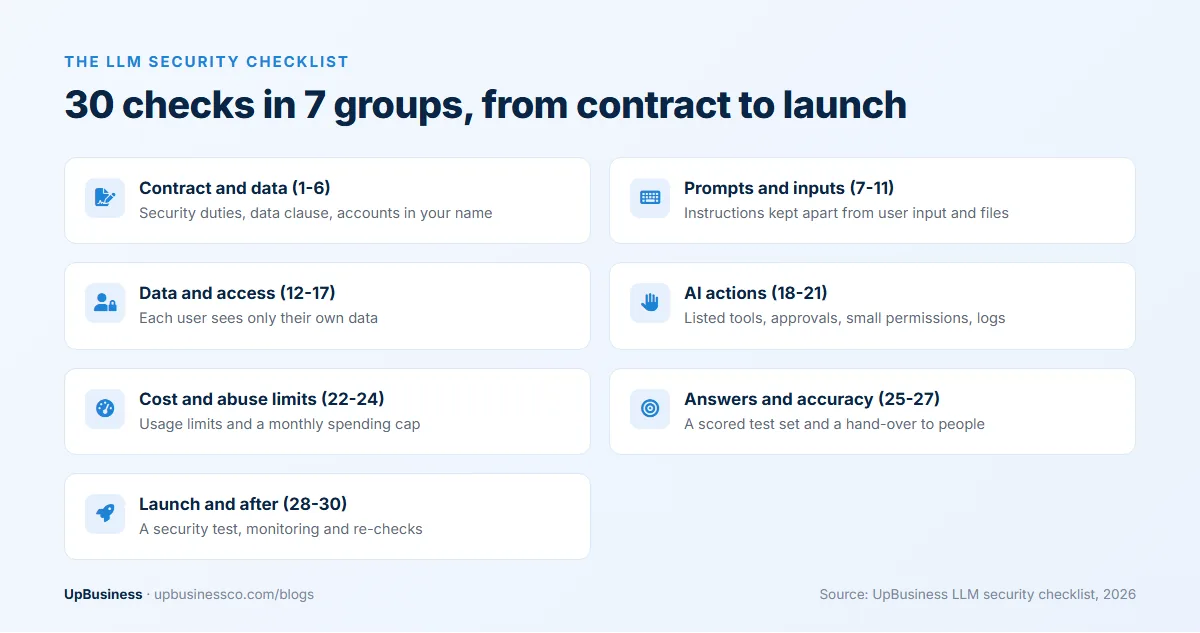
Use these 30 checks in order. The first six belong in the contract. The rest should be shown to you, with evidence, before launch.
Before you sign: contract and data (checks 1 to 6)
- The contract names who is responsible for security, both during the build and after launch.
- A data processing clause covers personal data, breach reporting and deleting data at the end.
- The partner lists every AI model provider and third-party tool that will see your data.
- The model provider's business terms say your inputs and outputs won't be used to train its models.
- All accounts, API keys and cloud resources are in your company's name.
- You know where data will be stored, and that location meets your own rules.
Check 2 matters more than it looks. Under India's data protection law, the business that decides why data is used stays responsible for it, even when another company processes it[3]. Europe's GDPR and the UK's data law work the same way. Our software development contract checklist covers the exact clauses.
Prompts and inputs (checks 7 to 11)
- Your instructions to the AI are kept separate from user input and from documents the AI reads.
- The partner has tested at least 20 known prompt injection attacks and shared the results.
- Text inside uploaded files, web pages and emails is treated as data, never as instructions.
- No passwords, keys or secret business rules sit inside the prompt.
- Very long or unusual inputs are rejected or trimmed before they reach the model.
Prompt injection can't be fully prevented today. Instructions and data reach the model through the same text, and no filter separates them perfectly. Checks 7 to 11 reduce the risk. The next groups limit the damage when an attack gets through.
Data and access (checks 12 to 17)
- The AI can only reach the data the current user is allowed to see.
- Access is checked in your systems, not by asking the AI to behave.
- Customer documents are stored so that one customer's files can't appear in another's answers.
- Personal data is removed or masked before it's sent to the model, where possible.
- Chat logs are kept only as long as needed, and access to them is limited.
- Only named people can add or change documents in the AI's knowledge base, and changes are logged.
Check 13 is easy to miss. "We told the AI not to show other users' data" is not a control. If the AI can see the data, assume someone will find a way to make it repeat it.
What the AI is allowed to do (checks 18 to 21)
- Every action the AI can take is listed in writing, such as looking up an order or creating a ticket.
- Actions that move money, delete data or contact customers need a person to approve them.
- The AI's tools use their own logins with the smallest possible permissions.
- Every action the AI takes is logged with who asked, what it did and when.
This group is about the third risk, excessive agency. It moved from sixth to third place in the 2026 edition. As more AI apps take real actions, mistakes stop being embarrassing answers and start being real losses.
Cost and abuse limits (checks 22 to 24)
- Each user and each account has a usage limit per hour or per day.
- A monthly spending cap is set with the model provider, with alerts before you hit it.
- The app slows or blocks traffic that looks automated.
Model providers charge per token, a small piece of text. A busy chatbot on a strong model can cost hundreds of dollars a month, and an abused one much more. Our guide to AI automation cost shows how to estimate normal usage.
Answers and accuracy (checks 25 to 27)
- The partner built a test set of real questions with correct answers, and shares the score.
- When the AI isn't sure, it says so or hands over to a person.
- AI output is checked before it's shown on a page, saved to a database or used by another system.
Launch and after (checks 28 to 30)
- A security test covering both the normal app and the AI parts is done before launch.
- Someone monitors logs for attacks, errors and cost spikes after launch.
- The checklist is run again after every model change or major new feature.
Worked Example: Checking a Customer Support Chatbot
Here's how the checklist works on a common first project. An online store wants a chatbot that answers questions about orders, returns and delivery. It reads the store's help articles and can look up a customer's order once they log in. It can also start a return.
Walking through the checklist with the partner turns up five decisions.
- Order lookups (checks 12 and 13). The chatbot never searches orders by name or email. It calls the store's own order system with the logged-in customer's ID. So even a clever prompt can't pull up someone else's order.
- Returns (checks 18 and 19). The chatbot can start a return but can't approve a refund. A staff member approves refunds over a set amount.
- Help articles (check 17). Only two people on the support team can add or edit articles, and every change is logged. That stops a bad article from teaching the chatbot wrong return rules.
- Costs (checks 22 and 23). Each customer gets a limit of 30 messages an hour. The store sets a monthly spending cap with an alert at 80%.
- Accuracy (checks 25 and 26). The partner builds a test set of 200 real customer questions. When the chatbot isn't confident, it offers to connect the customer to a person.
None of these decisions needs special security software. They're design choices, made early and written into the brief. That's typical. Most of the protection in an AI app comes from what it's allowed to see and do, not from the AI itself.
The same approach works for internal tools. An HR assistant that answers policy questions needs the same data checks, because staff shouldn't see each other's salary or leave records through it.
Evidence to Ask For Before Launch
A partner saying "yes" to every check isn't enough. Ask for something you can see. This table shows what good evidence looks like.
| Area | Evidence to ask for |
|---|---|
| Prompt injection | A list of attacks tried, with the result of each |
| Data access | A demo where a test user tries to see another user's data and fails |
| Actions | The written list of tools, and a screenshot of the approval step |
| Cost limits | A screenshot of the spending cap and alert settings |
| Accuracy | The test set, the score, and examples of wrong answers |
| Security test | The test report, with every high-risk finding fixed and re-tested |
| Logging | A sample log entry showing user, action and time |
If you can't read the report yourself, ask the partner to walk you through it on a call. A good partner will explain each finding in plain words and say how it was fixed.
How Much Does LLM Security Testing Cost?
Security testing of an AI app usually has two parts. The first is a standard test of the app around the AI. Our VAPT testing cost guide puts a test of one web app at about $420 to $2,100 with a partner company in India. The second part tests the AI itself, such as prompt injection, data leaks and unsafe actions. That adds time, and the price depends on how many tools and data sources the AI can reach.
Two habits keep the cost down. Build the checks in from the start. Testing then finds less to fix. And keep the AI's access small, because every extra tool or data source is one more thing to test. A chatbot that only answers from public help articles needs far less testing than an assistant that can issue refunds.
Ask for the security test as a separate line in the proposal. Then you can compare it across partners, and it won't be the first thing cut when the budget gets tight.
Red Flags in a Partner's Security Answers
Some answers tell you the partner hasn't thought about AI security yet. Watch for these:
- "The AI provider handles security." The provider secures its model. You and your partner secure everything around it.
- "We added a rule telling the AI not to share private data." A rule in the prompt is not access control.
- "Prompt injection isn't a real problem for business apps." It's the top risk on the OWASP list.
- "We'll do security after launch." By then, the design choices that matter most are fixed.
- No spending cap, because "usage will be low". Usage is low until someone abuses it.
For a broader set of questions, see our list of questions to ask an AI development company. If you're writing a request for proposal, our AI RFP template has a security section you can paste this checklist into.
What UpBusiness Partner Data Shows
Every company that applies to list on UpBusiness goes through document and portfolio checks. As of October 2026, 83 companies had applied, 53 were approved and 25 were rejected. That screening checks the company, not each project. So you still need this checklist for the app itself.
In November 2026, 13 companies appeared on our AI integration page. We counted the 6 that list AI integration as part of their own services.
| Company | City | Team | Typical project | TrustScore |
|---|---|---|---|---|
| Zluck Solutions | Surat | 11 to 50 | $10,000 | 75.33 |
| Capsquery | Kolkata | 1 to 10 | $1,000 | 75.00 |
| Nexios Technologies | Surat | 11 to 50 | $5,000 | 72.00 |
| Axewik Technologies | Surat | 1 to 10 | $25,000 | 71.67 |
| Globik AI | Mumbai | 11 to 50 | $25,000 | 70.33 |
| SPEQTO Technologies | Noida | 51 to 200 | $5,000 | 70.33 |
Typical projects range from $1,000 to $25,000, and two of the six work at the $25,000 level. Apps at that size often touch customer data or take actions. The checks in this guide matter most there. At the smaller end, a $1,000 project is often a narrow chatbot. It still needs the contract checks, data access checks and a spending cap.
These are self-reported project sizes, not quotes. For build and running costs of AI apps, see our guides to AI integration services and RAG chatbot cost.
How to Use This LLM Security Checklist
You'll get the most from it if you use it three times.
- When you ask for proposals. Paste checks 1 to 30 into your brief. Ask each company which checks are included in its price and which cost extra.
- Before launch. Go through the evidence table with your partner. Don't sign off until every high-risk item is done or has a written plan.
- After big changes. Run it again when you switch models, add a tool or connect a new data source.
Score each check as done, partly done or missing. Treat checks 2, 5, 12, 13, 19 and 23 as must-haves. If any of those is missing, the app isn't ready for real customers, however good the demo looks.