


Browse our curated list of Salesforce Implementation Companies
Salesforce implementation cost in 2026 usually lands between $2,400 and $75,500 for small and growing companies. Large, multi-team projects can pass $250,000. The setup is only half the bill, though. You also pay for licences every year, and those start at $25 per user per month and go up to $550.
So what will you actually pay? That depends on three things: how many people use Salesforce, how much it has to change to fit your business, and who does the work. This guide walks through each one with real prices. You'll see the 2026 licence list, the hours each phase takes, what partner companies charge per hour, and a full year-one budget for a 25-person team.
Key takeaways
- Licences cost $25 (Starter Suite), $100 (Pro Suite), $195 (Core), $395 (Advanced) or $550 (Max) per user per month at list price in 2026.
- A simple setup takes 60 to 150 hours. A mid-size project with Sales and Service Cloud and several integrations can take 700 to 1,800 hours.
- US federal contract data puts the median Salesforce ceiling rate at $151 an hour across 133 rates.
- For small teams, licences often cost more than the setup. Ten Pro Suite users cost $12,000 a year, every year.
- Of the 8 partner companies on the UpBusiness Salesforce listing, 2 offer Salesforce implementation on their profiles. Both report an average project size of $10,000.
What Is the Average Salesforce Implementation Cost?
For a small business, the average Salesforce implementation cost is roughly $2,400 to $22,700. Growing companies usually spend $8,000 to $75,500. Big multi-team projects run from about $28,000 to well over $250,000. The low end of each range is an offshore partner company. The high end is US rates.
Here's how that breaks down. These are our estimates. We priced each project's hours at $40 an hour for an offshore partner company and $151 an hour, the US federal median, for US rates.
| Project type | What's included | Hours | Offshore partner | US rates |
|---|---|---|---|---|
| Starter setup | 5 to 15 users, Starter or Pro Suite, standard sales pipeline, one data import | 60 to 150 | $2,400 to $6,000 | $9,100 to $22,700 |
| Growing company | 15 to 75 users, Pro Suite or Core, custom fields and objects, 2 or 3 integrations | 200 to 500 | $8,000 to $20,000 | $30,200 to $75,500 |
| Mid-size, several teams | 75 to 300 users, Sales and Service Cloud, 4 or more integrations | 700 to 1,800 | $28,000 to $72,000 | $105,700 to $271,800 |
| Enterprise | 300+ users, quoting, industry clouds, complex data and security rules | 2,000 to 5,000 | $80,000 to $200,000 | $302,000 to $755,000 |
Why such wide ranges? Two companies with 50 users can pay very different amounts. One uses Salesforce almost as it comes. The other needs custom screens, five connected systems and ten years of messy data moved across. The second one can easily cost four times as much.
How Much Does Salesforce Cost per User per Month?
Salesforce costs $25 to $550 per user per month in 2026, depending on the edition. An edition is simply a package of features. Here are the list prices from the Sales Cloud pricing page[1]. Service Cloud uses the same five prices[2].
| Edition | Price per user per month | Billing | Good fit for |
|---|---|---|---|
| Free Suite | $0 | Free | Trying the basics with a tiny team |
| Starter Suite | $25 | Monthly or yearly | Small teams that want a ready-made CRM |
| Pro Suite | $100 | Yearly | Growing teams that need forecasting and more automation |
| Core | $195 | Yearly | Companies that need deep customization; replaces Enterprise Edition |
| Advanced | $395 | Yearly | Larger teams with stricter security needs; replaces Unlimited Edition |
| Max | $550 | Yearly | The full feature set with Salesforce's AI agents; replaces Agentforce 1 |
Let's make that real. Say you have 25 users. Here's what one year of licences costs at each level.
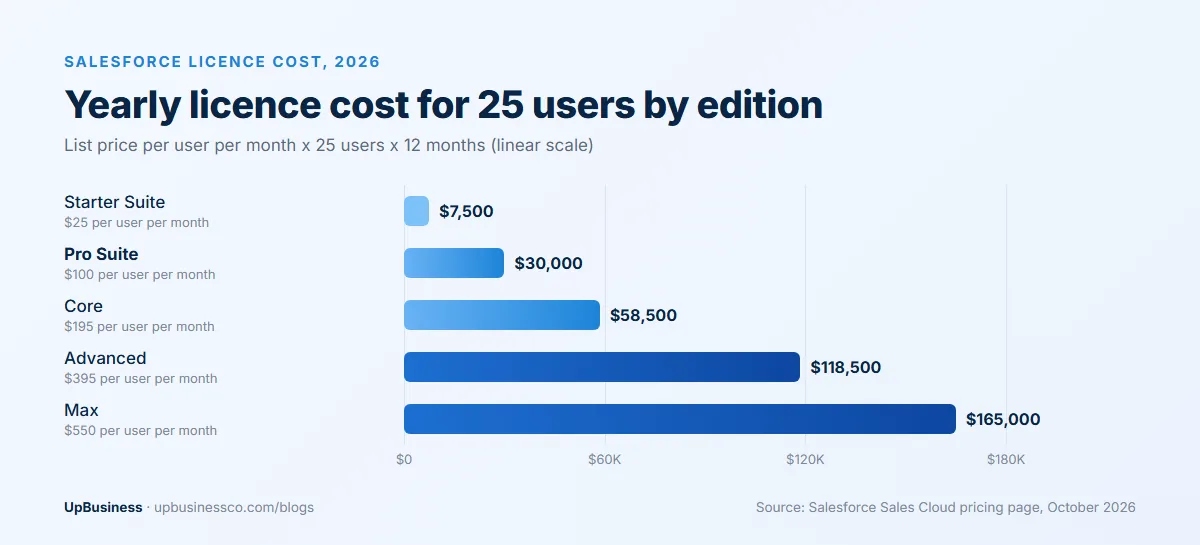
That's $7,500 a year on Starter Suite and $30,000 on Pro Suite. Core jumps to $58,500, and Max reaches $165,000. For many small teams, the yearly licence bill is bigger than the whole setup project. So pick the edition carefully. Paying for Core just to get one feature is a common and costly mistake.
A few add-ons cost extra. Revenue Intelligence starts at $220 per user per month, and Revenue Cloud, which handles quotes through to billing, starts at $200[1]. On Service Cloud, Enhanced Messaging adds $75 per user per month on the editions that include it[2].
Where Do the Implementation Hours Go?
Most of the hours go into setting up Salesforce, moving your data and connecting other tools. Very little goes into the launch itself. Here's a typical split, based on our estimates.
| Phase | Share of hours | What happens |
|---|---|---|
| Discovery and design | 10% to 15% | Mapping your sales or service process, roles and reports before anything is built |
| Configuration | 25% to 35% | Setting up fields, page layouts, pipeline stages, user access and flows (point-and-click automations) |
| Customization | 10% to 20% | Writing Apex, Salesforce's own programming language, for anything the built-in tools can't do |
| Data migration | 10% to 20% | Cleaning, removing duplicates and importing accounts, contacts, deals and history |
| Integrations | 15% to 25% | Connecting email, accounting, marketing, support and your own product |
| Testing and training | 10% to 15% | Checking everything works, then teaching your team and admin |
| Go-live and hypercare | About 5% | Launch, plus the first weeks of close support (hypercare) while people settle in |
Use this table when you read a quote. If a proposal puts almost nothing into discovery or data migration, expect change requests later. Those two phases are where surprises hide.
Testing is done in a sandbox. That's a copy of your Salesforce account (your "org") where people can try changes without breaking live data. Core, Advanced and Max each include a Partial Sandbox. Advanced and Max also include a Full Sandbox, which is a complete copy[1]. On Core, a Full Sandbox costs extra.
How Much Do Integrations and Data Migration Cost?
Integrations and data migration are where most Salesforce budgets break. A simple email link takes a few hours. A custom link to your own product can take weeks. Here are typical ranges, based on our estimates and the same two rates.
| Job | Hours | Offshore partner ($40/h) | US rates ($151/h) |
|---|---|---|---|
| Email and calendar sync (Gmail or Outlook) | 5 to 15 | $200 to $600 | $760 to $2,270 |
| Accounting software, using a ready-made app | 20 to 40 | $800 to $1,600 | $3,020 to $6,040 |
| Marketing or support tool | 20 to 60 | $800 to $2,400 | $3,020 to $9,060 |
| Your own product, custom API work | 60 to 200 | $2,400 to $8,000 | $9,060 to $30,200 |
| Data migration: one clean source | 20 to 40 | $800 to $1,600 | $3,020 to $6,040 |
| Data migration: several messy sources with history | 80 to 200 | $3,200 to $8,000 | $12,080 to $30,200 |
An API is simply the door one system uses to talk to another. When a ready-made app already connects the two tools, the job is mostly setup. When nothing exists, someone has to write and test that connection, and keep it working when either side changes.
Data is the other trap. Say you have 40,000 contacts spread across two spreadsheets and an old CRM. Some people appear three times. Some have no company name. Someone has to decide which record wins, fix the gaps and map every field. That can easily take 100 hours. If your own team cleans the data first, you can cut that bill by half or more.
Ask every partner company how many systems it plans to connect and how it will move your history. If two quotes differ by thousands of dollars, the answer is usually here.
How Much Do Salesforce Consultants Charge per Hour?
Salesforce consultants charge about $130 to $190 an hour at US contract rates. Offshore partner companies charge much less. We pulled every Salesforce rate on the US government's GSA CALC database in October 2026: 133 rates from 45 contractors, with a median of $151 an hour[3].
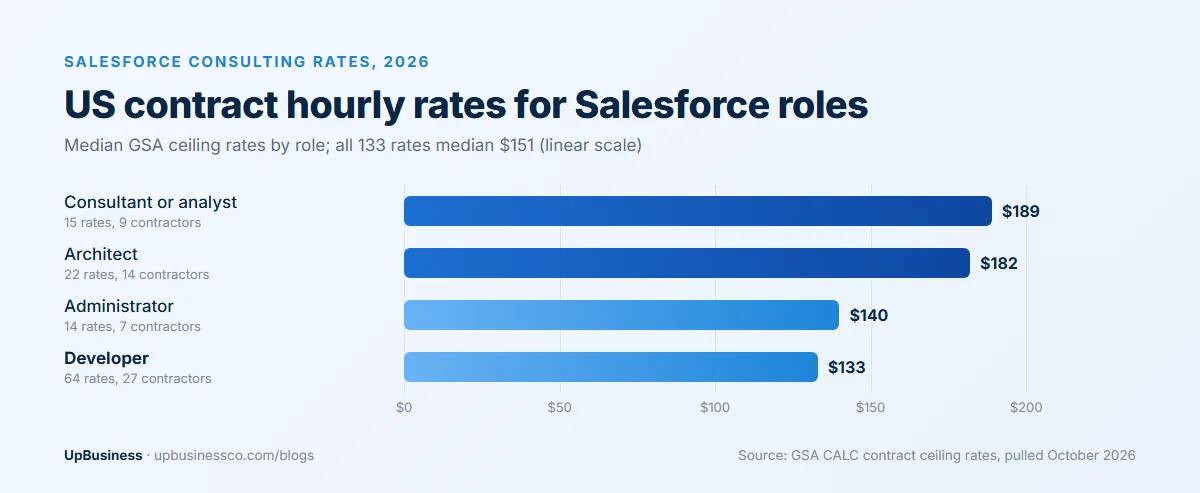
By role, consultants and analysts had a median of $189 an hour. Architects, who design how the whole system fits together, came in at $182. Administrators were at $140 and developers at $133. These are ceiling rates, meaning the most a contractor can charge government buyers. Commercial quotes are often a little lower.
Offshore rates are far lower. In our estimates, an offshore Salesforce developer often costs $25 to $50 an hour. That's why we use $40 for the offshore columns in this guide. Our software development cost benchmark shows how rates compare across regions.
A lower rate doesn't always mean a lower total, though. A team that's new to Salesforce may take twice the hours. Ask for certified people and a similar past project.
Is There a Salesforce Implementation Cost Calculator?
Salesforce doesn't publish an official implementation cost calculator, but you can build a quick estimate yourself. It takes four numbers.
- Users times licence price times 12. That's your yearly licence cost. For 25 users on Pro Suite: 25 x $100 x 12 = $30,000.
- Hours for your project type. Use the first table. A growing company might need 300 hours.
- Hours times rate. 300 hours at $40 is $12,000. At $151, it's $45,300.
- Add 15% for surprises. Messy data and late requests are normal. A buffer keeps them from wrecking the budget.
Here's a worked example of exactly that.
A Worked Example: Year One for a 25-User Sales Team
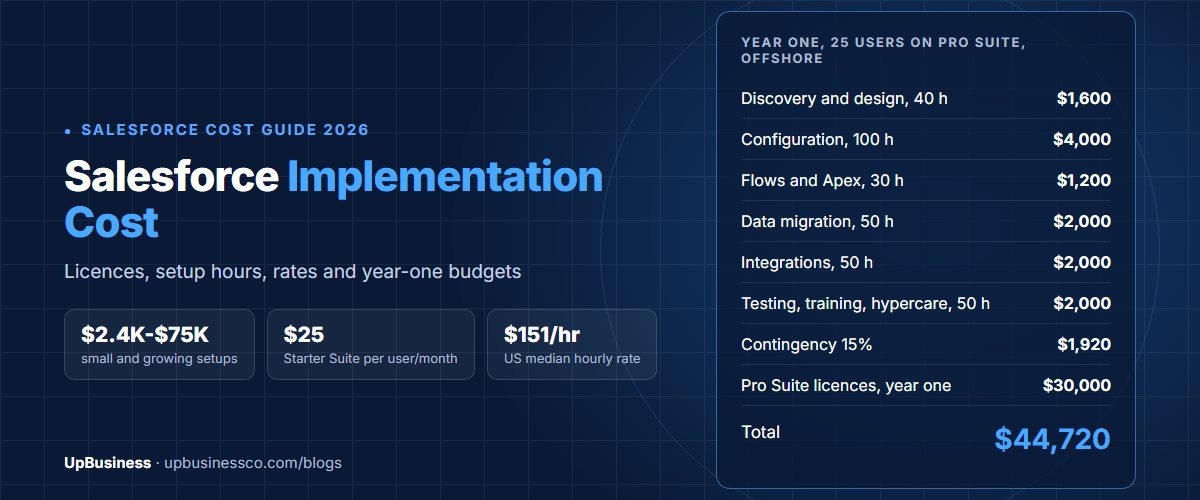
Picture a 25-person sales team moving from spreadsheets to Pro Suite. They need their pipeline set up, a few automations, their contacts moved over, and links to email and accounting. Here's the year-one bill, using our estimated hours.
| Line | Hours or units | Offshore partner ($40/h) | US rates ($151/h) |
|---|---|---|---|
| Discovery and design | 40 hours | $1,600 | $6,040 |
| Configuration: fields, layouts, pipeline, access | 100 hours | $4,000 | $15,100 |
| Flows and small Apex changes | 30 hours | $1,200 | $4,530 |
| Data cleanup and migration | 50 hours | $2,000 | $7,550 |
| Email and accounting integrations | 50 hours | $2,000 | $7,550 |
| Testing and training | 30 hours | $1,200 | $4,530 |
| Hypercare after launch | 20 hours | $800 | $3,020 |
| Contingency, 15% | $1,920 | $7,248 | |
| Pro Suite licences, 25 users for 12 months | $100 per user per month | $30,000 | $30,000 |
| Total year one | 320 hours | $44,720 | $85,568 |
Notice something? With an offshore partner, the licences are two thirds of the year-one bill. In year two, the setup cost disappears, but the $30,000 licence bill comes back. That's why the edition choice matters so much.
What if this team picked Core instead? Licences would rise to $58,500 a year. In return, they'd get Premier support and a Partial Sandbox included. Only pay for that if you really need it.
What Is Included in a Salesforce Success Plan?
A Success Plan is Salesforce's support package, and the basic one is free. There are three levels[4]:
- Standard. Included with every licence. You get help articles, free Trailhead training, the community and support cases.
- Premier. Included with Core, Advanced and Max. You get faster support, onboarding help and expert guidance. On Starter and Pro Suite, you can buy it as an extra.
- Signature. The top level, with a named customer success manager and the fastest response times. It's priced through your account executive.
Salesforce doesn't publish a price for buying Premier or Signature on top of a lower edition. Ask for it in writing during your licence talks.
Should You Hire a Salesforce Admin or a Partner Company?
Hire a partner company for the first build, then decide on an admin once you're live. The setup needs many skills at once: design, data, integrations and some coding. Day-to-day upkeep needs far fewer.
Here's a simple way to think about it:
- Under 15 users, no integrations. Starter and Pro Suite are built to be set up by one admin. Free Trailhead training covers most of it. You may not need outside help at all.
- 15 to 75 users. Use a partner company for the build. Then keep them on for a few hours a month. At our offshore rate, 20 hours a month is about $800.
- 75+ users or several clouds. You'll likely need an in-house admin plus a partner for bigger changes.
Whoever does the work, make sure your contract says you own the configuration, code and documentation. Our software development contract checklist covers the clauses to ask for.
What Are the Hidden Costs of Salesforce?
The biggest hidden cost is that the licence bill repeats every year. After that come add-ons, data clean-up and ongoing changes. Watch for these:
- Edition creep. One missing feature can push you up an edition. For 25 users, moving from Pro Suite to Core adds $28,500 a year.
- Add-ons. AI features, quoting, analytics and messaging are often priced per user on top of your edition.
- Extra testing space. A Full Sandbox costs extra on Core.
- AppExchange apps. AppExchange is Salesforce's app store. Many useful apps charge their own monthly fee per user.
- Bad data. Duplicates and missing fields can double the migration hours. Clean data before the project starts.
- Change after launch. Your team will ask for new reports and fields. Budget a few hours every month.
- Training new hires. Every new person needs onboarding. Someone has to own that.
How Long Does a Salesforce Implementation Take?
A simple setup takes 3 to 8 weeks. A growing company with integrations usually needs 2 to 4 months. Mid-size projects take 3 to 6 months, and enterprise rollouts often run 6 to 12 months or more. These are our estimates.
Time and money move together. The longer a project runs, the more hours you pay for. The quickest way to save is a tight first phase. Launch the core pipeline first, then add extras once people are using it.
What Salesforce Partner Companies on UpBusiness Charge
The Salesforce implementation companies listing on UpBusiness showed 8 partner companies in October 2026. Most of them are broader software companies. Only 2 list Salesforce Implementation Services as a service on their profiles: iTechCloud Solution and HashStudioz Technologies.
Both report an average project size of $10,000. Their TrustScores are 70.33 and 72.3. Salesforce work makes up 40% of the services at iTechCloud Solution and 20% at HashStudioz Technologies.
| Company | Location | Team size | Average project | TrustScore | Salesforce share of services |
|---|---|---|---|---|---|
| iTechCloud Solution | Surat | 11-50 | $10,000 | 70.33 | 40% |
| HashStudioz Technologies | Noida | 201-500 | $10,000 | 72.3 | 20% |
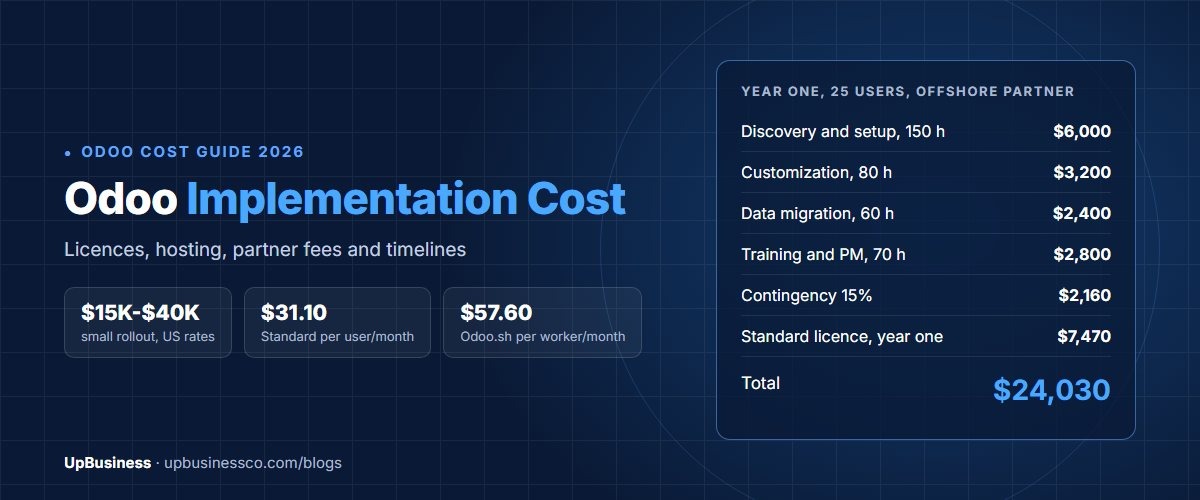
Average project size is an average across all of a company's work, not only Salesforce. It's the typical size of job each one takes on, not a minimum price. The $10,000 figure fits our offshore estimate for a growing company. Before you hire, ask any company on the listing for 2 or 3 Salesforce projects like yours. If you also run an ERP, our Odoo implementation cost guide and ERP software development guide show how those projects compare.
How Can You Lower Salesforce Implementation Cost?
- Start on the smallest edition that works. Moving up later is just a licence change. Your setup carries over.
- Launch in phases. Get the pipeline live first. Add integrations and automation in phase two.
- Use built-in tools before code. Flows are cheaper to build and change than Apex.
- Clean your data first. Your own team can remove duplicates for free before the partner starts billing.
- Check AppExchange before custom builds. A ready-made app can cost less than weeks of development.
- Negotiate licences. List prices are a ceiling. Multi-year and larger contracts are often discounted, so ask.
How Do You Get an Accurate Salesforce Quote?
Send every partner company the same short brief, then ask each one to price it line by line. Your brief should list your users, teams, the edition you plan to use, every system you want connected and how much data you're moving.
Then ask for discovery, configuration, customization, data migration, integrations, testing, training and hypercare as separate lines. Ask for a fixed price on the first phase, tied to written acceptance criteria. Time and materials works better for changes after launch. Our guide to comparing software development proposals shows how to line quotes up side by side. If Salesforce turns out to be the wrong fit, our custom SaaS development guide covers building your own.
When you're ready, post your project on UpBusiness with your users, edition and integrations, and we'll match you with verified Salesforce partner companies that fit your budget.