


Browse our curated list of Technical SEO Companies
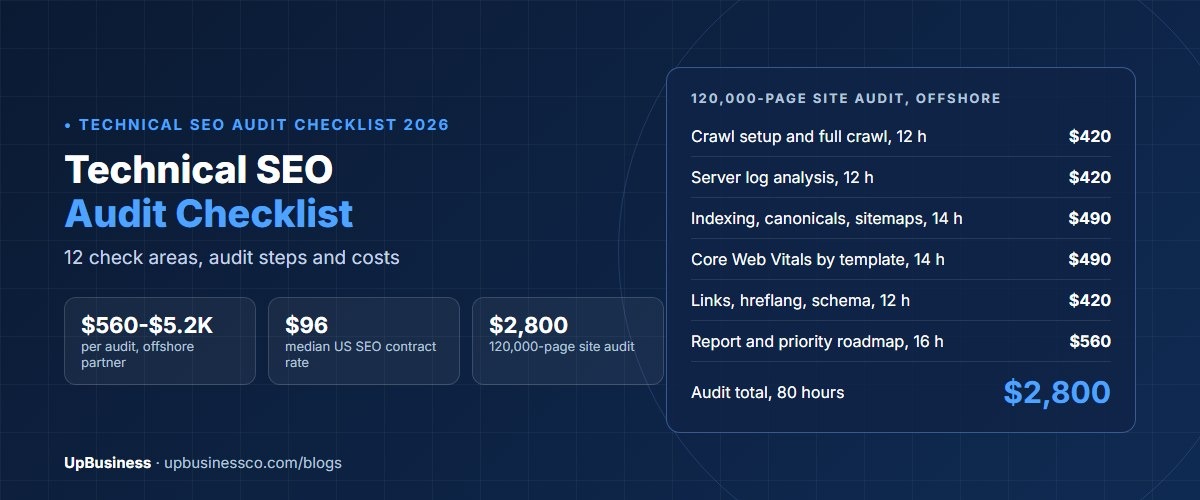
A technical SEO audit checklist makes sure search engines can find, crawl, render and index the pages that matter on your site, and skip the ones that don't. For a large site, a full technical audit against this checklist costs about $2,100 to $5,250 in 2026 with an offshore partner company. US SEO specialists on government contracts have a median ceiling rate of about $96 an hour[1]. A 120,000-page B2B site, for example, pays about $2,800 for the audit in our worked budget.
This guide is for marketing leads, product owners and engineering managers at companies with large or complex websites. You'll get the checklist we would use on an enterprise site, grouped by area, with why each check matters and how to test it. Then you'll see what an audit and the fixes cost, a worked budget and how to choose a partner.
Key takeaways
- Start with crawling and indexing. If Google can't reach or index a page, nothing else on this list helps it.
- Large sites usually lose the most to duplicate URLs, filter pages, slow templates and broken internal links.
- Google's Core Web Vitals targets are a Largest Contentful Paint of 2.5 seconds or less, Interaction to Next Paint of 200 milliseconds or less and Cumulative Layout Shift of 0.1 or less.
- A technical audit of a large site takes 60 to 150 hours, or $2,100 to $5,250 offshore. Fixes usually cost one to three times the audit.
- Run the checks before and after every migration, redesign or platform change.
What Is a Technical SEO Audit Checklist?
A technical SEO checklist is a list of checks on how your site is built and served, rather than on what your pages say. Content and links decide how well a page can rank. Technical SEO decides whether the page can be found and understood at all.
On a small site, most of this is handled by a good platform. On an enterprise site, with tens of thousands of pages, several teams publishing and years of old URLs, small technical problems multiply. One bad template can affect thousands of pages at once, and one wrong line in a robots file can hide a whole section from search.
1. Crawling Checks
Search engines must be able to reach your important pages without wasting time on the rest. Google explains that the robots.txt file tells crawlers which URLs they can access, mainly to avoid overloading your site, and that it is not a way to keep a page out of search results[2].
- robots.txt allows key sections. Check that product, service, category and blog sections are not blocked by mistake, especially after a launch from a staging site.
- Low-value URLs are controlled. Internal search results, endless filter combinations and session URLs should not soak up crawling.
- Server responds quickly and reliably. Frequent server errors or slow responses make crawlers slow down.
- No long redirect chains. Each old URL should redirect once, straight to its final page.
- Log files are reviewed. Server logs show what Googlebot actually crawls. On big sites, this often reveals crawling spent on junk URLs.
2. Indexing Checks
A page can be crawled and still not be indexed. These checks make sure the right version of each page is the one in search.
- Canonical tags point to the main version. Google uses canonical signals to pick one URL from a set of duplicates[3]. Check that tags point to live, indexable pages, not to redirects or blocked URLs.
- No accidental noindex tags. Search templates and staging leftovers for noindex tags on pages that should rank.
- Indexing report is healthy. In Search Console, review why pages are excluded, and look for patterns by template.
- Thin and duplicate pages are handled. Merge, improve or remove pages that add nothing, such as near-empty tag pages.
- Status codes are correct. Removed pages return 404 or 410, moved pages return 301, and live pages return 200.
3. XML Sitemap Checks
- Sitemaps list only indexable, canonical URLs. Leave out redirects, errors and noindex pages.
- Large sites use several sitemaps. Google's limit is 50,000 URLs or 50MB uncompressed per sitemap file, so large sites split them and use a sitemap index[4].
- Sitemaps are split by section. Separate files for products, categories and articles make indexing problems easier to spot.
- Last modified dates are accurate. Only update them when the page really changes.
- Sitemaps are submitted in Search Console and referenced in robots.txt.
4. Site Structure and Internal Link Checks
- Important pages are close to the home page. Key categories and services should be reachable in a few clicks.
- No orphan pages. Every page you want indexed should have at least one internal link pointing to it.
- Broken internal links are fixed. Links to 404 pages waste crawling and frustrate visitors.
- Anchor text is descriptive. Links say what the target page is about, not just "click here".
- Breadcrumbs reflect the structure. They help users and give search engines a clear hierarchy.
- Pagination and filters are planned. Category pages with many items need crawlable paging and clear rules for filter URLs.
5. Page Speed and Core Web Vitals Checks
Google's Core Web Vitals measure loading, responsiveness and visual stability. Google recommends a Largest Contentful Paint of 2.5 seconds or less, Interaction to Next Paint of 200 milliseconds or less and Cumulative Layout Shift of 0.1 or less[5].
- Field data is checked by template. Group pages by template in Search Console, so you fix the cause once.
- Largest images are optimised. Use modern formats, correct sizes and priority loading for the main image.
- Heavy scripts are reduced. Tag managers, chat widgets and third-party scripts often slow interaction.
- Layout space is reserved. Images, ads and banners should have set sizes so the page doesn't jump.
- Caching and a CDN are in place. Static files are cached and served close to users.
Our website speed optimization services guide covers what speed work costs on its own.
6. Mobile Checks
- Mobile pages have the same content as desktop. Google mainly uses the mobile version for indexing.
- Structured data and meta tags match on mobile and desktop.
- Tap targets and text are usable without zooming.
- Pop-ups don't block content on small screens.
7. JavaScript Rendering Checks
Many enterprise sites are built with JavaScript frameworks. Google can render JavaScript, but it processes pages in stages, and content that depends on scripts can be delayed or missed[6].
- Key content is in the rendered HTML. Test important templates with the URL Inspection tool.
- Links are real links. Use standard anchor tags with href values, not click handlers alone.
- Server-side or static rendering is used for pages that must rank, where possible.
- Titles, canonicals and meta robots are set correctly in the HTML the server sends, not just after scripts run.
8. Structured Data Checks
- The right types are used. Organization, Product, Article, Breadcrumb and FAQ markup where they fit the page.
- Markup matches visible content. Don't mark up prices, ratings or answers that users can't see.
- Errors are monitored. Check the enhancement reports in Search Console after each release.
9. International and Multi-Language Checks
- hreflang tags link each language or country version. Each page lists all its versions, including itself, as Google describes[7].
- Return links are complete. If page A points to page B, page B must point back to page A.
- Visitors are not forced to redirect by location. Offer a choice instead, so crawlers can reach every version.
- Currency, language and content match the market for each version.
10. Security and Site Health Checks
- Every page uses HTTPS, with HTTP versions redirecting once.
- One preferred host is used. Choose www or non-www and redirect the other.
- Mixed content is removed. No images or scripts load over HTTP on secure pages.
- Custom 404 pages help users find their way back.
11. Migration and Release Checks
Most large ranking drops follow a migration, redesign or platform change. Run these checks before and after every big release.
- A full redirect map exists. Every old URL maps to the most relevant new URL.
- Staging is blocked, live is open. Check robots.txt and noindex tags on launch day.
- Crawl before and after. Compare titles, canonicals, status codes and internal links.
- Watch Search Console daily for the first few weeks.
Our website redesign SEO guide and Shopify migration services guide cover migrations in more depth.
12. AI Search Visibility Checks
AI answers in search and chat tools now pull from web pages too. The basics are the same as for classic search. Pages must be crawlable, fast and clearly structured.
- Your robots rules are deliberate. Decide which AI crawlers you allow, and check you are not blocking them by accident.
- Key facts are in plain text. Prices, specs and answers should not sit only inside images or scripts.
- Headings ask and answer real questions. Clear question headings with short answers are easy to quote.
- Structured data matches the page. It helps tools understand products, articles and organisations.
- Brand and author details are clear. An about page, author pages and consistent company details build trust.
How to Run a Technical SEO Audit, Step by Step
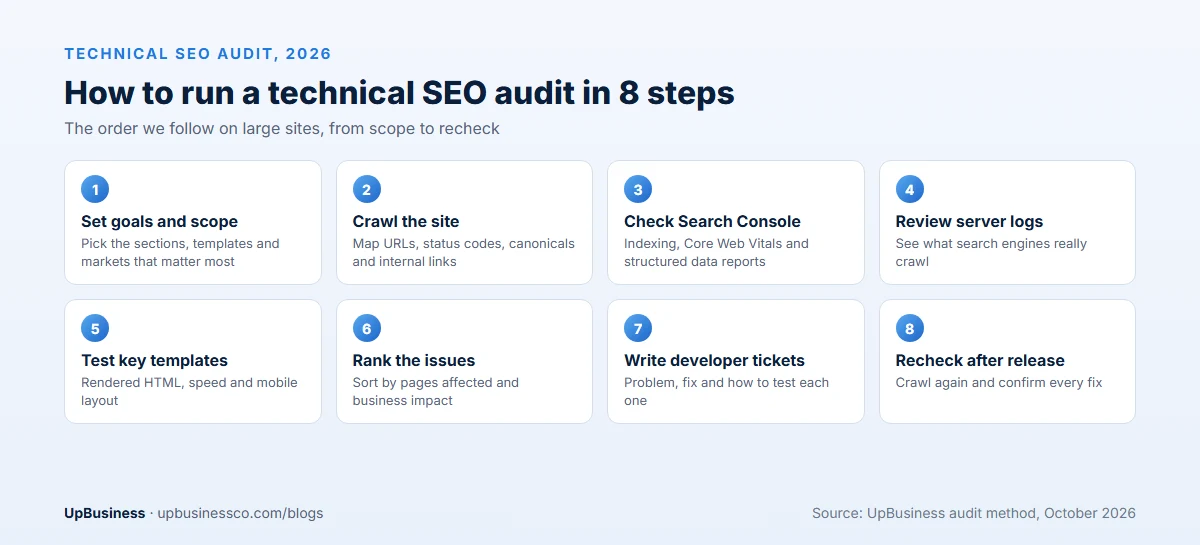
- Set goals and scope. List the sections, templates and markets that matter most.
- Crawl the site. Map every URL, status code, canonical and internal link.
- Check Search Console. Review indexing, Core Web Vitals and structured data reports.
- Review server logs. See what search engines really crawl on large sites.
- Test key templates. Inspect rendered HTML, speed and mobile layout.
- Rank the issues. Sort by pages affected and business impact.
- Write developer tickets. Each ticket explains the problem, the fix and how to test it.
- Recheck after release. Crawl again and confirm each fix worked.
Many teams run a full audit once a year, a lighter check every quarter and a crawl before and after every big release.
Keep the audit file after each run. Comparing this year's crawl with last year's shows which problems came back and which teams or templates cause them. That history turns a one-off report into a working checklist your team can use for every release, and it makes the next audit faster and cheaper.
Common Technical SEO Problems on Enterprise Sites
Large sites tend to break in the same places. Knowing them helps you read an audit report faster and ask better questions when a partner presents it.
Filter and search pages. Online stores, job boards and directories let users filter by colour, size, price or place. Each filter can create a new URL. Left alone, these pages multiply into the millions and eat crawl time that should go to real pages.
Old redirects. Every redesign leaves redirects behind. After a few years, one old link may hop through three or four pages before it lands. Each hop slows crawlers and users, and some chains end in errors.
Template mistakes. One wrong canonical or noindex tag in a shared template can hit thousands of pages at once. These are often added during testing and never removed.
Slow scripts. Marketing tags, chat tools and tracking scripts pile up over time. Each one adds a little delay, and together they can push pages past the Core Web Vitals targets.
Teams working alone. On big sites, product, marketing and engineering teams all publish pages. Without shared rules for URLs, links and templates, problems come back after every release. A short checklist in the release process is often the cheapest fix of all.
How to Prioritise the Checklist
No team can fix everything at once. Sort issues by how many important pages they affect and how badly.
| Priority | Typical issues | Why |
|---|---|---|
| Fix now | Blocked sections, wrong noindex, broken canonicals, server errors | Whole sections can drop out of search |
| Fix this quarter | Duplicate URLs, filter pages, slow templates, redirect chains | Wastes crawling and weakens rankings across many pages |
| Fix steadily | Broken internal links, missing structured data, thin pages | Smaller gains that add up over time |
| Monitor | New releases, new templates, Core Web Vitals trends | Stops old problems coming back |
What a Technical SEO Audit Costs in 2026
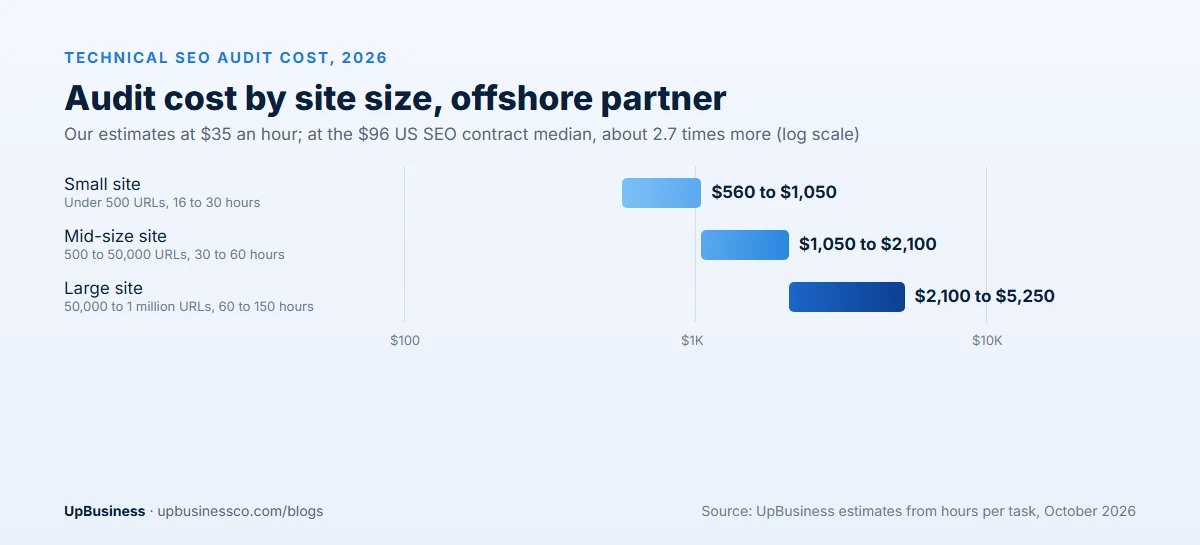
An audit checks your site against this list, finds the problems and ranks the fixes. Our estimates use an offshore partner rate of $35 an hour, and $96 an hour for the US comparison, the median ceiling rate across 59 SEO roles on US government (GSA) contracts.
| Site size | Audit hours | Offshore partner ($35/h) | US median ($96/h) |
|---|---|---|---|
| Small site, under 500 URLs | 16 to 30 | $560 to $1,050 | $1,536 to $2,880 |
| Mid-size site, 500 to 50,000 URLs | 30 to 60 | $1,050 to $2,100 | $2,880 to $5,760 |
| Large site, 50,000 to 1 million URLs | 60 to 150 | $2,100 to $5,250 | $5,760 to $14,400 |
| Ongoing technical monitoring | 8 to 20 a month | $280 to $700 a month | $768 to $1,920 a month |
Fixes are separate, and they usually need your developers or the partner's. Expect fixes to cost one to three times the audit, depending on how many problems sit in shared templates.
Worked Example: Technical SEO Budget for a 120,000-Page Site
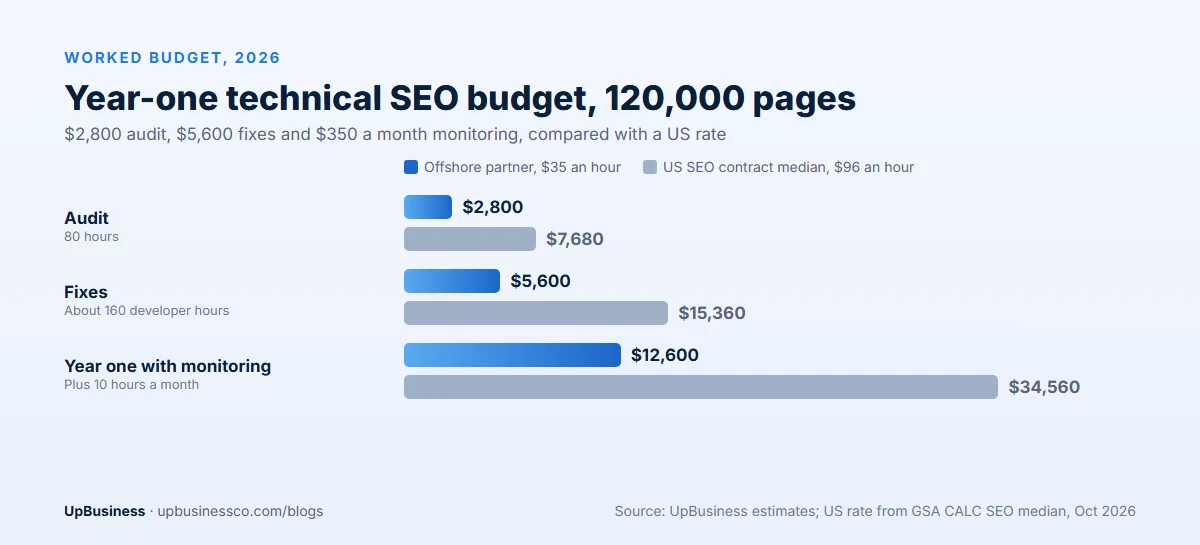
Here is a plan for a B2B company with a 120,000-page site, including product pages, documentation, a blog and two language versions. Organic traffic has been flat since a redesign last year.
| Audit task | Hours | Offshore ($35/h) | US median ($96/h) |
|---|---|---|---|
| Crawl setup and full crawl | 12 | $420 | $1,152 |
| Server log analysis | 12 | $420 | $1,152 |
| Indexing, canonical and sitemap review | 14 | $490 | $1,344 |
| Core Web Vitals and template review | 14 | $490 | $1,344 |
| Internal links, hreflang and structured data | 12 | $420 | $1,152 |
| Report and priority roadmap | 16 | $560 | $1,536 |
| Audit total | 80 | $2,800 | $7,680 |
The audit finds the biggest problems in four templates and in redirect chains left by the redesign. Fixing them takes about 160 developer hours, or $5,600 offshore. The company then keeps 10 hours a month of monitoring, or $350 a month. Year one comes to about $12,600 offshore, against about $34,560 at $96 an hour.
Tools for a Technical SEO Audit
- Google Search Console for indexing, Core Web Vitals, structured data and URL inspection. It is free.
- A site crawler to map every URL, status code, canonical and internal link.
- Server log analysis to see what search engines actually crawl.
- Page speed tools such as PageSpeed Insights and Lighthouse for lab and field data.
- A rank and traffic tracker to measure the effect of fixes over time.
Red Flags in a Technical SEO Proposal
- An automated tool report sold as an audit. Ask how many hours go to manual review.
- Hundreds of issues with no priorities. You need a ranked list tied to business impact.
- No log file analysis for a large site. It is one of the best signals on enterprise sites.
- No help with fixes. A report your developers can't act on rarely changes results.
- Promises of quick ranking jumps. Technical fixes remove barriers. Results still depend on content and links.
How to Choose a Technical SEO Partner
Ask these questions before you sign:
- Have you audited sites of our size and on our platform?
- Do you include log file analysis and JavaScript rendering checks?
- How do you rank issues, and will you write tickets our developers can use?
- Will you check fixes after release and before and after migrations?
- What does ongoing monitoring cost?
Technical SEO is one part of a full SEO plan. Our guide to professional SEO services and SEO agency pricing guide cover the rest, and our ecommerce SEO services guide and local SEO services cost guide cover store and map searches. For how AI search is changing the work, see our SEO trends 2026 guide.
When you're ready, post your project on UpBusiness with your site size, platform and goals, and we'll match you with verified technical SEO partner companies.