


Browse our curated list of Website Development Companies
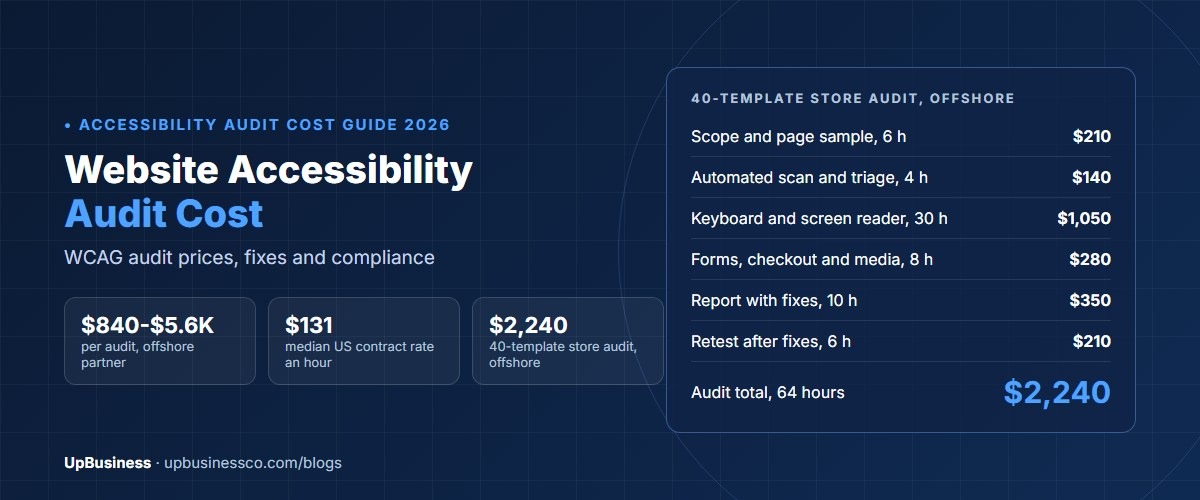
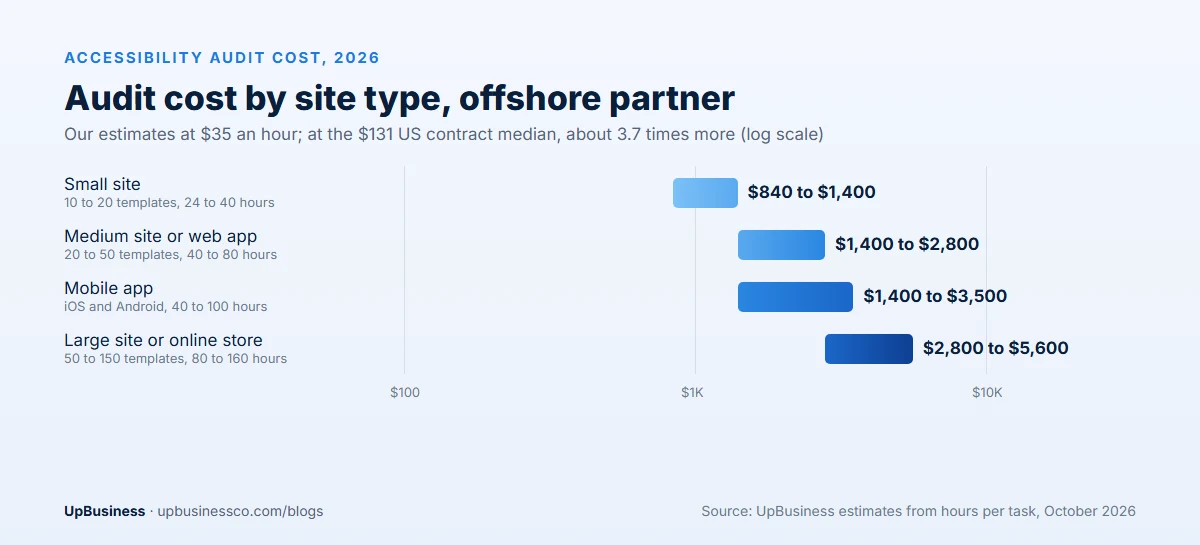
A website accessibility audit costs about $840 to $5,600 in 2026 with an offshore partner company. The price depends on how many page types and user flows need testing. Fixing the problems it finds usually costs one to three times the audit. US rates are far higher: the median US government contract ceiling rate for accessibility specialists is about $131 an hour[1]. A 40-template online store, for example, pays about $2,240 for a full audit and retest in our worked budget.
The need is real. WebAIM's 2026 study of the top one million home pages found detectable accessibility failures on 95.9% of them, with an average of 56.1 errors per page[2]. This guide is for the person who approves the budget: a founder, a marketing or product lead, or a compliance owner. You'll see what an audit includes and what it costs by site size. You'll also see what fixes cost, a worked budget and how to avoid the wrong kind of help.
Key takeaways
- A manual WCAG audit of a small site costs $840 to $1,400 with an offshore partner company. Large sites and online stores cost $2,800 to $5,600.
- US government contract ceiling rates for accessibility and Section 508 specialists have a median of about $131 an hour, across 97 rates from 42 contractors.
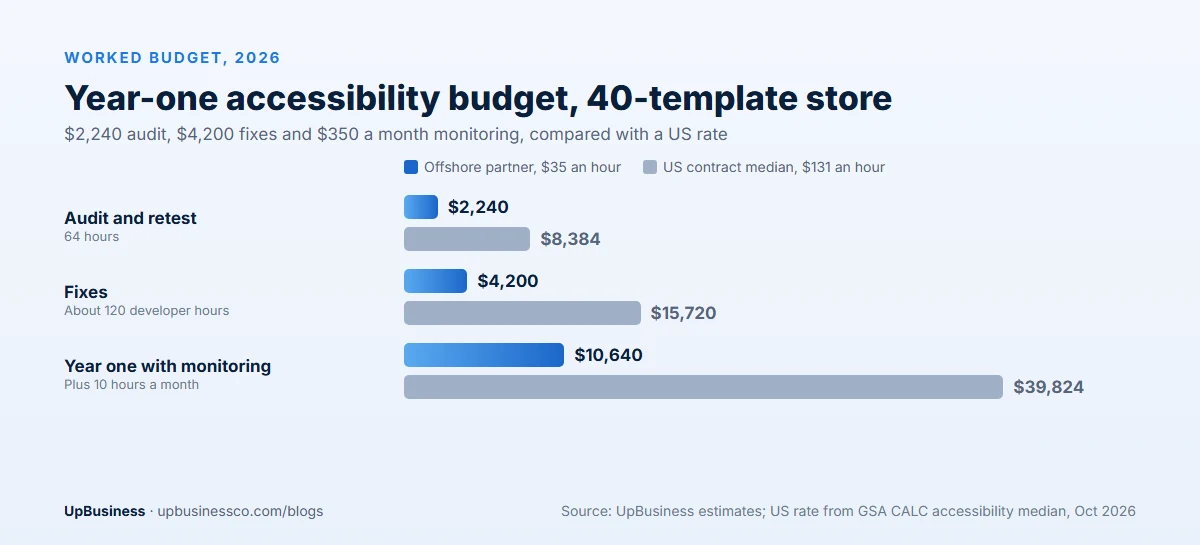
- Our worked 40-template store needs 64 audit hours and about 120 hours of fixes: $6,440 offshore against about $24,100 at the US median.
- Automated scanners find only part of the problems. A real audit includes keyboard and screen reader testing by a person.
- Overlay widgets that promise instant compliance do not fix the underlying code. Budget for real fixes instead.
How Much Does a Website Accessibility Audit Cost in 2026?
Website accessibility audit cost in 2026 depends mainly on how many unique page types, often called templates, and key user flows your site has. Testers don't check every page. They check one example of each template, such as a product page or a blog post, plus user flows such as sign-up and checkout.
Our estimates below use an offshore partner rate of $35 an hour. For the US comparison, we use $131 an hour, the median ceiling rate for accessibility and Section 508 roles on US government (GSA) contracts. Ceiling rates are the most a contractor may charge government buyers, so private quotes vary around them.
| Site type | Audit hours | Offshore partner ($35/h) | US median ($131/h) |
|---|---|---|---|
| Small site, 10 to 20 templates | 24 to 40 | $840 to $1,400 | $3,144 to $5,240 |
| Medium site or web app, 20 to 50 templates | 40 to 80 | $1,400 to $2,800 | $5,240 to $10,480 |
| Large site or online store, 50 to 150 templates | 80 to 160 | $2,800 to $5,600 | $10,480 to $20,960 |
| Mobile app, iOS and Android | 40 to 100 | $1,400 to $3,500 | $5,240 to $13,100 |
These are audit fees only. Fixing the problems, writing an accessibility statement or conformance report and ongoing monitoring are separate costs, covered below.
What a Website Accessibility Audit Includes
Most audits test against the Web Content Accessibility Guidelines (WCAG), the international standard from the W3C. The current version is WCAG 2.2, and most buyers aim for level AA[3]. A complete audit has six parts.
| Audit step | What the tester does | Share of audit hours |
|---|---|---|
| Scope and sample | Agrees which templates, user flows and devices to test | 5% to 10% |
| Automated scan | Runs tools across the site to catch common, easy-to-detect problems | 5% to 10% |
| Keyboard testing | Uses the site with no mouse to check focus, order and traps | 15% to 20% |
| Screen reader testing | Uses tools such as NVDA, JAWS or VoiceOver to check labels, headings and announcements | 25% to 35% |
| Visual and content checks | Checks contrast, zoom, text alternatives, captions and form errors | 15% to 20% |
| Report and retest | Lists each issue with the WCAG rule, severity and a suggested fix, then checks the fixes | 15% to 20% |
Manual testing takes most of the hours, and it is where the value is. Automated tools catch problems such as missing alt text and low contrast, but they can't tell whether a screen reader user can actually complete your checkout.
How a Website Accessibility Audit Works, Step by Step
Knowing the steps helps you judge a proposal and plan your own team's time.
1. Scoping call. The partner asks about your site, your users, your markets and any deadlines. Together you pick the sample: one of each template, plus the user flows that matter most, such as sign-up, search, booking or checkout. You agree the standard, usually WCAG 2.2 level AA, and the browsers, devices and screen readers to test with.
2. Automated scan. The tester runs tools across the sample to catch easy-to-find problems. This gives a quick picture of common issues, but it is only the starting point.
3. Manual testing. This is the core of the audit. The tester uses each page and user flow with only a keyboard, then with a screen reader, then at high zoom and with different colour settings. They fill in forms with mistakes on purpose, to check that error messages are clear and announced. They watch videos to check captions and listen for anything a blind user would miss.
4. Report. Each problem is logged with where it appears, the WCAG rule it breaks, how serious it is and a suggested fix. Good reports group problems by shared component, so one fix clears many pages.
5. Fixes and retest. Your developers, or the partner, fix the problems. The tester then checks each fix and updates the report. The final report shows what is fixed and what is still open.
Which Accessibility Problems to Fix First
Most audits find more problems than a team can fix at once. Sort them by impact, not by how easy they are.
Blockers come first. These stop a user from finishing a task at all. Think of a checkout button a keyboard can't reach, or a form a screen reader can't read. They hurt customers and carry the most legal risk.
Serious problems come next. These make a task very hard, such as unclear error messages, missing headings or images that carry key information without text alternatives.
Then fix shared components. Problems in the menu, footer, forms and design system appear on every page. Fixing them early clears a large share of the report quickly.
Content problems last, but steadily. Alt text, link wording and captions are usually quick, but there are many of them. Train editors and work through them over a few weeks.
Why Accessibility Audits Matter in 2026
There are three reasons companies budget for accessibility: law, customers and quality.
Law. In the US, the Department of Justice has published guidance on how the ADA applies to websites[4], and lawsuits over website access are common. In the EU, the European Accessibility Act has applied since 28 June 2025. It covers many products and services sold to consumers, including online shops and banking[5]. If you sell to customers in the US or the EU, accessibility is now part of doing business there.
Customers. People with disabilities, older users and anyone using a phone in bright sunlight all benefit from clear contrast, labels and keyboard support. A checkout that can't be completed with a screen reader is a checkout that loses sales.
Quality. Accessible code is usually cleaner code. Proper headings, labels and structure also help search engines and AI tools understand your pages.
What Fixing Accessibility Problems Costs
The audit tells you what is wrong. Fixing it is usually the bigger cost. Fix hours depend on how many problems sit in shared templates and components, which fix many pages at once, and how many are one-off content problems.
| Common problem | Typical fix | Hours to fix | Offshore estimate |
|---|---|---|---|
| Low colour contrast | Update colours in the design system | 4 to 12 | $140 to $420 |
| Missing or poor alt text | Write text alternatives for images | 1 hour per 20 to 40 images | $35 per 20 to 40 images |
| Form fields without labels | Add labels and clear error messages | 6 to 20 | $210 to $700 |
| Menus and pop-ups that trap keyboard users | Rebuild focus handling in components | 8 to 30 | $280 to $1,050 |
| Custom widgets without screen reader support | Add correct roles, states and announcements | 10 to 40 | $350 to $1,400 |
| Videos without captions | Add captions and transcripts | 1 to 2 per video hour | $35 to $70 per video hour |
A useful rule of thumb is that fixes cost one to three times the audit. Sites built on a clean component library sit at the low end. Older sites with many custom widgets sit at the high end.
Other Accessibility Costs to Plan For
| Item | What it is | Offshore estimate |
|---|---|---|
| Accessibility statement | A public page explaining your standard, known gaps and how to report problems | $140 to $350 |
| Conformance report (VPAT or ACR) | A formal report many business and government buyers ask for | $280 to $700 |
| Ongoing monitoring | Monthly scans and spot checks of new pages and features | $280 to $700 a month |
| Team training | Teaching designers, developers and editors to avoid new problems | $420 to $1,400 per session |
| Testing with disabled users | Sessions where real users try key user flows | Varies by number of sessions |
Monitoring matters because accessibility is not a one-time project. Every new page, feature and marketing campaign can bring new problems. A small monthly budget is cheaper than a full audit every year.
Worked Example: Accessibility Budget for a 40-Template Online Store
Here is a plan for an online store with 40 templates, including home, category, product, cart, checkout, account and blog pages. It sells to customers in the US and the EU and wants to meet WCAG 2.2 level AA.
| Audit task | Hours | Offshore ($35/h) | US median ($131/h) |
|---|---|---|---|
| Scope and page sample | 6 | $210 | $786 |
| Automated scan and triage | 4 | $140 | $524 |
| Keyboard and screen reader testing | 30 | $1,050 | $3,930 |
| Forms, checkout and media checks | 8 | $280 | $1,048 |
| Report with suggested fixes | 10 | $350 | $1,310 |
| Retest after fixes | 6 | $210 | $786 |
| Audit total | 64 | $2,240 | $8,384 |
The audit finds most problems in shared components: the main menu, product filters, image gallery and checkout form. Fixing them takes about 120 developer hours, or $4,200 offshore. Audit plus fixes comes to about $6,440 offshore. At $131 an hour, the same 184 hours cost about $24,100.
The store then keeps 10 hours a month of monitoring and fixes for new pages, or $350 a month. Year one totals about $10,640 offshore, against about $39,800 at the US median.
Automated Scans vs Manual Audits vs Overlays
Buyers often see three very different offers that all claim to solve accessibility. They are not the same.
| Automated scan only | Overlay widget | Manual audit and fixes | |
|---|---|---|---|
| Typical cost | Free to a few hundred dollars a month | Monthly subscription | $840 to $5,600 audit, plus fixes |
| What it finds | Part of the problems, mostly simple ones | Changes the page on top, not the code | Nearly all problems, including user flows |
| Fixes the code? | No | No | Yes, when fixes are done |
| Best use | Ongoing monitoring between audits | Not recommended as a compliance fix | Meeting WCAG and reducing legal risk |
Scanners are useful for catching new problems early. Overlays add a toolbar or script that tries to change the page as it loads. The code underneath stays the same, and many disabled users and experts criticise them. If someone promises full compliance from a single line of code, be careful.
Red Flags in an Accessibility Audit Proposal
- Scan-only reports sold as audits. Ask how many hours go to manual keyboard and screen reader testing.
- No list of templates and user flows. Without a clear sample, you can't compare quotes.
- Issues without fixes. Each issue should name the WCAG rule, the severity and a suggested fix.
- No retest. A retest proves the fixes work.
- Guaranteed protection from lawsuits. No audit can promise that.
- Testers who can't name their tools. Ask which screen readers and browsers they test with.
How to Keep Accessibility Costs Down
- Fix components, not pages. Fixing a shared menu or form fixes every page that uses it.
- Start with key user flows. Sign-up, search, checkout and contact forms matter most.
- Build it into new work. Adding accessibility during design is far cheaper than fixing it later. Plan it into any website redesign.
- Train your editors. Many new problems come from content, such as images without alt text.
- Scan monthly. Catch problems before they spread.
What Your Team Needs to Do During an Audit
An audit goes faster and costs less when your side is ready. Before testing starts, send the partner your list of templates and key user flows. Add test accounts with sample data. If the live site takes payments or holds personal data, give access to a staging site instead. Name one person who can answer questions within a day.
During the audit, avoid big releases on the pages being tested, because changes can make results out of date. When the report arrives, book a short walk-through with your designers and developers. Ask the tester to show the worst problems live, with a keyboard and a screen reader. Seeing a real user get stuck is the fastest way to make a team care. It also shows developers what good looks like before they start.
Accessibility Audits for Web Apps and Mobile Apps
Web apps and mobile apps cost more to audit than marketing sites, because the user does more than read. Dashboards, data tables, drag-and-drop tools, date pickers and live updates all need careful testing with a keyboard and a screen reader.
For a web app, the sample is built around tasks rather than pages: create an account, complete the main workflow, change settings and get help. Each task is tested from start to finish. Plan 40 to 80 audit hours for a typical business web app, or $1,400 to $2,800 with an offshore partner company.
Mobile apps need testing on both iOS and Android, with VoiceOver and TalkBack, larger text settings and different screen sizes. Plan 40 to 100 hours for both platforms. If your app shares code across platforms, many fixes will apply to both, which keeps fix costs down.
In-House Team vs Freelancer vs a Verified Partner on UpBusiness
| In-house team | Freelance tester | Verified partner on UpBusiness | |
|---|---|---|---|
| Typical cost | Staff time plus training and tools | $30 to $150 an hour | $25 to $50 an hour offshore |
| Who checks their claims | Your own review | You do | UpBusiness verifies documents and client work |
| Can they also fix problems? | Yes, if trained | Sometimes | Often, with developers on the same team |
| Best for | Ongoing checks once skills exist | A small site audit | Audit, fixes and retest in one place |
Many companies start with an outside audit and use it to train their own team. They then keep a partner on a small monthly plan for checks and a yearly audit.
How to Choose an Accessibility Audit Partner
Ask these questions before you sign:
- Which WCAG version and level will you test against?
- Which templates and user flows are in the sample?
- Which screen readers, browsers and devices will you use?
- How many hours go to manual testing, and who does it?
- Does the price include a retest and help with fixes?
- Can you provide an accessibility statement or conformance report?
Compare at least three quotes side by side. Our guide to comparing software development proposals shows how to line them up, and our software project brief template helps you write a clear scope.
Accessibility also affects other website budgets. Our website development cost guide, ecommerce website development cost guide, landing page cost guide and website maintenance cost guide show where to include it.
When you're ready, post your project on UpBusiness with your site type, page templates and target standard, and we'll match you with verified website development partner companies that handle accessibility audits and fixes.