


Browse our curated list of Zoho ERP Implementation Companies
Zoho implementation cost in 2026 usually runs from $1,400 to $4,200 for a basic Zoho CRM setup with a partner in India, or $6,000 to $18,000 with a partner in the US, UK or Australia. A Zoho One rollout across several departments costs about $7,000 to $21,000 in India and $30,000 to $90,000 with a Western partner. That is the partner's fee only. Zoho licences come on top: Zoho One lists at US$37 per employee a month on all-employee pricing, or US$90 per user a month on flexible user pricing. Partners in India often charge $20 to $45 an hour, while partners in the US, UK and Australia often charge $100 to $180.
This guide breaks down what you pay for, cost by Zoho app and project size, licence prices, hidden costs, a worked example for a 25-person company, and how to compare Zoho partner quotes.
Key takeaways
- Licence fees are set by Zoho. Implementation fees are set by the partner, and they vary more than the licences.
- A basic Zoho CRM setup takes two to four weeks. A Zoho One rollout for several teams usually takes 8 to 16 weeks.
- Data migration, integrations and custom Deluge code cause most budget overruns, not the setup itself.
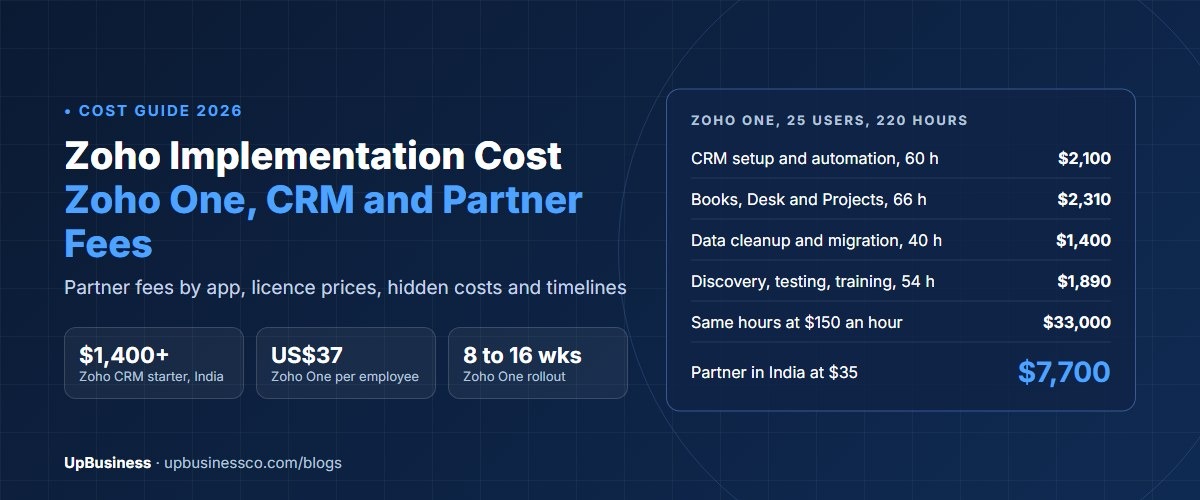
- For a 25-user Zoho One rollout of about 220 hours, a partner in India at $35 an hour charges about $7,700. The same hours at $150 cost about $33,000.
- Budget 10% to 20% of the implementation fee each year for support and changes after go-live.
Zoho Implementation Cost at a Glance
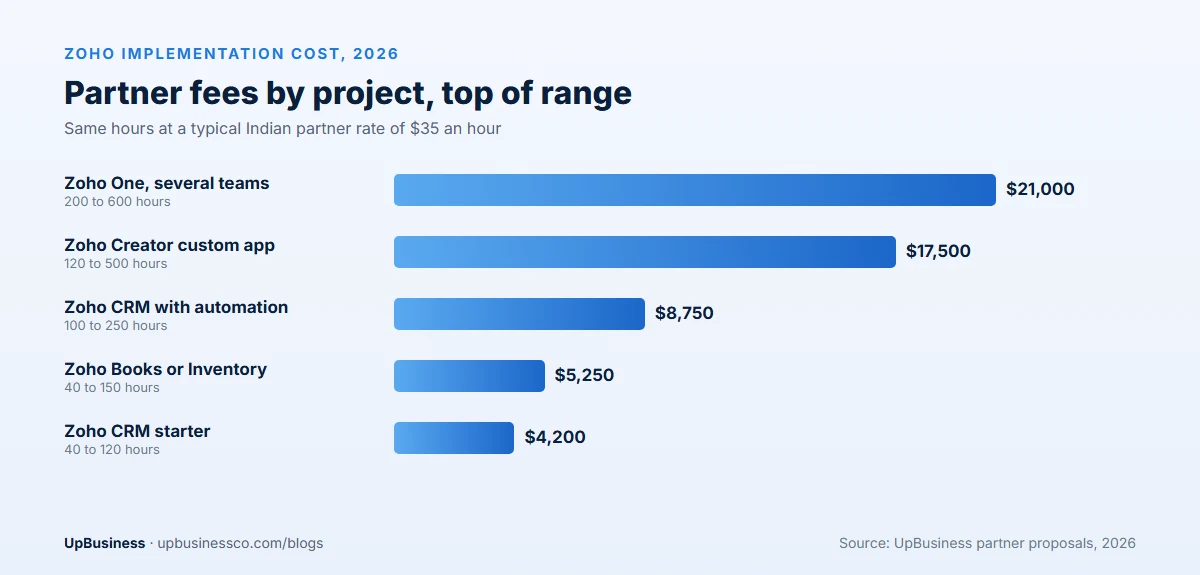
| Project | Typical scope | Partner hours | Cost at $35 an hour | Cost at $150 an hour |
|---|---|---|---|---|
| Zoho CRM starter | One sales team, standard modules, simple data import | 40 to 120 | $1,400 to $4,200 | $6,000 to $18,000 |
| Zoho CRM with automation | Custom fields, workflows, email and web forms, reports | 100 to 250 | $3,500 to $8,750 | $15,000 to $37,500 |
| Zoho Books or Inventory | Chart of accounts, tax, opening balances, bank feeds | 40 to 150 | $1,400 to $5,250 | $6,000 to $22,500 |
| Zoho One, several teams | CRM, Books, Desk, Projects and People, linked together | 200 to 600 | $7,000 to $21,000 | $30,000 to $90,000 |
| Zoho Creator custom app | A custom business app on Zoho's low-code platform | 120 to 500 | $4,200 to $17,500 | $18,000 to $75,000 |
These ranges come from the proposals we see on UpBusiness. The two rate columns show the same hours at a typical Indian partner rate and a typical US, UK or Australian partner rate. Your quotes depend on users, data, integrations and how much you change Zoho's standard setup.
Licence Cost vs Implementation Cost
Buyers often mix up two separate bills:
- Licences are what you pay Zoho every month or year to use the apps. Zoho sets the price.
- Implementation is what you pay a partner, once or in stages, to set the apps up for your business, move your data, connect other systems and train your team.
Some partners resell licences and bundle both into one quote. That's fine, but ask for the two parts as separate lines, so you can compare partners fairly and see what you'll keep paying after the project ends.
Zoho Licence Prices in 2026
Zoho One is the bundle most growing companies consider. On Zoho's US pricing page in November 2026, it lists at[1]:
| Zoho One plan | List price | Rule |
|---|---|---|
| All-employee pricing | US$37 per employee a month | You license every employee in the company. Zoho marks this as a first-year price |
| Flexible user pricing | US$90 per user a month | You license only the people who use it |
All-employee pricing is cheaper per head but covers everyone. Flexible pricing suits a company where only part of the team uses Zoho. Single apps, such as Zoho CRM, Books or Desk, have their own plans, and Zoho prices differ by country[2]. Check the pricing page for your region, and ask whether the quoted price is billed monthly or yearly.
Licences often cost more than the implementation over three years. Thirty employees on all-employee pricing come to about $13,320 in the first year. Twenty-five users on flexible pricing come to about $27,000 a year.
What a Zoho Implementation Includes
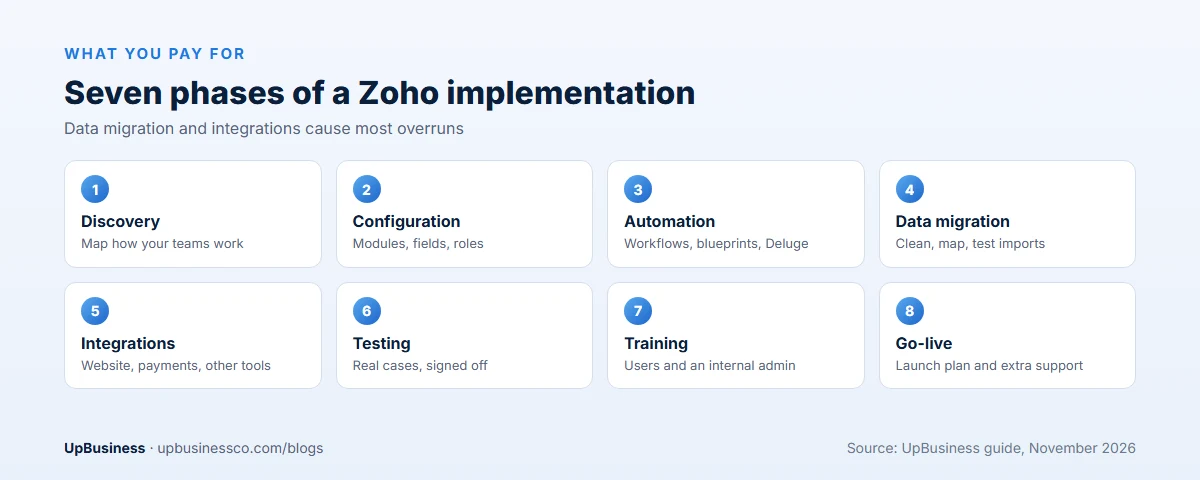
- Discovery. The partner maps how your sales, finance, support or operations teams work today, and what must change. Usually 5% to 15% of the hours.
- Configuration. Modules, fields, layouts, pipelines, roles, permissions and approval rules.
- Automation. Workflows, assignment rules, email templates, blueprints and custom functions written in Deluge, Zoho's scripting language[3].
- Data migration. Cleaning, mapping and importing contacts, deals, invoices, tickets and history from your old system or spreadsheets.
- Integrations. Connecting Zoho to your website, payment provider, accounting system, e-commerce store or other tools, through Zoho Flow, built-in connectors or the API.
- Testing. Your team checks real cases before go-live.
- Training and go-live. Sessions for users and admins, a launch plan and a short period of extra support.
What Drives Zoho Implementation Cost
- Number of apps. Each extra app adds setup, testing and training. Linking apps, such as CRM to Books, adds more.
- Data quality. Clean data from one system is quick to move. Messy spreadsheets with duplicates can double the migration hours.
- Integrations. Each outside system adds 10 to 60 hours, depending on how good its API is.
- Custom code. Deluge functions and Zoho Creator apps are priced like software development, because they are.
- Users and locations. More teams mean more roles, rules and training. Several countries add currencies, taxes and languages.
- Partner location. The same hours cost three to five times more with a partner in the US, UK or Australia than in India.
Zoho CRM Implementation Cost in Detail
Zoho CRM is where most companies start, so it's worth breaking down. A starter setup covers leads, contacts, accounts, deals and a sales pipeline, with standard fields and a simple import. That's 40 to 120 hours.
The cost rises with each of these:
- Custom modules and fields for things your business tracks that Zoho doesn't, such as projects, properties or policies.
- Blueprints, which force a set order of steps, for example before a deal can move to "won".
- Email and phone integration, so every message and call is logged against the customer.
- Web forms and lead routing, so new leads reach the right person automatically.
- Reports and dashboards built around the numbers your managers actually use.
- Territories and roles for larger sales teams who must see only their own accounts.
A CRM with most of these usually lands at 100 to 250 hours.
Zoho Books and Finance: Points That Change the Price
Finance setups have their own cost drivers. Tax rules matter most: GST, VAT or sales tax set-up differs by country, and a company that sells in several countries needs more work. Opening balances, the chart of accounts and bank feeds are standard. Moving years of old invoices and payments is not, and it can double the hours. Agree with your accountant which history must move and which can stay in an archive. Time the go-live with the start of a month or, better, a financial year.
Partner Pricing Models
| Model | How it works | Best for | Watch out for |
|---|---|---|---|
| Fixed package | A set price for a defined setup, for example a CRM starter | Small teams with standard needs | What's excluded, often data and integrations |
| Fixed project | A price for a written scope | Zoho One rollouts with a clear plan | Change requests priced high |
| Hourly | Pay for hours used, with timesheets | Unclear scope, phase two work | Budget creep without a cap |
| Monthly retainer | A block of hours each month for support and changes | After go-live | Unused hours that don't roll over |
For a first project, ask for a paid discovery phase at a fixed price, then a fixed quote for the build based on what discovery found. Our guide to comparing proposals line by line shows how to line up quotes that are structured differently.
Hidden Costs to Budget For
- Data cleanup. Often billed separately, and often larger than expected.
- Add-ons and extensions. Some Marketplace extensions and extra storage or credits cost extra each month.
- Integration tools. Third-party connectors outside Zoho may carry their own subscription.
- Your team's time. Someone must answer questions, test and sign off. On a Zoho One project that is often several hours a week for each team lead.
- Training new staff. Plan short refresher sessions after go-live.
- Ongoing changes. Businesses change, and Zoho setups need updates. Budget 10% to 20% of the implementation fee each year.
Worked Example: Zoho One for a 25-Person Company
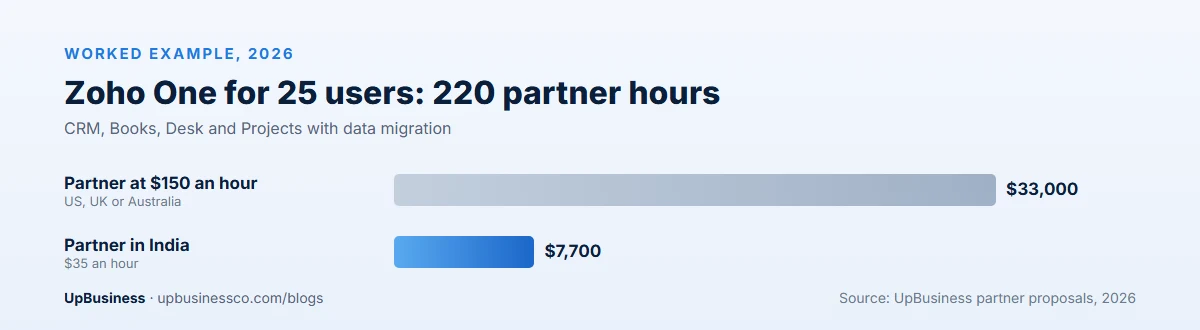
A 30-employee services company wants 25 people on Zoho CRM, Books, Desk and Projects. It has 8,000 contacts in spreadsheets, an old accounting file and a website contact form. A partner estimates about 220 hours.
| Work | Hours | Partner in India at $35 an hour | Partner at $150 an hour |
|---|---|---|---|
| Discovery and design | 24 | $840 | $3,600 |
| CRM setup and automation | 60 | $2,100 | $9,000 |
| Books setup and opening balances | 30 | $1,050 | $4,500 |
| Desk and Projects setup | 36 | $1,260 | $5,400 |
| Data cleanup and migration | 40 | $1,400 | $6,000 |
| Website form and testing | 18 | $630 | $2,700 |
| Training and go-live support | 12 | $420 | $1,800 |
| Total | 220 | $7,700 | $33,000 |
Licences come on top. On all-employee pricing, 30 employees at US$37 a month cost about $13,320 in the first year. On flexible pricing, 25 users at US$90 cost about $27,000 a year. Here all-employee pricing is cheaper, because nearly everyone uses Zoho. In a company where only half the staff need it, flexible pricing may win.
So the first-year cost of this project is roughly $21,000 with an Indian partner, or about $46,000 with a partner at $150 an hour, using all-employee licences.
Zoho Implementation Timeline
| Project | Typical time |
|---|---|
| Zoho CRM starter | Two to four weeks |
| Zoho CRM with automation and integrations | Four to eight weeks |
| Zoho Books or Inventory | Two to six weeks, timed with your financial year |
| Zoho One, several teams | 8 to 16 weeks, often in phases |
| Zoho Creator custom app | 6 to 20 weeks |
Rolling out in phases lowers risk. Start with the team that gains most, often sales on CRM, then add finance and support once the first team is settled.
Zoho vs Odoo vs Salesforce: Cost Compared
Buyers often compare Zoho with two other platforms:
- Odoo is stronger for manufacturing, inventory and accounting-heavy businesses, and implementations tend to cost more because of the customisation. See our Odoo implementation cost guide.
- Salesforce licences and partner fees are usually much higher, and it suits larger sales teams with complex processes. See our Salesforce implementation cost guide.
- Zoho usually has the lowest total cost for small and mid-sized companies that want CRM, finance and support in one place.
If no packaged platform fits, our guide to custom ERP software development explains when building your own makes sense.
How to Choose a Zoho Implementation Partner
- Check partner status. Zoho lists authorised partners in its partner directory[4]. Ask which apps the partner is certified for.
- Ask for two similar projects. Same apps, similar team size and, ideally, your industry. Call those clients.
- Meet the people who will do the work. Ask the consultant to show a past setup and explain why they built it that way.
- Check Deluge and integration skills. Ask for an example of a custom function and an integration they built.
- Ask for a data migration plan. Who cleans the data, how many test imports and who signs off.
- Agree the handover. Admin training, written documentation and admin access in your name.
Our list of questions to ask a software company works for Zoho partners too.
Support and Admin Costs After Go-Live
| Option | Typical cost | Best for |
|---|---|---|
| Ad hoc hourly support | Partner's hourly rate, billed as used | Small, rare changes |
| Monthly retainer | $300 to $1,500 a month with an Indian partner | Regular changes and new reports |
| Internal admin | Part of one person's job, plus training | Companies with 25 or more users |
Most companies combine an internal admin for small changes with a partner retainer for automation, integrations and new apps. Whichever you choose, keep the admin login, the documentation and the Zoho account in your company's name.
Questions to Ask a Zoho Partner Before You Sign
- Which Zoho apps are you certified for, and how many rollouts like ours have you finished this year?
- Who exactly will work on our project, and how many hours a week will they give it?
- What does your quote exclude? Show us the list in writing.
- How many test imports will you run before the final data migration, and who checks them?
- Which parts need custom Deluge code, and could a standard feature do the job instead?
- What happens if a Zoho update changes a feature we rely on?
- What does support cost after go-live, and how fast do you respond to an urgent issue?
- Can we speak to two clients who went live in the last year?
A good partner answers these clearly and puts the answers into the proposal. A partner who can't name the people, the exclusions or the support price is guessing, and you will pay for the guesswork later.
Red Flags in Zoho Partner Quotes
- A low fixed price with data migration and integrations "to be confirmed".
- No discovery phase, so the partner hasn't seen your processes before quoting.
- The partner wants to own the Zoho account or the admin login.
- Heavy custom code where standard Zoho features would do.
- No training or documentation in the scope.
- Licence prices that don't match Zoho's own pricing page, with no explanation.
How to Keep Zoho Costs Down
- Use standard features first. Change your process to fit Zoho where the change is small. Custom code costs money every year.
- Clean your data before the project. Remove duplicates and old records yourself.
- Roll out in phases. Smaller phases mean fewer surprises and earlier value.
- Train an internal admin. One trained person can handle small changes without a partner.
- Pick the right licence model. Compare all-employee and flexible pricing for your real user count.
Contract Points for a Zoho Project
- The Zoho account, admin rights and billing are in your company's name.
- Deluge code, Creator apps and integration scripts are assigned to you in writing.
- The scope lists every app, module, integration and data source, with what is excluded.
- Acceptance tests are written before the build and signed off by your team.
- Support after go-live has a set period, response times and a monthly price.
Our software development contract checklist covers the general clauses. If Zoho will also run your email campaigns, our guide to marketing automation services covers the setup scope.
Finding Zoho Implementation Partners on UpBusiness
UpBusiness lists verified partner companies, mostly based in India. Every company has passed five checks reviewed by our team: company details, registration and tax papers, the founder's identity, expertise and three client projects with evidence. Only companies with a TrustScore of 70 or more are listed.
Our Zoho implementation page and ERP solutions page list companies that work on business systems. Not every one names Zoho as a core service yet, so ask each for two Zoho rollouts and its Zoho partner status before you shortlist.
- Post your requirement with the Zoho apps you need, your user count and budget.
- Get three partner companies matched to your budget, service and industry.
- Compare them side by side, ask for a paid discovery phase and choose the one with the clearest plan. Buyers pay nothing, and there's no commission on the project.