


Browse our curated list of AI Chatbot Companies
There are three ways to add AI customer support in 2026. You can buy an AI agent from your help desk provider and pay per resolved conversation. You can build your own on top of an AI model. Or you can hire a partner company to set up, connect and tune one for you. Buying is fastest and cheapest at low volume. Building or partnering usually costs less once you handle thousands of conversations a month, or when the AI needs to take actions in your own systems.
This guide compares the three options on cost, speed, control and risk. It uses the published prices of three large platforms, checked on 31 October 2026, and a worked example for a business with 10,000 support tickets a month. It doesn't cover chatbot basics. For those, see our guide to AI chatbots in customer service.
Key takeaways
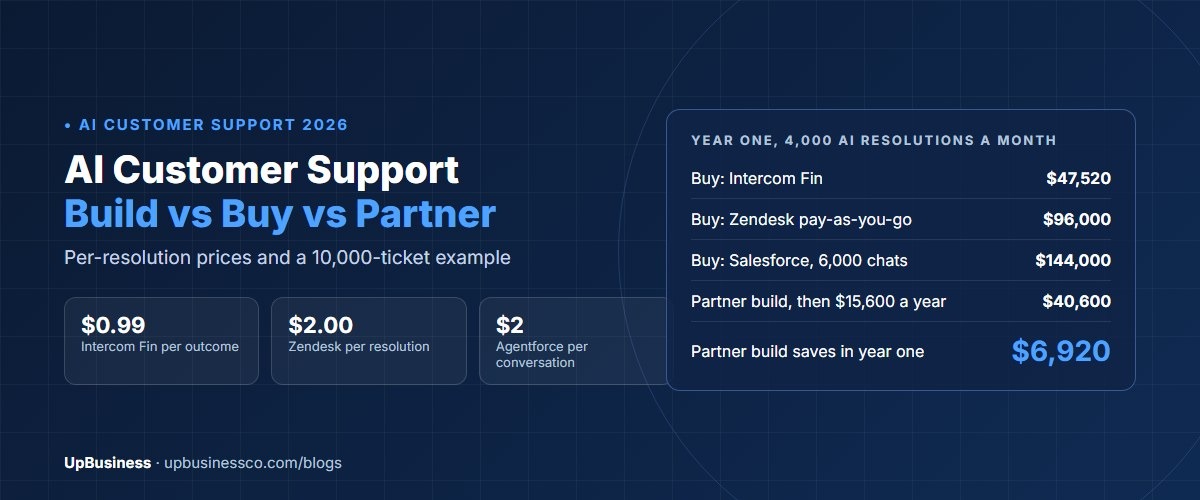
- Bought AI agents are priced per result. Intercom's Fin costs $0.99 per outcome, Zendesk lists $2.00 per automated resolution on pay-as-you-go, and Salesforce Agentforce lists $2 per conversation.
- At 4,000 AI resolutions a month, bought AI agents cost about $47,500 to $144,000 a year. A partner-built assistant in our example costs about $40,600 in year one and about $15,600 a year after that.
- Below about 1,000 AI resolutions a month, buying almost always wins.
- Whichever route you pick, your company is responsible for what the AI tells customers.
- Gartner predicts that by 2027, half of the organisations that planned big cuts to support staff because of AI will drop those plans. Plan for AI plus people, not AI instead of people.
What AI Customer Support Means in 2026
AI customer support used to mean a chatbot with fixed answers. Today it usually means an AI agent that reads your help content and customer data, answers in plain language, takes simple actions and hands over to a person when it should.
A typical setup does four jobs:
- Answers questions from your help articles, policies and product data.
- Takes actions, such as checking an order, starting a return or booking a call.
- Hands over to an agent with a summary, so the customer doesn't repeat themselves.
- Helps agents by drafting replies and summarising long tickets.
Gartner predicted in March 2025 that by 2029, agentic AI will resolve 80% of common customer service issues without a person, cutting operating costs by 30%[1]. Even if that's optimistic, the direction is clear. The question for most businesses is how to get there, not whether to.
Build vs Buy vs Partner: The Three Options
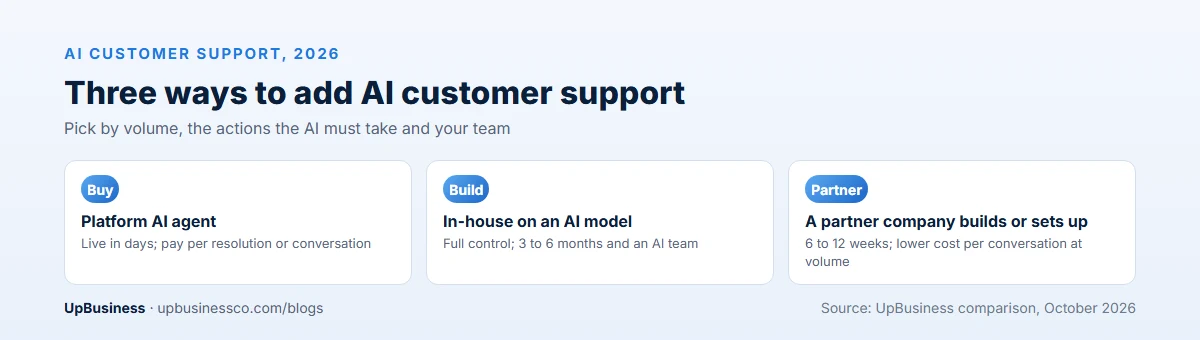
| Buy | Build in-house | Partner | |
|---|---|---|---|
| What it means | Switch on the AI agent from your help desk or a specialist provider | Your own engineers build an assistant on an AI model | A partner company builds or sets up the assistant for you |
| Time to launch | Days to weeks | 3 to 6 months | 6 to 12 weeks |
| Upfront cost | Low | High: your team's time | Medium: a project fee |
| Running cost | Per resolution or conversation, rising with volume | Model usage, hosting and your team's time | Model usage, hosting and a support retainer |
| Control over answers and actions | Limited to what the platform allows | Full | Full, if you own the code and prompts |
| Best for | Low to medium volume, standard questions | Companies with an AI team and unusual needs | High volume or custom actions, without an in-house AI team |
The "partner" option covers two things. A partner can build a custom assistant that you own. Or it can set up and connect a platform you buy, which is often faster than doing it yourself. Many businesses do both: buy for the first year, then move high-volume work to a custom build once they know what customers ask.
Start Here: Your Help Content Decides the Result
Whichever route you choose, the AI can only be as good as the information it reads. Most weak AI support projects fail here, not in the technology.
Before you buy or build anything, check your help content:
- Is there one current answer for each common question, or three old ones that disagree?
- Are refund, delivery and warranty policies written down clearly, with dates and numbers?
- Do agents use private notes or saved replies that customers never see? Those often hold the real answers.
- Can the AI read live data it needs, such as order status, through an API?
Fixing content usually takes two to four weeks for a mid-size business. It's worth doing even without AI, because human agents give better answers too.
What Buying Costs: Per-Resolution Pricing
The big help desk platforms now charge for AI by result, not by seat. Here's what three of them published when we checked on 31 October 2026.
| Platform | AI agent price | What counts |
|---|---|---|
| Intercom Fin | $0.99 per outcome; a minimum monthly commitment applies when used with another help desk | A customer confirms the issue is resolved, doesn't ask for more help, or Fin completes a workflow |
| Zendesk AI agents | $2.00 per automated resolution on pay-as-you-go; some plans include 5 to 10 per agent a month | A request resolved by the AI agent without a person |
| Salesforce Agentforce | $2 per conversation, or Flex Credits at $500 per 100,000 credits | Each conversation, or each action at 20 credits (about $0.10) |
Sources: Intercom pricing, Zendesk pricing and Salesforce Agentforce pricing. Zendesk changed how it measures resolutions in May 2026, so check its current terms. These prices are on top of the platform's normal seat fees.
Per-result pricing is fair at low volume, because you only pay when the AI does the work. But it grows in step with your volume. If the AI resolves twice as many tickets next year, the bill doubles too.
What Building Costs
A custom support assistant usually sits on retrieval-augmented generation (RAG). The AI searches your help content and data, then writes an answer from what it found. Here's a typical scope for a first version, with costs at an offshore partner rate and at the US median rate. On US government contracts, the median ceiling rate for software developers and engineers is about $132 an hour[2].
| Work | Hours | Offshore at $35 an hour | US median at $132 an hour |
|---|---|---|---|
| Discovery, test set and design | 80 | $2,800 | $10,560 |
| Content clean-up and search setup | 120 | $4,200 | $15,840 |
| Assistant, prompts and guardrails | 200 | $7,000 | $26,400 |
| Help desk, order and CRM connections | 200 | $7,000 | $26,400 |
| Testing, handover flow and launch | 114 | $3,990 | $15,048 |
| Total first version | 714 | $24,990 | $94,248 |
These hours are our estimate for a mid-size business with one language and three system connections. Real quotes vary with your content, data and how many actions the assistant must take. Our guides to RAG chatbot cost and AI chatbot development cost cover the ranges in more detail.
After launch, plan for three running costs: AI model usage, hosting and someone to review answers and update content. For the example below, we assume about $600 a month for model usage and hosting, and 20 hours a month of support at $35 an hour.
Worked Example: 10,000 Tickets a Month
Take an online retailer with 10,000 support tickets a month. It expects the AI to fully resolve 40% of them, or 4,000 a month, and to talk to about 6,000 customers in total. Here's the first-year AI cost of each route, on top of the help desk it already pays for.
| Route | How it's priced | Monthly AI cost | Year one | Year two |
|---|---|---|---|---|
| Buy: Intercom Fin | 4,000 outcomes at $0.99 | $3,960 | $47,520 | $47,520 |
| Buy: Zendesk pay-as-you-go | 4,000 resolutions at $2.00 | $8,000 | $96,000 | $96,000 |
| Buy: Salesforce per conversation | 6,000 conversations at $2 | $12,000 | $144,000 | $144,000 |
| Partner build, offshore | About $25,000 build, then $1,300 a month | $1,300 | About $40,600 | $15,600 |
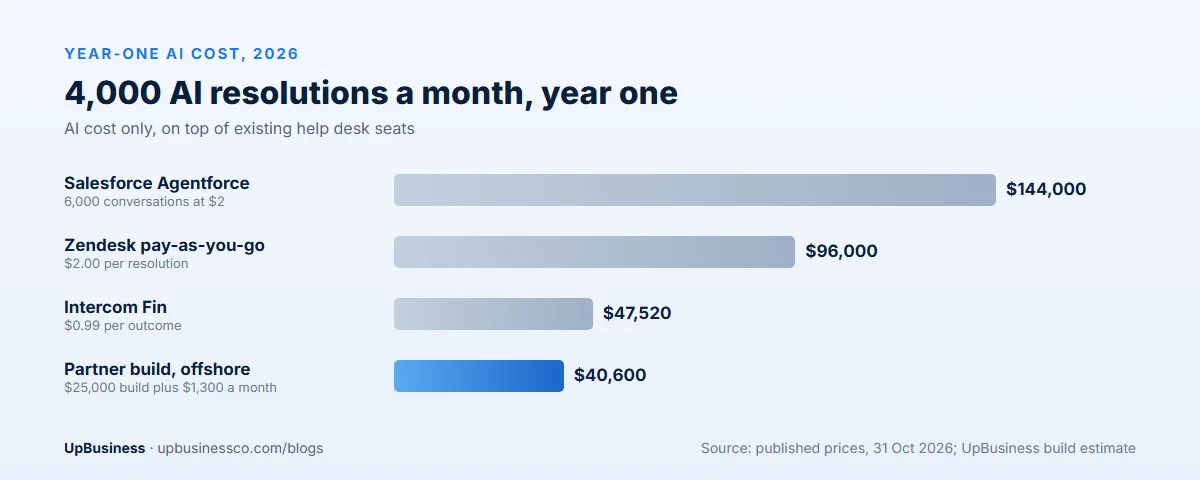
At this volume, the partner build costs less from year one and far less in year two. Now take a business with 1,000 tickets a month and 400 AI resolutions. Intercom's Fin would cost about $396 a month, or $4,750 a year, while the partner build still costs about $25,000 up front. At that volume, buying wins easily.
Platform discounts, committed-volume deals and your own staff time can all move these numbers. Use your own ticket counts, and ask for quotes on both routes before you decide.
What a Partner Company Delivers
If you go the partner route, know what you're paying for. A good partner company delivers more than a working chatbot.
- A test set and quality report. Hundreds of real questions with correct answers, and the assistant's score on them before launch.
- Connections to your systems, such as your help desk, order system and CRM, with clear limits on what the AI may change.
- A handover flow that passes the conversation and a summary to your agents.
- An admin view where your team can read conversations, flag wrong answers and update content.
- Documents and access, so your team or another company can run and change the system later.
Ask for each of these by name in your contract. If a quote doesn't mention testing or handover, it's probably missing them.
Lock-In: The Cost That Shows Up Later
Bought AI agents are tied to their platform. If you move help desks, you usually start the AI setup again. That's fine if you're happy where you are. It matters more if your contract renews soon or prices rise.
A custom build has its own lock-in risk: the company that built it. Avoid that by owning the code, prompts and test sets, and by keeping AI model accounts in your company's name. Then you can switch partners or models without starting over.
When to Buy, Build or Partner
Buy when
- You handle fewer than about 1,000 AI-resolved conversations a month.
- Most questions are standard: order status, returns, passwords, opening hours.
- You already use a help desk that offers an AI agent.
- You want something live this month.
Build in-house when
- You already have engineers with AI experience and time to spare.
- Support is a core part of your product, and you want full control.
- You have strict rules on where data may go, which bought tools can't meet.
Partner when
- Volume is high enough that per-resolution fees add up, usually thousands a month.
- The assistant must take actions in your own systems, such as an ERP or a custom order database.
- You need several languages or channels, such as WhatsApp or voice, under one setup.
- You don't have an in-house AI team, and don't want to hire one yet.
For a wider view of the same choice across all AI projects, see our guide to custom AI vs off-the-shelf AI. If you need support on WhatsApp or by phone, our guides to WhatsApp chatbot cost and AI voice agent cost cover those channels.
Agent Assist: The Low-Risk First Step
If you're not ready to let AI talk to customers, start by giving it to your agents. Agent assist tools draft replies, summarise long tickets and suggest help articles. A person reads and sends every answer.
This has three benefits. Mistakes are caught before customers see them. Agents get faster from the first week. And you learn which questions the AI handles well, which tells you where a customer-facing assistant will work best later.
Most help desk platforms include some agent assist features in their AI plans. A partner company can also build them into your own tools if your agents work in a custom system.
Costs People Forget to Budget For
- Content clean-up. Two to four weeks of someone's time, as described above.
- Review time. Someone has to read a sample of AI conversations every week. Plan for a few hours a week, more in the first month.
- Seat fees. Per-resolution prices are usually on top of the platform's normal agent seats.
- Model price changes. AI model prices change often. A custom build should let you switch models without a rebuild.
- New channels. Adding WhatsApp, email or voice later can add new fees or build work.
- Languages. Each extra language needs its own testing, even when the model handles it well.
Risks You Own Either Way
Buying a tool doesn't move the risk to the tool's maker. In a 2024 case, a Canadian tribunal held Air Canada responsible for wrong refund advice its website chatbot gave a customer, and ordered it to pay the difference in fare, plus interest and fees[3]. The airline argued the chatbot was responsible for its own answers. The tribunal didn't accept that.
Plan for these risks whichever route you choose:
- Wrong answers. Keep policies, prices and terms in one up-to-date source, and test answers against it before and after launch.
- Bad handovers. Make it easy to reach a person, and pass the conversation summary across.
- Private data. Decide what the AI may see and say, and check that your provider won't train its models on your customers' conversations.
- Tricks and misuse. Test how the assistant handles users who try to make it ignore its rules.
- Cutting staff too fast. Gartner predicts that by 2027, 50% of organisations that expected to cut their customer service workforce significantly because of AI will abandon those plans[4]. Move people to harder cases first, and reduce headcount only after results hold for several months.
How to Measure Success
Agree these numbers before launch, and track them every week for the first three months.
| Measure | What it tells you | A sensible first target |
|---|---|---|
| Resolution rate | Share of conversations the AI closes without a person | 25% to 40% in the first three months |
| Answer accuracy | Share of answers rated correct on your test set | 85% to 90% or more |
| Customer satisfaction | Ratings for AI conversations against human ones | Within a few points of human agents |
| Handover quality | Whether agents get a useful summary | Customers rarely repeat themselves |
| Cost per resolution | Total AI cost divided by AI resolutions | Below your current cost per ticket |
A 90-Day Rollout Plan
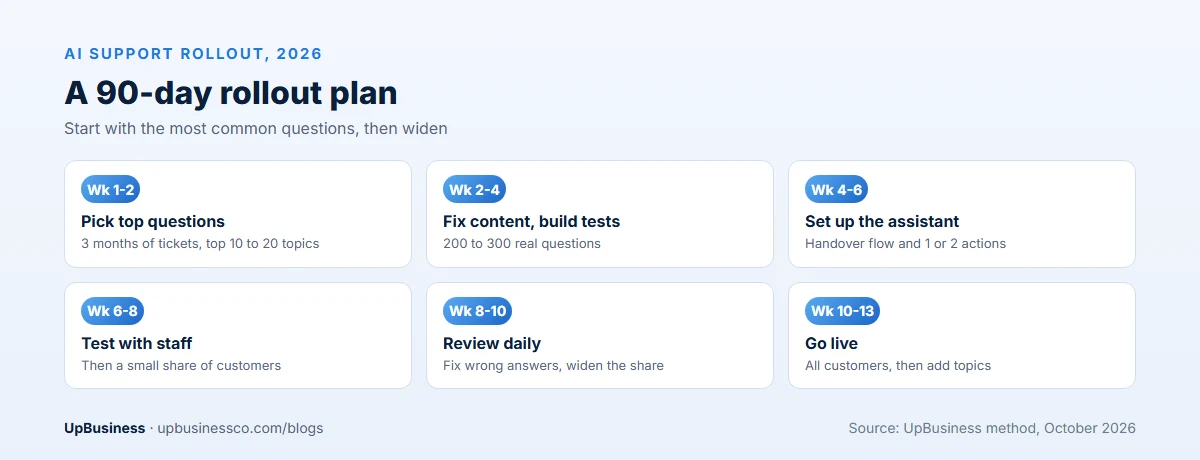
- Weeks 1 to 2: pull 3 months of tickets, group them by topic and pick the 10 to 20 most common questions.
- Weeks 2 to 4: fix the help content for those topics, and build a test set of 200 to 300 real questions with correct answers.
- Weeks 4 to 6: set up the assistant, the handover flow and one or two simple actions, such as order status.
- Weeks 6 to 8: test it with your own team, then with a small share of real customers.
- Weeks 8 to 10: review wrong answers every day, fix content and prompts, and widen the share of customers.
- Weeks 10 to 13: go live for all customers on the chosen topics, then add new topics one at a time.
Questions to Ask an AI Partner Company
- Which support assistants have you built, and can we speak to one of those clients?
- Will you build our own assistant, set up a platform, or both? Why that choice for us?
- How will you test answer quality, and what accuracy do you expect on our test set?
- What will it cost to run each month at our volume, including model usage and hosting?
- Who owns the code, prompts, test sets and configuration at the end?
- How do you keep our customers' data out of AI model training?
For a formal process, use our AI RFP template. Our list of questions to ask an AI development company covers more.
Find an AI Partner Company on UpBusiness
UpBusiness lists AI partner companies that have passed a five-step check by our team: registration papers, the founder's identity, expertise and three client projects with evidence. Only companies with a TrustScore of 70 or more out of 100 are listed. You can browse AI chatbot companies or post your requirement.
- Post your requirement with your ticket volume, help desk and budget.
- Get three partner companies matched to your budget, service and industry.
- Compare them side by side and contact them directly. Buyers pay nothing, and there's no commission on the project.