


Browse our curated list of UI/UX Design Companies
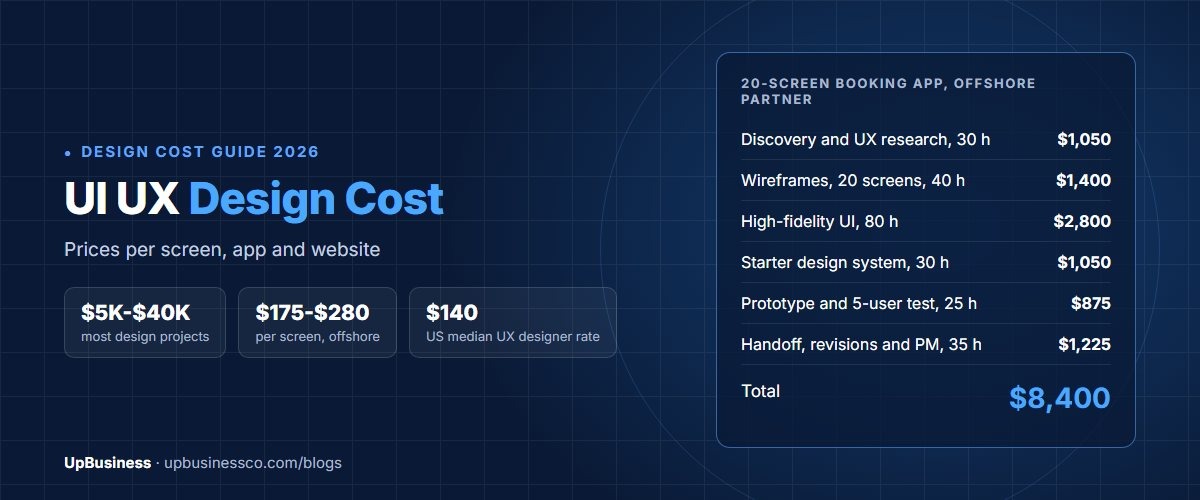
UI UX design cost in 2026 runs from about $500 for a simple landing page to more than $100,000 for a large software product. Most business projects land between $5,000 and $40,000. A 20-screen mobile app, for example, costs about $8,400 with an offshore partner company and about $33,600 at US contract rates.
The price comes down to two numbers: how many hours the work takes, and what each hour costs. This guide shows you both. You'll see prices by project type, by screen and by deliverable, real hourly rates from US government contract data, a worked budget, and what design partner companies on UpBusiness charge.
A quick note on terms. UX (user experience) design is how a product works: the steps, the layout and the flow. UI (user interface) design is how it looks: colours, type, buttons and icons. Most projects need both, so most quotes price them together.
Key takeaways
- Most UI/UX projects cost $5,000 to $40,000. Landing pages start near $500, and large products with a design system can pass $100,000.
- Each unique screen takes about 5 to 8 hours to wireframe and design. That is $175 to $280 per screen offshore and $700 to $1,120 at US rates.
- US federal contract data puts the median UX designer ceiling rate at $140 an hour and the median UI designer rate at $136.
- An in-house US designer costs about $148,600 a year once benefits are added to the $104,000 median salary.
- Of the 7 partner companies on the UpBusiness design listing, 3 have design services as their top specialisations. Their average project sizes run from $100 to $10,000, with a median of $1,000.
How Much Does UI UX Design Cost in 2026?
A typical UI/UX project costs $5,000 to $40,000. Where you land depends on the size of the product and who does the work. The table shows our estimates. We built them from hours per task and two rates. We used $35 an hour for an offshore partner company and $140 an hour, the US contract median covered later in this guide.
| Project type | Typical scope | Hours | Offshore partner | US rates |
|---|---|---|---|---|
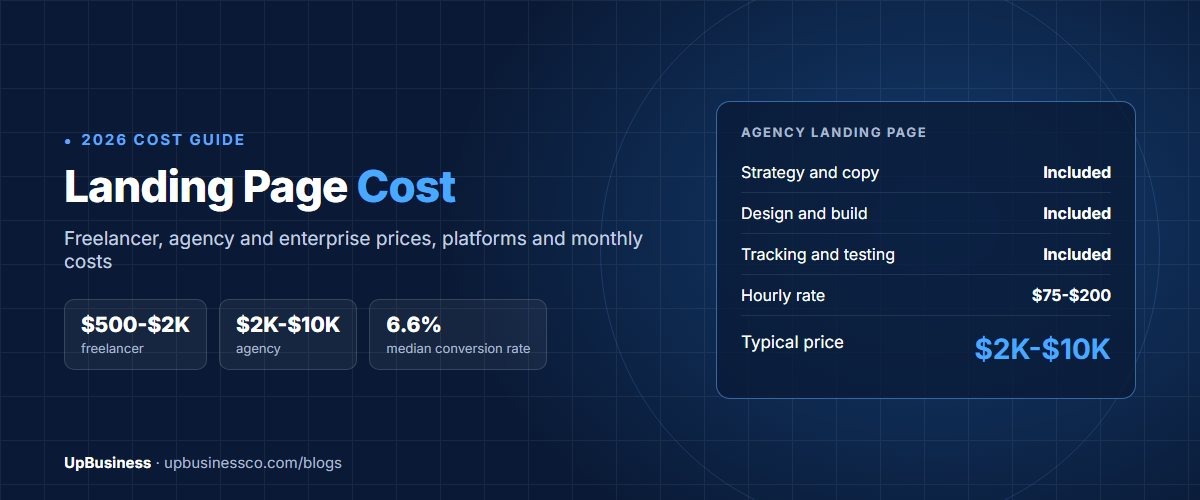
| Landing page (full cost guide) | 1 page, 1 to 2 design rounds | 15 to 30 | $500 to $1,000 | $2,000 to $4,000 |
| Small business website | 5 to 10 pages, simple brand style | 40 to 80 | $1,400 to $2,800 | $5,600 to $11,200 |
| Mobile app MVP | 15 to 25 screens, one user type | 150 to 250 | $5,000 to $9,000 | $21,000 to $35,000 |
| SaaS web app | 30 to 60 screens, 2 to 3 user roles | 300 to 600 | $10,000 to $21,000 | $42,000 to $84,000 |
| Large product with design system | 100+ screens, research and testing | 800 to 1,500 | $28,000 to $53,000 | $110,000 to $210,000 |
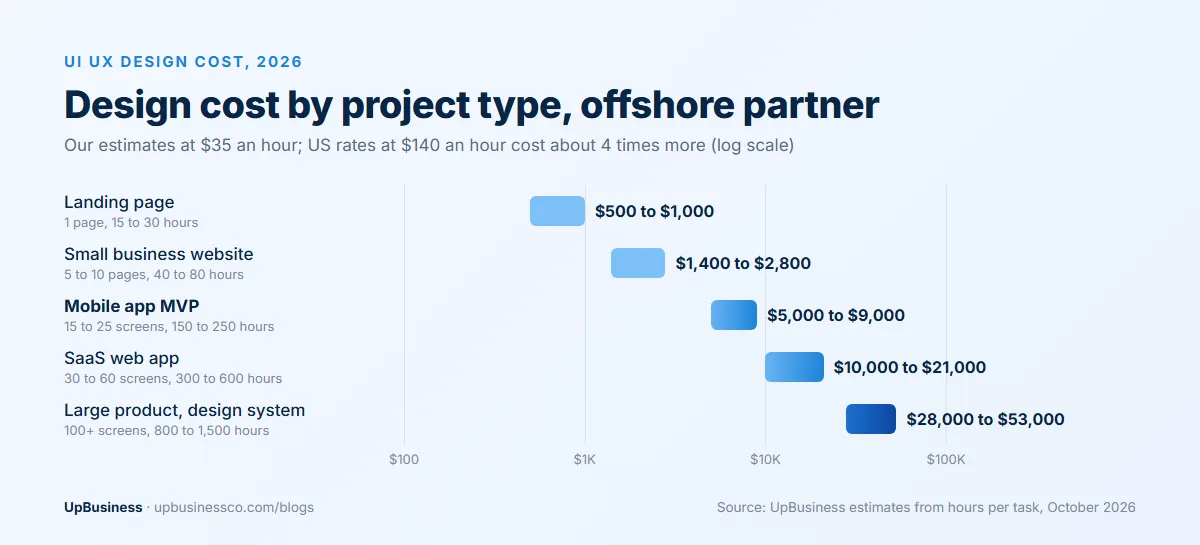
Look at the gap between the two columns. The work is the same. Only the hourly rate changes. That is why two honest quotes for one app can differ by four times.
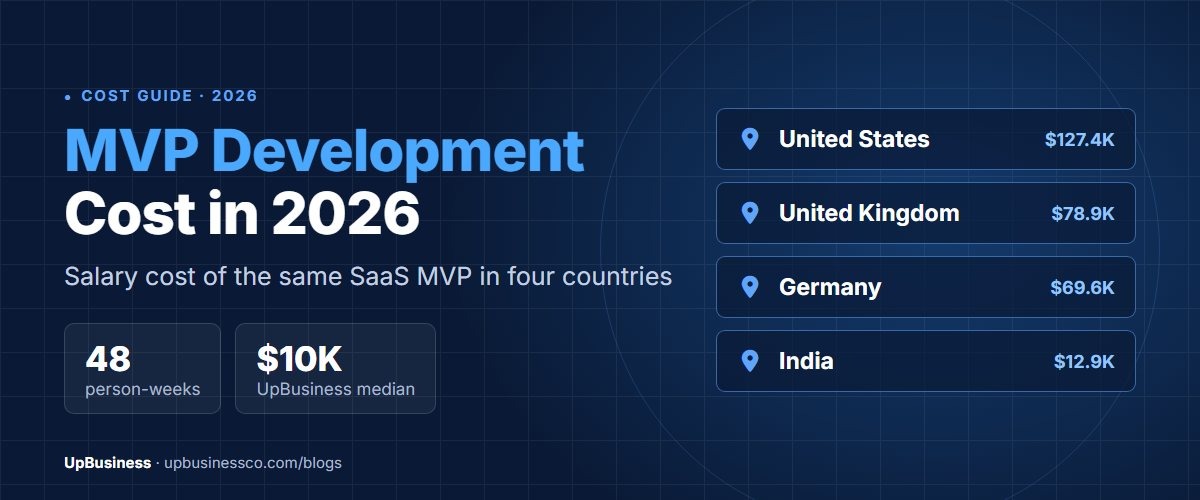
Design is only part of the build. If you also need the product coded, our guides to website development cost and MVP development cost price the development side.
What Are You Paying For in a UI/UX Design Project?
You pay for five kinds of work. Some quotes bundle them. Others list each one. Knowing the pieces helps you compare quotes line by line.
- UX research. Talking to users, studying competitors and testing ideas. It tells you what to build before you pay to design it.
- User flows and wireframes. Wireframes are plain grey sketches of each screen. They fix the layout before any colour or styling.
- High-fidelity UI design. The final look of every screen, ready for developers.
- Design system. A shared library of buttons, forms, colours and rules. It keeps every screen consistent and speeds up later work.
- Clickable prototype. Linked screens you can tap through like a real app. You use it to test with users and to show investors.
| Deliverable | Typical hours | Offshore partner ($35/h) | US rates ($140/h) |
|---|---|---|---|
| UX research (interviews, 5-user test, report) | 30 to 60 | $1,050 to $2,100 | $4,200 to $8,400 |
| User flows and wireframes | About 2 per screen | $70 per screen | $280 per screen |
| High-fidelity UI design | 3 to 6 per screen | $105 to $210 per screen | $420 to $840 per screen |
| Design system | 40 to 120 | $1,400 to $4,200 | $5,600 to $16,800 |
| Clickable prototype | 15 to 40 | $525 to $1,400 | $2,100 to $5,600 |
| UX audit of an existing product | 20 to 50 | $700 to $1,750 | $2,800 to $7,000 |
Research is the line buyers cut first. It is also cheaper than you might think. Nielsen Norman Group found that a test with just 5 users finds about 85% of usability problems[1]. Three small rounds of 5 users usually teach you more than one big study.
How Much Does UI/UX Design Cost Per Screen?
Expect about 5 to 8 hours per unique screen. That covers the wireframe, the final design and one round of changes. At $35 an hour that is $175 to $280 a screen. At $140 an hour it is $700 to $1,120.
The key word is unique. A product list and a search results page may share one layout. Once the first is designed, the second takes an hour, not six. So count unique screens, not total screens, when you ask for a per-screen price.
Here is a simple example. A food delivery app might have 40 screens in total. Only about 22 are truly different. The rest are variations, such as empty states and error messages. Price the 22, then add a small fee for the variations.
Per-page pricing for websites works the same way. A home page takes the most time because it sets the style. Inner pages that reuse the same blocks cost much less.
How Much Does App UI/UX Design Cost?
A mobile app MVP with 15 to 25 screens costs about $5,000 to $9,000 offshore and $21,000 to $35,000 at US rates. An MVP (minimum viable product) is the smallest version you can launch and learn from.
Three things push app design costs up:
- Two platforms. iOS and Android follow different design rules. Designing both natively adds 20% to 40% in our estimates. Our iOS vs Android cost guide explains the gap on the build side.
- More user roles. A marketplace app has buyers, sellers and an admin. Each role needs its own screens and flows.
- Complex states. Payments, bookings and live tracking need many extra screens for loading, errors and edge cases.
A SaaS web app is usually bigger. It has dashboards, settings, billing and admin areas. Plan for 30 to 60 screens and $10,000 to $21,000 offshore.
How Much Does Website UI/UX Design Cost?
A 5 to 10 page business website costs about $1,400 to $2,800 to design offshore and $5,600 to $11,200 at US rates. A single landing page costs $500 to $1,000 offshore.
Ecommerce sites cost more. They need product pages, filters, a cart and a checkout. Each of those is a hard design problem, and small changes affect sales. In our estimates, a mid-size store needs 60 to 120 hours.
If you are redesigning a site that already ranks on Google, plan the design around your existing pages. Our guide to website redesign SEO shows how to keep your rankings. For style ideas, see our web design trends report.
What Is a UI/UX Designer's Hourly Rate?
In the US, the median ceiling rate for a UX designer on federal contracts is $140 an hour. That figure comes from 298 rates offered by 144 contractors on the GSA CALC database[2]. Ceiling rates are the maximum a contractor may charge the government. Commercial quotes often come in lower.
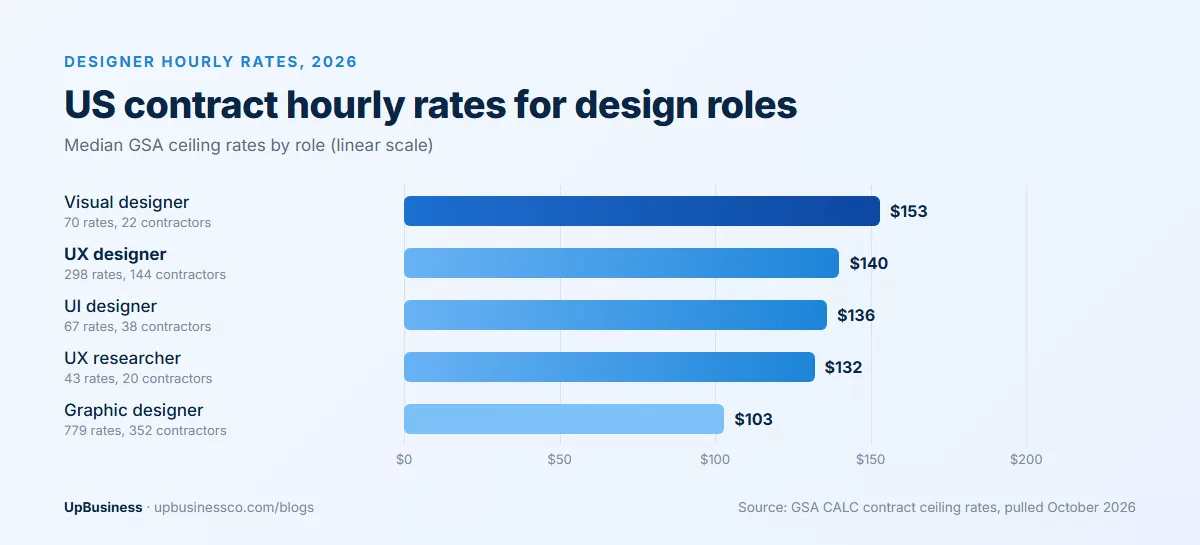
Here are the medians for the main design roles, pulled in October 2026:
- Visual designer: $153 an hour (70 rates).
- UX designer: $140 an hour (298 rates).
- UI designer: $136 an hour (67 rates).
- UX researcher: $132 an hour (43 rates).
- Graphic designer: $103 an hour (779 rates).
Employee pay tells a similar story. The US Bureau of Labor Statistics puts the median salary for web and digital interface designers at $104,000 in May 2025[3]. That is about $50 an hour before benefits. Wages make up 70.0% of total employer cost, according to the BLS[4]. So the full cost of that designer is about $148,600 a year, or $71 an hour.
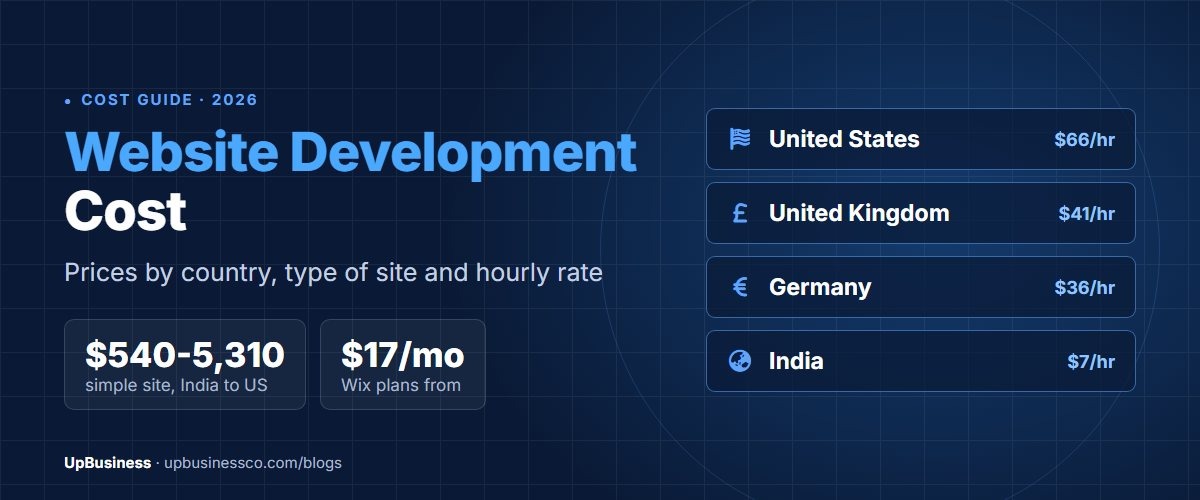
Offshore partner companies charge much less. In our estimates, design teams in India and similar markets bill about $20 to $50 an hour. That is the main reason the offshore column in our tables is so much lower.
How Do UI/UX Designers Charge? Pricing Models Explained
Designers charge in five main ways. The model you pick changes who carries the risk when the scope grows. Here is how each one works, with an example from a 20-screen app.
| Model | How it works | Example | Best when |
|---|---|---|---|
| Hourly | You pay for every hour worked | 240 hours at $35 is $8,400 | Scope is still unclear |
| Fixed price | One agreed price for a fixed scope | $8,000 to $10,000 for 20 screens | Screens and flows are already planned |
| Per screen | A set price for each unique screen | 20 screens at $250 is $5,000, plus research | You have a clear screen list |
| Monthly retainer | A set number of hours each month | 40 hours a month at $35 is $1,400 | You ship new features every month |
| Design sprint | A short, fixed block of work, often one to two weeks | One designer for two weeks, about 80 hours | You need to test an idea fast |
Fixed price feels safer, but read the scope closely. Partner companies add a buffer for risk, often 10% to 25% in our estimates. Every change outside the agreed list becomes a paid change request.
Hourly billing is fairer when you are still learning what you need. Protect yourself with a weekly cap and a short report of hours used. Per-screen pricing is easy to compare, but check what it leaves out. Research, the design system and the prototype are often extra.
What Hidden Costs Should You Plan For?
The design quote is rarely the whole bill. Plan for these extras before you sign:
- Design support during development. Developers will have questions and find gaps. In our estimates, budget about 10% of the design hours for this, so 24 hours on a 240-hour project.
- Test user fees. If you pay people to join interviews or usability tests, add their fees to the research line.
- Fonts, icons and stock photos. Some need paid licences, especially for apps and ads. Ask your designer to list every paid asset.
- Tool seats. Your own team may need Figma seats to comment and inspect files. A developer seat costs $12 a month on the Professional plan[5].
- Late changes. A change after coding starts costs far more than the same change in a wireframe. It touches design, code and testing at once.
A simple habit helps. Keep 15% of your design budget aside as a buffer. On the $8,400 example app, that is about $1,260.
What Makes UI/UX Design Cost More?
Six things move the price most. Check each one before you ask for quotes.
- Unique screens. The biggest driver. Twice the unique screens means close to twice the cost.
- User roles. Every extra role, such as admin or seller, adds a new set of flows.
- Research depth. Skipping research saves money now but often costs more in rework later.
- Design system. A full system adds 40 to 120 hours up front. In our estimates, it pays back once you pass about 30 screens.
- Revision rounds. Most quotes include two rounds. In our estimates, each extra round adds 10% to 20%.
- Accessibility. Designing for screen readers, keyboard use and colour contrast takes extra care. It is cheaper to plan from day one than to fix later.
A Worked Example: Designing a 20-Screen Booking App
Say you run a chain of fitness studios. You want a mobile app where members book classes and pay. After planning, you count 20 unique screens and one user type. Here is how the budget breaks down. The hours are our estimates for a partner company doing the whole job.
| Line | Hours | Offshore partner ($35/h) | US rates ($140/h) |
|---|---|---|---|
| Discovery workshop and UX research with 5 members | 30 | $1,050 | $4,200 |
| User flows and wireframes, 20 screens | 40 | $1,400 | $5,600 |
| High-fidelity UI, 20 screens | 80 | $2,800 | $11,200 |
| Starter design system | 30 | $1,050 | $4,200 |
| Clickable prototype and a 5-user test | 25 | $875 | $3,500 |
| Developer handoff and revisions | 20 | $700 | $2,800 |
| Project management | 15 | $525 | $2,100 |
| Total | 240 | $8,400 | $33,600 |
You also need design tools. Figma's Professional plan costs $16 a month per full seat, and a developer seat costs $12[5]. For two designers over three months, that adds about $96. Your partner company may already cover this.
With one or two designers, 240 hours takes about six to eight weeks. Rushing it to three weeks usually means more people, more meetings and a higher bill.
Freelancer vs Agency vs In-House: Which Costs Less?
A freelancer usually costs the least per hour. A partner company costs more but gives you a full team. An in-house designer only makes sense once you have steady design work all year.
| Option | Typical cost | Best for | Watch out for |
|---|---|---|---|
| Freelancer | Lowest hourly rate | Small, clear jobs such as a landing page or a UI refresh | One person covers research, UX and UI; no backup if they leave |
| Partner company | $20 to $50 an hour offshore; $140 median US ceiling rate | Full products that need research, UX, UI and a design system | Check who actually does the work |
| In-house designer (US) | About $148,600 a year with benefits | Steady, ongoing product design | Hiring time and cost when work is slow |
Here is a quick way to compare. The $148,600 a year for one in-house designer buys about 1,060 hours at the $140 US contract rate, or about 4,200 hours at $35 offshore. If you need far less design than that each year, outside help is usually cheaper. Our agency vs freelancer vs in-house guide runs the full numbers.
What Design Partner Companies on UpBusiness Charge
The design agencies listing on UpBusiness showed 7 partner companies in October 2026. Only 3 of them have design services as their top specialisations. Their average project sizes range from $100 to $10,000, with a median of $1,000. Their TrustScores range from 70.67 to 71.67.
| Company | Location | Team size | Average project | TrustScore | Top design specialisation |
|---|---|---|---|---|---|
| Haraay Design Studio | Pune | 11-50 | $10,000 | 70.67 | Mobile app design |
| Dextrous Infosolutions | Noida | 11-50 | $1,000 | 71.26 | Ecommerce website design |
| Bytexus Software Solutions | Lucknow | 11-50 | $100 | 71.67 | Mobile app design |
Average project size is an average, not a minimum. It covers all of a company's work, not only UI/UX. The other companies on the listing focus on broader work, such as branding, video or general websites.
The low median tells you many projects here are small, such as a website or app refresh. For a full product, ask each company for 2 or 3 examples of similar size.
How Can You Lower UI/UX Design Cost?
- Cut unique screens. Reuse layouts wherever you can. Every screen you merge saves 5 to 8 hours.
- Start with an MVP. Design the core flow first. Add extra features after users try it.
- Use a ready UI kit. A paid component kit can replace much of a custom design system for an early product.
- Test early with 5 users. Small tests catch big problems while they are still cheap to fix.
- Give clear feedback. Collect all comments in one place, and agree who signs off. Vague feedback causes extra rounds.
- Own your files. Make sure the contract gives you the source design files. You'll need them for every future update.
How to Get an Accurate UI/UX Design Quote
Send every partner company the same brief. List your users, the main tasks they do, the platforms you need and a rough screen count. Our software project brief template gives you a ready format.
Then ask each company to price the same lines: research, wireframes, UI, design system, prototype and revisions. Ask how many revision rounds are included and who will do the work day to day. Our guide to comparing software development proposals shows how to line up the answers.
When you're ready, post your project on UpBusiness with your screen count, platforms and budget, and we'll match you with verified design partner companies that fit.