

Browse our curated list of Backend Development Companies
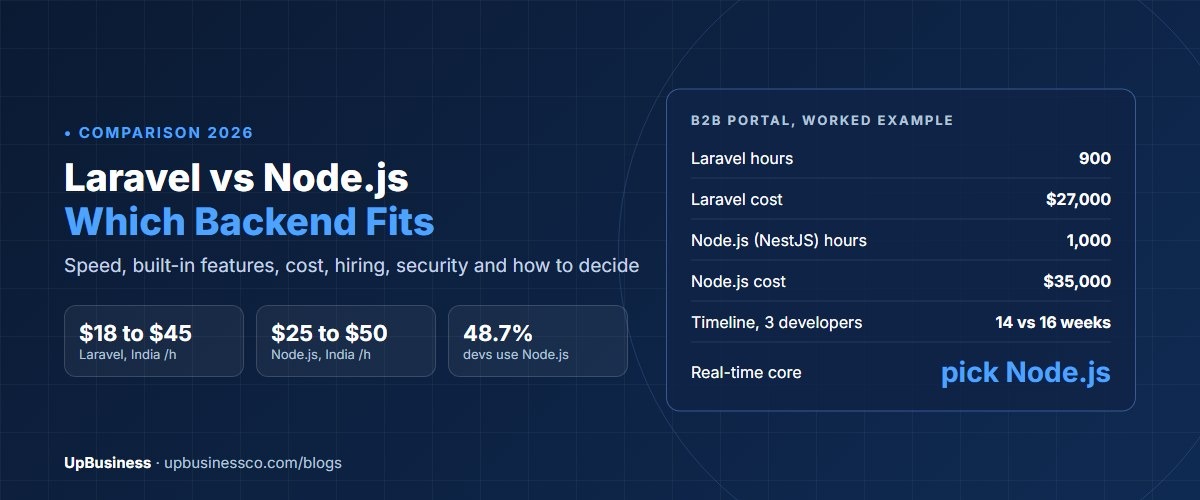
Laravel vs Node.js is a choice between a complete framework and a flexible runtime. Laravel is a PHP framework with logins, database tools, queues, email and an admin-friendly structure built in, so business apps such as portals, dashboards and SaaS products get built quickly. Node.js runs JavaScript on the server and is strongest for real-time features, many open connections and teams that already write JavaScript. For a typical business app, both work well. Laravel is often a little faster and cheaper to build, and Node.js is the better fit for chat, live tracking and streaming.
This guide is for founders, product owners and managers choosing a backend before hiring a development company. It compares speed, cost, hiring, security, support dates and fit, then gives a simple way to decide.
Key takeaways
- Laravel is a full framework. Node.js is a runtime, so most Node.js apps also need a framework such as Express or NestJS.
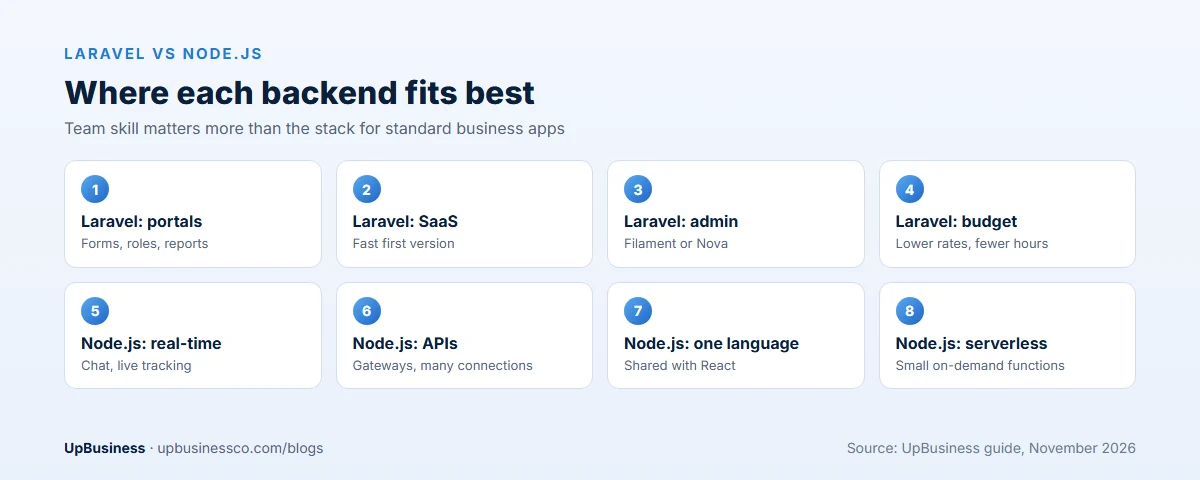
- Laravel suits data-heavy business apps with forms, roles, reports and admin panels. Node.js suits real-time apps and API gateways.
- Both hiring pools are large. 48.7% of developers in the Stack Overflow 2025 survey used Node.js, and 64% of PHP developers in JetBrains' 2025 survey used Laravel.
- In our estimates, a standard business app takes about 10% fewer hours in Laravel, and Indian Laravel rates run slightly lower.
Laravel vs Node.js at a Glance
| Laravel | Node.js | |
|---|---|---|
| What it is | A web framework for PHP | A runtime that runs JavaScript on the server |
| First released | 2011 | 2009 |
| Comes with | Routing, database tools, logins, queues, email, tests | A core runtime; frameworks and libraries are added |
| Common frameworks | Laravel itself | Express, NestJS, Fastify |
| Best at | Business apps, portals, SaaS, admin-heavy systems | Real-time apps, many connections, APIs, streaming |
| Language shared with frontend | No, PHP on the server | Yes, JavaScript or TypeScript |
| Support model | Each version: 18 months of fixes, 2 years of security | Even-numbered LTS lines, about 30 months each |
| Typical Indian partner rate | $18 to $45 an hour | $25 to $50 an hour |
What Laravel and Node.js Are
Laravel is a framework for PHP, the language behind about 7 in 10 websites whose server language is known, according to W3Techs[1]. Laravel gives developers a fixed structure and ready parts: Eloquent for databases, Blade for page templates, built-in login and permissions, background jobs, scheduled tasks, email and file storage. Two Laravel developers will usually organise a project the same way, so a new developer can find their way around quickly.
Node.js lets developers run JavaScript, the language of web browsers, on the server. On its own it's a runtime, not a framework. Teams add Express for a light setup or NestJS for a structured one, then pick separate libraries for databases, logins and queues. That gives more freedom, and more decisions. Two Node.js projects can look very different inside.
This difference matters more than any speed test. With Laravel you buy a set of decisions already made. With Node.js your partner makes them, so their experience counts for more.
Performance: Laravel vs Node.js Speed
For most business apps, both are fast enough. The database and the way queries are written decide speed far more often than the language.
Node.js was built not to wait. When a request needs the database or another service, Node.js moves on to the next request and comes back when the answer arrives. That makes it very good at handling thousands of connections that mostly wait, such as chat, live dashboards, delivery tracking and notifications. It's weaker at long calculations, which block other users unless they're moved to worker threads.
Laravel on standard PHP starts fresh for every request. That is simple and safe, but adds a small cost each time. Laravel Octane keeps the app in memory between requests, using servers such as FrankenPHP, Swoole or RoadRunner, and closes much of the gap for high-traffic APIs. For live features, Laravel Reverb adds WebSocket support inside the Laravel stack.
The practical answer: if your product keeps tens of thousands of live connections open, lean toward Node.js. If it's mostly forms, records, reports and workflows, Laravel's speed won't be your problem. Benchmarks you see online usually test empty "hello world" apps, which tell you little about a real product.
Development Speed and Built-In Features
This is where Laravel usually wins. Common business features come ready or as official packages.
| Feature | Laravel | Node.js |
|---|---|---|
| Login, password reset, email checks | Starter kits included | Libraries chosen and wired up |
| Database models and migrations | Eloquent and migrations built in | Prisma, TypeORM or Sequelize, chosen per project |
| Background jobs and scheduling | Built in | BullMQ or similar, added |
| API tokens | Sanctum, official | Passport.js or JWT libraries |
| Admin panel | Filament or Nova, quick to add | AdminJS or a custom build |
| Real-time features | Reverb, official | Socket.IO or native WebSockets, very mature |
| Testing | PHPUnit or Pest, set up by default | Jest or Vitest, set up per project |
NestJS narrows the gap. It gives Node.js a clear structure and many built-in patterns, and it's popular for larger teams. Even so, a CRUD-heavy app with many screens, roles and reports usually takes fewer hours in Laravel, because more of it is already there.
Laravel vs NestJS
If you compare Laravel with Node.js, the fairer match is often NestJS. Both are full frameworks with a fixed structure, so the choice is less about freedom and more about language.
| Laravel | NestJS | |
|---|---|---|
| Language | PHP | TypeScript |
| Structure | Controllers, models, jobs, events | Modules, controllers, services, dependency injection |
| Database tools | Eloquent built in | TypeORM or Prisma, chosen per project |
| Learning curve | Gentle for most web developers | Steeper, closer to Java or .NET style |
| Best for | Fast business apps and SaaS | Large TypeScript teams and complex APIs |
NestJS suits companies that already write TypeScript on the frontend and want one language end to end. Laravel suits teams that want the most features out of the box and the shortest path to a working app.
Databases and Integrations
Laravel officially supports MySQL, MariaDB, PostgreSQL, SQLite and SQL Server. Most Laravel apps use MySQL or PostgreSQL, and Eloquent makes common queries short and readable. Laravel also has mature packages for payments, search and file storage.
Node.js works with any database through separate libraries. It's popular with MongoDB, and also common with PostgreSQL and MySQL through tools such as Prisma. Because JSON is native to JavaScript, Node.js is a natural fit for apps that pass a lot of JSON between services and outside APIs.
For most buyers, the database choice should follow the data, not the backend. Records with clear relations, such as orders, invoices and customers, fit a relational database in either stack.
Scaling: Can Both Handle Growth?
Yes. Both power apps with millions of users. Scaling problems almost always come from design, not the stack: slow database queries, missing caching, heavy work done during a request, or one server doing everything.
In Laravel, teams scale by moving slow work to queues, caching with Redis, running Octane and adding servers behind a load balancer. In Node.js, teams scale with the same tools, plus the cluster module or containers to use all CPU cores.
Ask any partner how they would handle ten times your launch traffic. A good answer names specific steps, such as queues, caching, database indexes and load tests, rather than claiming one stack "scales better".
Laravel vs Node.js Cost
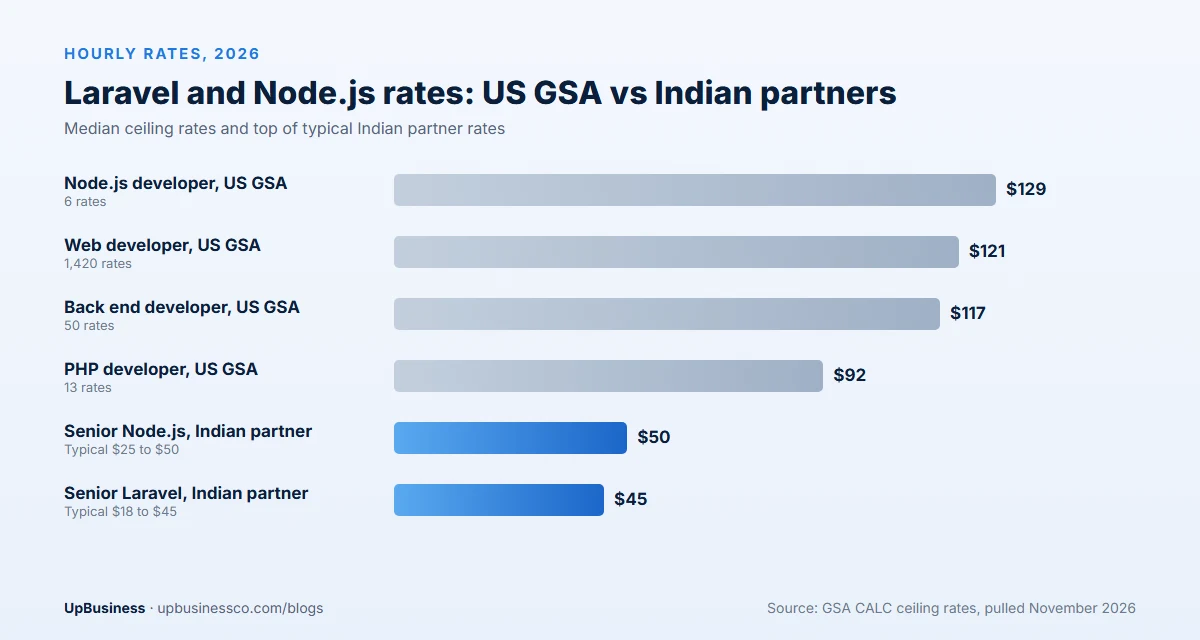
Language changes the hourly rate a little and the hours a bit more. Here's what US government contract data shows. These are GSA CALC ceiling rates, the most a contractor can charge US federal buyers, pulled in November 2026[2]:
| Role (GSA CALC, Nov 2026) | Rates found | Median per hour |
|---|---|---|
| Web developer, all levels | 1,420 | $121 |
| Back end developer | 50 | $117 |
| PHP developer titles | 13 | $92 |
| Node.js developer | 6 | $129 |
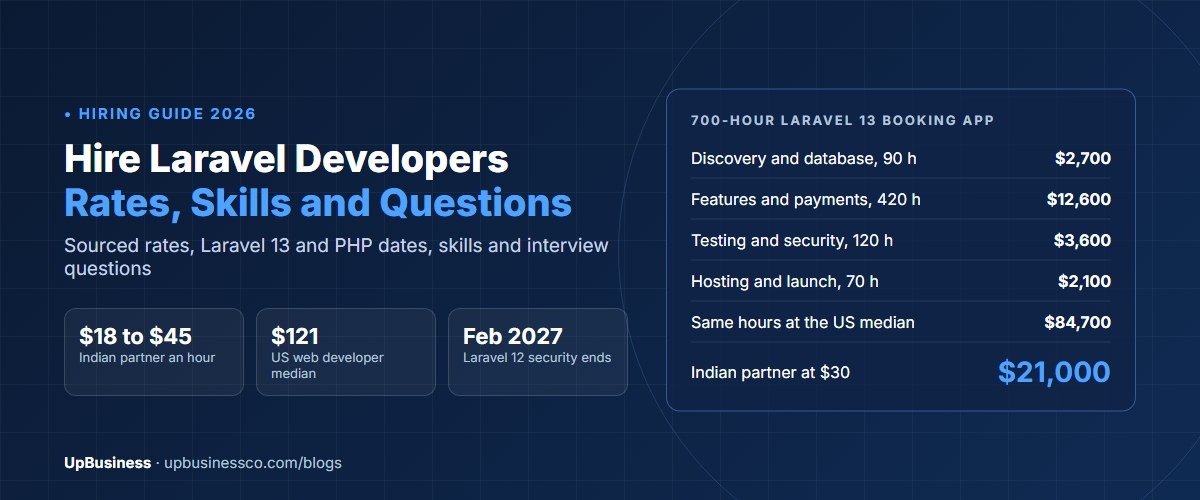
The PHP and Node.js samples are small, so treat them as a rough signal. Indian partner companies typically charge $18 to $45 an hour for Laravel work and $25 to $50 for Node.js, depending on seniority. Our guides to hiring Laravel developers and hiring Node.js developers break rates down by level.
Hosting costs are close. Laravel runs on low-cost shared or virtual servers, and on managed platforms such as Laravel Cloud and Forge. Node.js runs on the same virtual servers and on serverless platforms. Neither forces an expensive setup.
Worked Example: A B2B Customer Portal
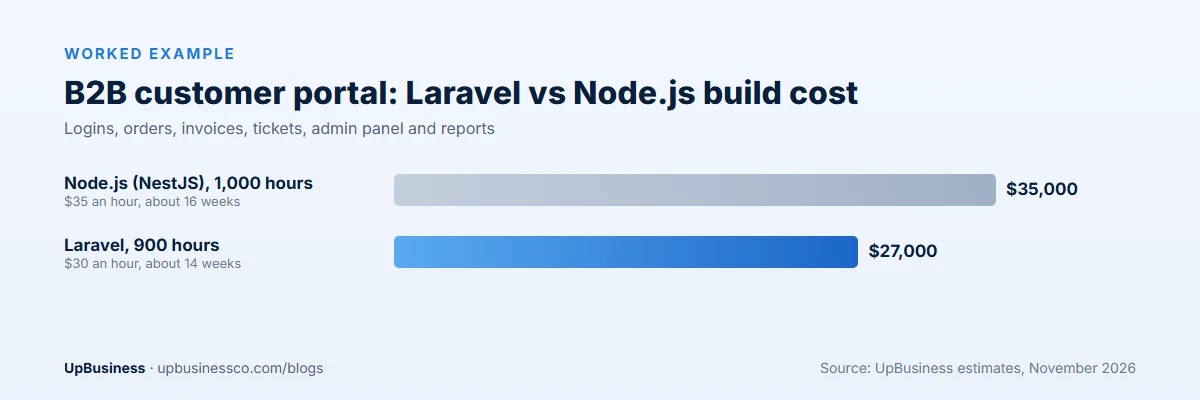
A distributor wants a portal where business customers log in, see prices, place repeat orders, download invoices and raise support tickets. Staff need an admin panel with roles and monthly reports. There are no live features beyond email alerts.
| Laravel | Node.js (NestJS) | |
|---|---|---|
| Estimated hours | 900 | 1,000 |
| Typical blended rate | $30 an hour | $35 an hour |
| Build cost | $27,000 | $35,000 |
| Timeline with 3 developers | About 14 weeks | About 16 weeks |
These are our estimates. Laravel saves hours on login, roles, the admin panel and reports. Now change the brief: add live chat between customers and sales staff, live order tracking and instant price updates on every open screen. The Node.js estimate rises by about 150 hours to 1,150, and the Laravel one by about 300 hours to 1,200, because real-time work is Node.js's home ground. At that point, team skill matters more than the stack.
Language is rarely the biggest cost driver. Scope, design changes and the skill of the team move the budget far more. See our MVP development cost guide for what drives app budgets.
Hiring: Which Developers Are Easier to Find?
Both pools are large. In the Stack Overflow Developer Survey 2025, 48.7% of developers used Node.js and 19.9% used Express[3]. In JetBrains' State of PHP 2025, 64% of PHP developers used Laravel, far ahead of any other PHP framework[4]. India has a deep Laravel market, built on years of PHP agency work.
The shape of the talent differs. Node.js developers often work across frontend and backend, because both use JavaScript or TypeScript. One full-stack developer can cover more of a small product. Laravel developers often bring strong experience with business systems, ecommerce and admin-heavy apps.
Test real skills before you hire. For Laravel, ask how they would stop a report page from making hundreds of database queries. For Node.js, ask how they would keep a slow task from freezing the server for other users. Good answers are specific.
Security and Upkeep
Both can be secure. They fail in different places.
Laravel includes protection against common attacks, such as cross-site request forgery and SQL injection, when developers use its tools as intended. Risk comes from old versions. Each Laravel release gets bug fixes for 18 months and security fixes for two years[5]. Laravel 12 security support ends on 24 February 2027, and Laravel 13 runs to early 2028. PHP has its own calendar: PHP 8.4 is supported to 31 December 2028 and PHP 8.5 to 31 December 2029[6].
Node.js apps depend on many small packages from npm, often hundreds. That is convenient but widens the attack surface. In September 2025, CISA warned of a widespread supply chain compromise affecting npm packages[7]. Ask any Node.js partner how they lock package versions, scan dependencies and approve new ones. For support dates, Node.js 24 is a long-term support line maintained until April 2028[8].
Whichever you choose, put version upgrades in the maintenance contract. An app left on an old version keeps running, but new security holes stay open.
Learning Curve and Code Quality
Laravel is easy to start with. Its documentation is clear, and its conventions tell developers where each piece of code belongs. That helps when a new developer joins, or when you change partners. A tidy Laravel app is quick for another team to pick up.
Node.js is easy to start too, since many developers already know JavaScript. The risk sits in the freedom. Without a framework like NestJS and agreed rules, projects drift into different styles, and handing them over takes longer. TypeScript helps a lot. It catches many errors before the code runs, so ask for it on any Node.js project of real size.
In both stacks, ask for automated tests, a short setup guide and code reviews. These matter more than the stack when you take over code later.
Common Mistakes When Choosing a Backend
- Choosing on benchmarks. Speed tests on empty apps don't predict how your product will run.
- Following a trend. A stack that's popular on social media may be hard to hire for in your budget.
- Ignoring upkeep. Ask who will upgrade versions every year and what that costs.
- Letting the partner pick only what it knows. Ask why the stack fits your product, not just why the team likes it.
- Splitting too early. Running two backends for a small app doubles hosting, updates and hiring.
When to Choose Laravel
- Business portals, internal tools, CRMs and ERPs with many forms, roles and reports.
- SaaS products where speed to a working first version matters most.
- Ecommerce and booking systems with an admin panel for staff.
- Teams or partners with strong PHP experience.
- Budgets where lower hourly rates and fewer hours make a real difference.
When to Choose Node.js
- Chat, live tracking, collaboration tools, notifications and live dashboards.
- API gateways and services that mostly pass data between other systems.
- Products where one JavaScript or TypeScript team will build frontend and backend.
- Apps built on React or Next.js where shared code and types save time.
- Serverless setups that run small functions on demand.
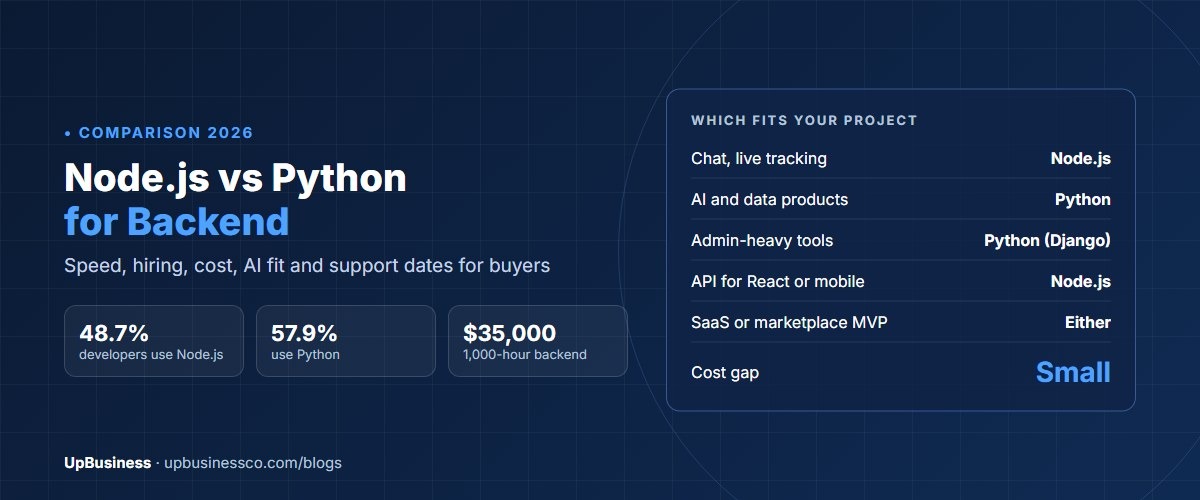
Weighing Node.js against another option? Our Node.js vs Python comparison covers AI and data-heavy products, and our guide to hiring Java developers covers large enterprise systems.
Can You Use Laravel and Node.js Together?
Yes. A common design runs the main business app on Laravel and adds a small Node.js service for real-time features such as chat or live updates. Another pairs a Laravel API with a React or Next.js frontend, which uses Node.js for building and serving pages.
Mixing makes sense when one part of the product has very different needs. It adds a second stack to host, update and hire for, so don't split a small app without a clear reason. For how larger products are divided into parts, see our guide to SaaS application architecture.
How to Decide: Laravel or Node.js
- Is real-time central to the product? If live chat, tracking or streaming is the core, choose Node.js.
- Is it mostly records, forms, roles and reports? If yes, Laravel is usually faster to build.
- What does your team or partner know best? A skilled team in either beats a weak team in the "right" one.
- Is your frontend React or Next.js with a JavaScript team? Node.js lets one team share code.
- Who will maintain it in three years? Choose the stack you can hire for in your market and budget.
Still unsure? Ask two partners, one strong in each stack, to quote the same brief. Our guide to comparing software development proposals shows how to read the quotes side by side. If you're also picking a frontend, see React vs Angular.
Find a Backend Development Partner on UpBusiness
UpBusiness lists backend development companies with verified profiles, TrustScores, team sizes and average project sizes. Post your requirement and we match you with three companies that fit your budget. Ask each which stack they recommend for your product and why. A good partner explains the trade-off in plain words and doesn't push the only stack it knows. If your project is a content website rather than an app, our WordPress website development cost guide may fit better.