

Browse our curated list of Custom Software Development Companies
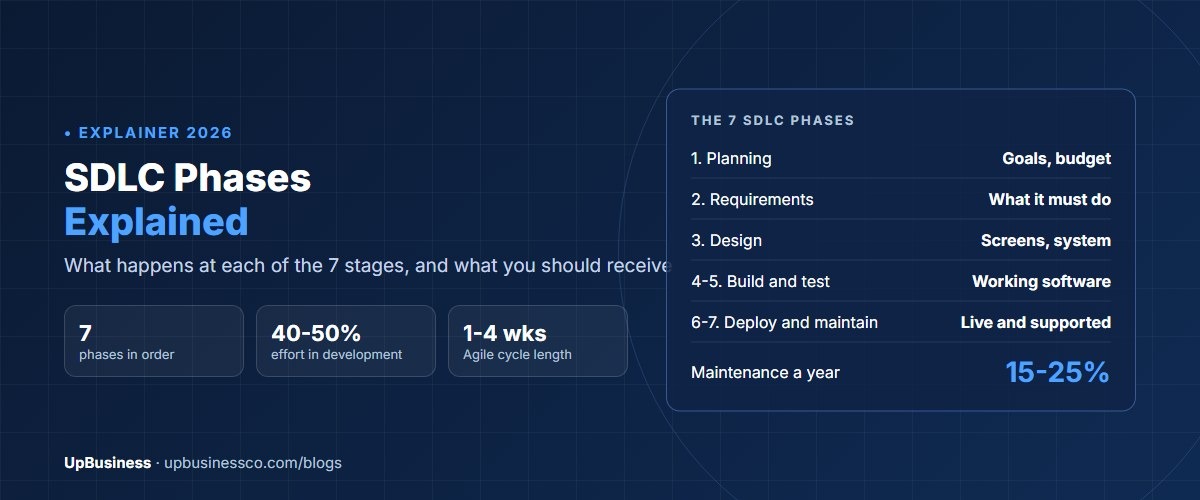
Every software project goes through seven SDLC phases. In order, they are planning, requirements, design, development, testing, deployment and maintenance. SDLC stands for software development life cycle. Each phase has its own goal, its own outputs and its own people. Whether a team works in one long sequence or in short two-week cycles, the same seven phases happen. What changes is how often they repeat.
This guide is for founders, product owners and managers who are paying for software and want to know what happens at each stage. It explains each SDLC phase in plain language, what you should receive at the end of it, how long it usually takes, and what to check. It also covers the main SDLC models, such as Waterfall and Agile, and which phases can be automated.
Key takeaways
- There are seven SDLC phases: planning, requirements, design, development, testing, deployment and maintenance. Some guides merge or split them, so you'll also see five or six.
- Every phase should end with something you can see, such as a requirements document, designs, working software or a test report.
- In Agile, the phases repeat in short cycles of one to four weeks. In Waterfall, each runs once, in order.
- Maintenance often costs more over the life of the software than the first build, so plan for it from day one.
What Are the Phases of the SDLC?
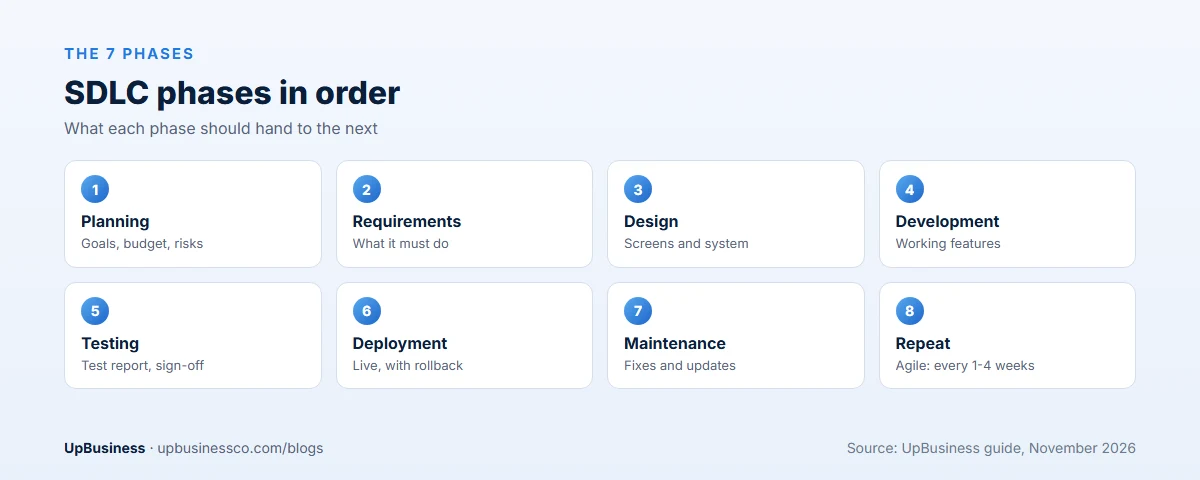
| Phase | Main question | What you should receive |
|---|---|---|
| 1. Planning | Should we build this, and is it worth it? | Goals, rough budget, timeline, risks |
| 2. Requirements | What exactly must it do? | Requirements document, user stories, priorities |
| 3. Design | How will it look and work? | Screen designs, system design, data model |
| 4. Development | Build it | Working features in a shared code repository |
| 5. Testing | Does it work and is it safe? | Test results, fixed defects, sign-off |
| 6. Deployment | Get it to users | Live system, release notes, rollback plan |
| 7. Maintenance | Keep it working and improving | Fixes, updates, monitoring reports |
The order matters. Each phase uses the output of the one before. If requirements are vague, design guesses. If design guesses, developers build the wrong thing, and testing finds it late, when it's most expensive to fix.
Phase 1: Planning
Planning decides whether the project should happen and roughly what it will take. The team agrees the problem to solve, who it's for, what success looks like, a budget range and a target date. They also list the biggest risks, such as an unclear integration or a hard deadline.
What to check: a written summary with goals you can measure, a budget range and named owners on your side. If you're hiring a company, this is where a one-page project brief helps.
Typical length: one to three weeks.
Phase 2: Requirements
Requirements analysis turns goals into a clear list of what the software must do. The team talks to the people who'll use it, maps the current process and writes down each need. Good requirements are clear, necessary and testable. The international standard for requirements work, ISO/IEC/IEEE 29148, is built on that idea[1].
Requirements usually come in two kinds. Functional requirements say what the system does, such as "a manager approves leave requests". Non-functional requirements say how well it does it, such as speed, security, accessibility and uptime.
What to check: a requirements document or a prioritised backlog of user stories, each with acceptance criteria. For websites, our website requirements document template shows what a good one looks like.
Typical length: two to six weeks, often combined with design in a paid discovery phase.
Phase 3: Design
Design decides how the software will look and how it will be built. There are two sides:
- User experience and interface design. Screen flows, wireframes and visual designs that users can click through before any code is written.
- System design. The technical plan: which technologies, how data is stored, how parts talk to each other, and how the system connects to others.
Security belongs here too. NIST's Secure Software Development Framework recommends building security into every phase, starting with design, rather than adding it at the end[2].
What to check: clickable prototypes for key screens, and a short architecture document in plain language. Ask the team why they chose each technology.
Typical length: two to six weeks.
Phase 4: Development
Development is where code gets written. Developers build features, connect them to databases and other systems, and review each other's code. This is usually the longest and most expensive phase, often half or more of the total effort.
Good teams work in small pieces, commit code to a shared repository every day and show working features regularly. Ask for the code to be stored in your company's own repository from day one.
What to check: a demo of working features every one to two weeks, code in your repository, and a clear list of what's done and what's left.
Typical length: one to nine months, depending on scope. Our software development cost benchmark shows typical hours by project size.
Phase 5: Testing
Testing checks that the software works, is secure and meets the requirements. Modern teams test throughout development, not just at the end. The main kinds are:
| Test type | What it checks | Who runs it |
|---|---|---|
| Unit tests | Small pieces of code work on their own | Developers, automatically |
| Integration tests | Parts work together, including other systems | Developers and testers |
| System tests | The whole system meets the requirements | Testers |
| Performance tests | Speed and behaviour under load | Testers |
| Security tests | Weak points attackers could use | Security specialists |
| User acceptance tests | Real users confirm it does the job | You and your users |
The software testing life cycle, or STLC, is the testing team's own process inside this phase: plan tests, write test cases, set up test data, run tests and report results.
What to check: a test report, a list of known defects with their severity, and your own user acceptance sign-off before launch.
Phase 6: Deployment
Deployment puts the software in front of real users. It can be a single launch, a gradual rollout to some users first, or frequent small releases. The team moves data from old systems, sets up monitoring and trains users.
Every release should have a rollback plan: a quick way to return to the previous version if something goes wrong. Automated pipelines make releases safer and faster. Our guide to CI/CD implementation services explains how they work.
What to check: release notes, a rollback plan, monitoring in place, and admin access to every account in your company's name.
Phase 7: Maintenance
Maintenance keeps the software working after launch. It covers fixing bugs, applying security updates, keeping up with new operating system and browser versions, improving speed and adding small features.
This phase never really ends, and over several years it often costs more than the first build. A common planning figure is 15% to 25% of the original build cost each year. Our app maintenance cost guide breaks this down.
What to check: a support agreement with response times, a monthly report of fixes and updates, and a plan for the next major upgrade.
SDLC Models: Waterfall, Agile and Others
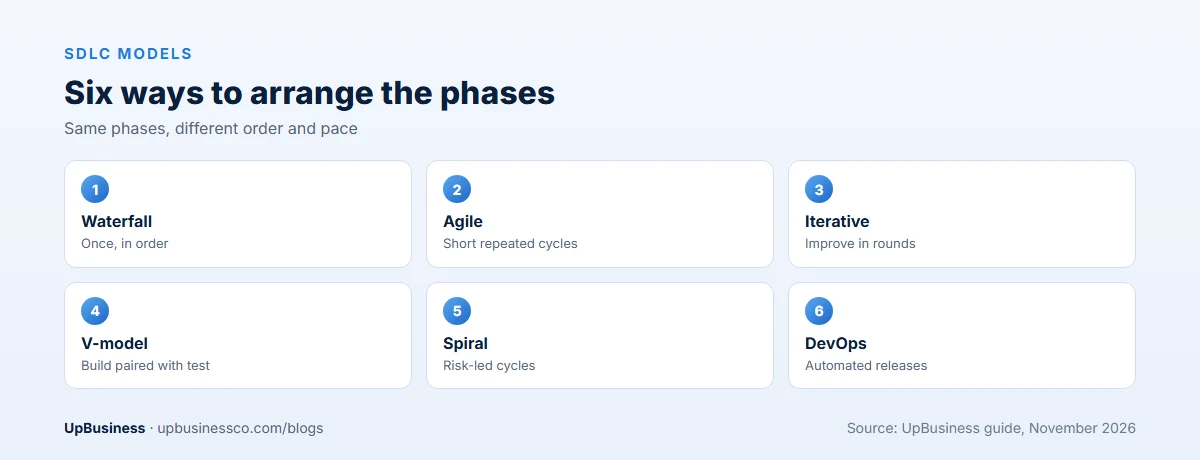
An SDLC model is the way a team arranges the phases. The phases stay the same. The model decides their order and how often they repeat.
| Model | How it works | Best for |
|---|---|---|
| Waterfall | Each phase once, in order, with sign-off between them | Fixed scope, strict rules, few expected changes |
| Agile (Scrum, Kanban) | All phases repeat in short cycles of 1 to 4 weeks | Products where needs will change and learning matters |
| Iterative | Build a basic version, then improve it in rounds | Large systems built in stages |
| V-model | Each build phase paired with a matching test phase | Safety-critical and regulated software |
| Spiral | Repeated cycles focused on reducing the biggest risks | Large, high-risk projects |
| DevOps | Development and operations joined, with automated releases | Software that changes often after launch |
Most business software today uses Agile or a hybrid. The Agile Manifesto puts working software ahead of long documents, and responding to change ahead of following a plan[3]. That doesn't mean no documents or no plan. It means short cycles, frequent demos and regular re-planning.
SDLC phases in Agile
In Agile, each sprint of one to four weeks runs a small version of every phase. The team plans the sprint, refines requirements for a few stories, designs and builds them, tests them, and often releases them. Maintenance and new features flow into the next sprint's plan. For a buyer, the benefit is visible progress every few weeks and the chance to change direction early.
How Long Does Each SDLC Phase Take?
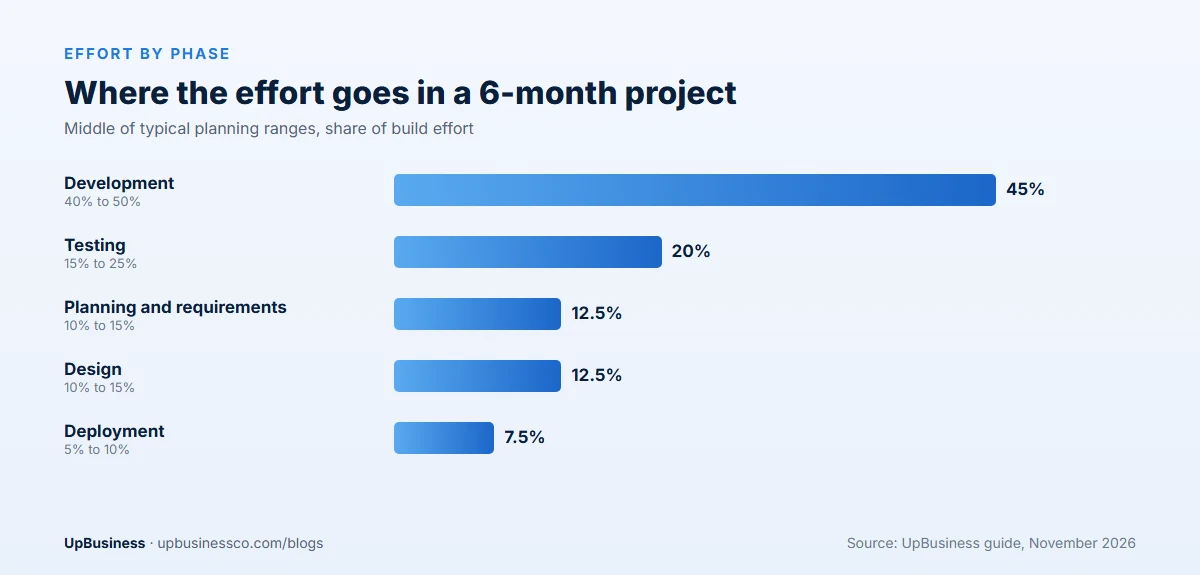
There's no fixed split, but for a typical custom business application built over six months, effort often lands roughly like this:
| Phase | Share of build effort | In a 6-month project |
|---|---|---|
| Planning and requirements | 10% to 15% | 3 to 4 weeks |
| Design | 10% to 15% | 3 to 4 weeks |
| Development | 40% to 50% | 10 to 12 weeks |
| Testing | 15% to 25% | Throughout, plus 2 to 3 weeks at the end |
| Deployment | 5% to 10% | 1 to 2 weeks |
These are planning ranges from typical project plans, not fixed rules. Maintenance comes on top, every year after launch. If a proposal shows almost no time for requirements, design or testing, ask why. Skipping them rarely saves money. It usually moves the cost to rework later.
Which SDLC Phases Can Be Automated?
Testing and deployment are the two phases most often automated. Automated tests run every time code changes, and automated pipelines build, test and release software with little manual work. Parts of development can be automated too: code formatting, security scanning and, increasingly, code suggestions from AI tools.
Planning, requirements and design need human judgment. Tools can help, but someone still has to decide what to build and why. Our guide to the AI development process shows how these phases look for AI projects.
SDLC Phases With an Example
Here is how the seven phases look for a real kind of project: a leave management app for a company with 300 staff.
- Planning. The HR head wants to stop handling leave by email. Goal: approve requests within one day and cut HR admin time by half. Budget range and a four-month target are agreed.
- Requirements. Staff request leave on phone or laptop. Managers approve or reject. HR sees balances and reports. The app links to the payroll system. Pages load in under 2.5 seconds.
- Design. The team draws the request, approval and report screens and tests them with five staff. The technical plan picks a web app, a database and a link to payroll.
- Development. Developers build the request screen first, then approvals, then reports. A demo runs every two weeks.
- Testing. Automated tests check leave balances. Testers try odd cases, such as half days and public holidays. Ten managers run acceptance tests.
- Deployment. One department goes live first for two weeks. Then the rest of the company joins.
- Maintenance. The team fixes small bugs, updates holiday calendars each year and adds a mobile alert that staff asked for.
Notice how each phase hands something clear to the next. That hand-off is what keeps a project on time.
How Many Phases Does the SDLC Have?
Most guides use seven, as above. Some use five: they merge planning with requirements and testing with development. Others use six or eight, adding a separate phase for security or for retiring the old system. The names change. The work does not. What matters to a buyer is that every one of these steps happens, and that you see its output.
Security in Every Phase
Security is not a phase of its own. It belongs in all of them. In planning, list the data you hold and the rules you must follow. In requirements, write security needs down, such as two-step sign-in. In design, plan who can see what. In development, review code and scan it for known weak points. In testing, run security tests. In deployment, lock down servers and accounts. In maintenance, apply updates every month.
Ask any company you hire how they handle each of these. A clear answer is a good sign. A vague one is a warning.
What a Buyer Should Check at Each Phase
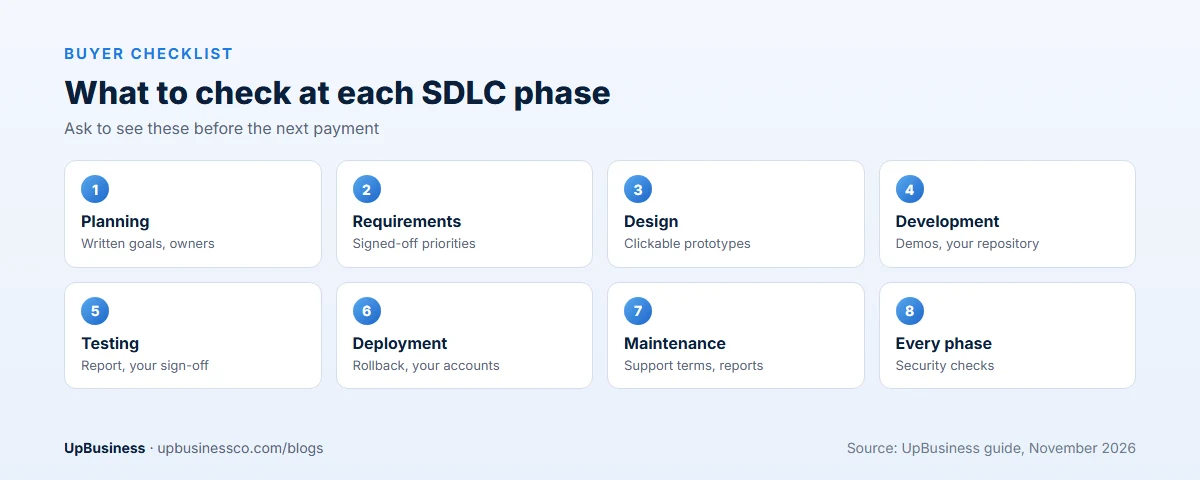
- Planning: written goals, budget range, named decision makers.
- Requirements: a prioritised list with acceptance criteria you've signed off.
- Design: clickable prototypes and a plain-language technical plan.
- Development: demos every one to two weeks, code in your repository.
- Testing: a test report and your own acceptance testing.
- Deployment: rollback plan, monitoring, accounts in your name.
- Maintenance: a support agreement with response times and monthly reports.
When you compare companies, ask each to show you the actual outputs from a past project for each phase. Our questions to ask a software development company and our guide to comparing proposals help you test their answers. Put the phase outputs and sign-offs into the contract; our software development contract checklist lists the clauses.
The SDLC When You Outsource
When you hire a software company, the phases stay the same, but who does what changes. You own planning and most of the requirements, because only you know the business. The company leads design, development, testing and deployment. Maintenance is shared: they fix and update, you decide what to improve.
Three habits keep an outsourced project healthy. First, name one decision maker on your side and one delivery lead on theirs. Second, ask for a demo every one to two weeks, not just a status report. Third, keep the code, cloud accounts and test data in your company's name from the first day. Then if you ever change partner, the next team can pick up where the last one stopped.
Ask for a short written handover at the end of each phase. It should say what was done, what was decided and what is still open. If people change on either side, that note saves weeks.
Agree in writing what each phase must deliver before the next payment is due. That links money to visible progress, which protects both sides.
Common SDLC Mistakes Buyers Make
- Skipping discovery. Jumping straight to a fixed price without requirements and design means the price is a guess.
- Testing only at the end. Defects found late cost far more to fix.
- No user acceptance testing. The people who'll use the software never try it before launch.
- Forgetting maintenance. No budget or contract for life after launch.
- Treating security as a final step. It belongs in every phase.
- Building everything at once. A smaller first release teaches you more. Our MVP development cost guide explains how to scope one.
Find a Software Development Partner on UpBusiness
UpBusiness lists verified partner companies, mostly based in India and serving buyers worldwide. Every company has passed checks reviewed by our team: company details, registration and tax papers, the founder's identity, expertise and three client projects with evidence. Only companies with a TrustScore of 70 or more are listed. Our guide to types of software development services helps you decide which kind of partner you need.
- Post your requirement with what you want to build, your budget and timeline.
- Get three partner companies matched to your budget, service and industry.
- Compare them side by side on our custom software development page, and ask each how they run every SDLC phase. Buyers pay nothing, and there's no commission on the project.