

Browse our curated list of Webflow Development Companies
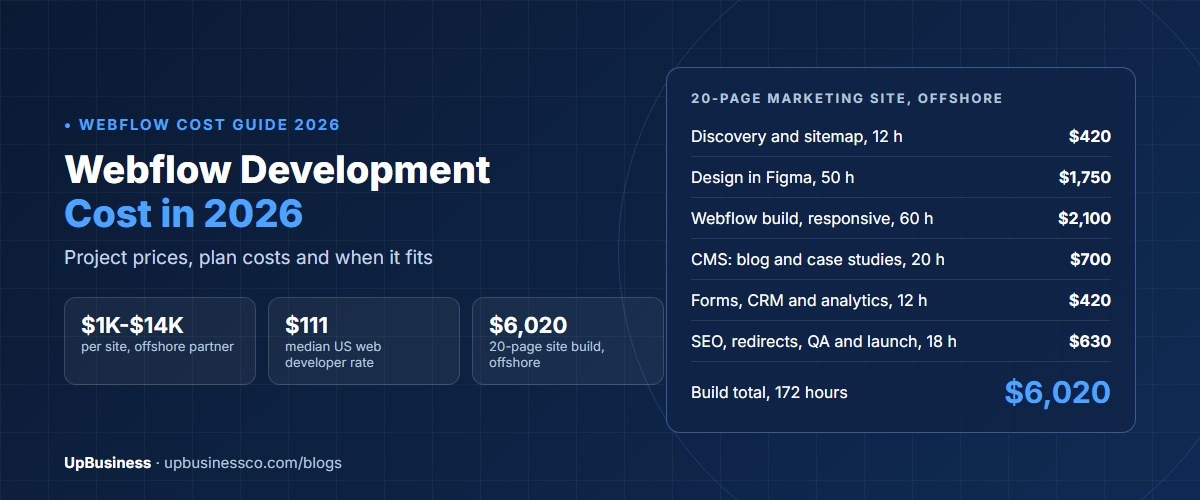
Webflow development costs about $1,050 to $14,000 in 2026 with an offshore partner company. The price depends on whether you start from a template, and how much content and animation you need. A typical 20-page business site costs about $6,020 offshore in our worked budget. US rates are higher: the median US government contract ceiling rate for web developers is about $111 an hour[1]. On top of the build, you pay Webflow for hosting through a monthly or yearly site plan[2].
This guide is for the person who approves the website budget: a founder, a marketing lead or a brand manager. You'll see what Webflow projects cost and what drives the price. You'll also find a worked budget, the running costs you pay to Webflow, a WordPress comparison and tips on choosing a partner.
Key takeaways
- A template-based Webflow site costs $1,050 to $2,100 with an offshore partner company. A custom-designed business site costs $3,500 to $7,000.
- US government contract ceiling rates for web developers have a median of about $111 an hour, across 937 rates from 451 contractors. Offshore partners often charge around $35.
- Our worked 20-page marketing site is 172 hours: $6,020 offshore and about $19,100 at the US median.
- Webflow site plans and workspace seats are separate monthly or yearly costs. Webflow changed its plans in 2026, so check current pricing before you budget.
- Webflow suits marketing sites that your team edits often. Large online stores and complex web apps usually fit other platforms better.
How Much Does Webflow Development Cost in 2026?
Webflow development cost in 2026 depends on four things. These are a template or custom design, the number of unique page designs, the amount of CMS content, and the animations and tools you add.
Our estimates below use an offshore partner rate of $35 an hour. For the US comparison, we use $111 an hour, the median ceiling rate for web developer roles on US government (GSA) contracts. Ceiling rates are the most a contractor may charge government buyers, so private agency quotes vary around them.
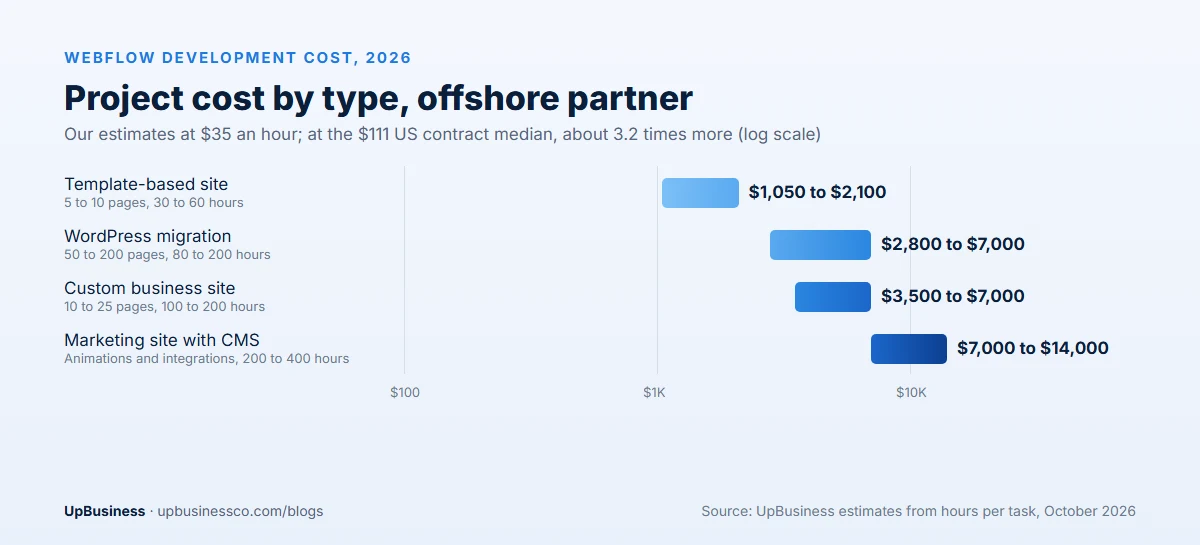
| Project type | Hours | Offshore partner ($35/h) | US median ($111/h) |
|---|---|---|---|
| Template-based site, 5 to 10 pages | 30 to 60 | $1,050 to $2,100 | $3,330 to $6,660 |
| Custom-designed business site, 10 to 25 pages | 100 to 200 | $3,500 to $7,000 | $11,100 to $22,200 |
| Marketing site with CMS, animations and integrations | 200 to 400 | $7,000 to $14,000 | $22,200 to $44,400 |
| Migration from WordPress, 50 to 200 pages | 80 to 200 | $2,800 to $7,000 | $8,880 to $22,200 |
| Ongoing support and updates | 5 to 20 a month | $175 to $700 a month | $555 to $2,220 a month |
These are design and build fees. They don't include your Webflow site plan, workspace seats, paid fonts, stock images or third-party tools.
What a Webflow Project Includes
A good Webflow project covers more than dragging boxes onto a page. Here is how the hours usually break down for a custom site.
| Stage | What the partner does | Share of hours |
|---|---|---|
| Discovery and sitemap | Agrees goals, pages, content and integrations | 5% to 10% |
| Design | Creates page designs in Figma, with a style guide for colours, fonts and components | 25% to 35% |
| Webflow build | Builds pages with reusable classes and components, for desktop, tablet and phone | 30% to 40% |
| CMS setup | Creates collections for blogs, case studies or team pages, with templates | 8% to 15% |
| Integrations | Connects forms, CRM, analytics, chat and booking tools | 5% to 10% |
| SEO, testing and launch | Sets titles, redirects, speed checks, accessibility checks and launches | 8% to 12% |
A well-built Webflow site uses a clear class naming system and reusable components. That makes it easy for your team to add pages later without breaking the design. Ask to see how a partner names classes before you hire them.
Webflow Hosting and Plan Costs
Webflow charges separately for hosting each live site and for the workspace your team uses to build and edit. Site plans are billed monthly or yearly, with yearly billing cheaper. Higher plans add more CMS items, more form submissions, more bandwidth and extra features[2].
Webflow changed its plan line-up in 2026, so check the official pricing page for current prices before you budget. As a rough guide, most small business and marketing sites fit the lower or middle site plans. Large content sites and big teams move to higher plans with custom pricing.
| Running cost | Who you pay | What to ask |
|---|---|---|
| Site plan (hosting) | Webflow | Which plan fits our CMS items, traffic and forms? |
| Workspace seats | Webflow | How many editors and designers need access? |
| Fonts, images and icons | Font and stock providers | Are licences in our company's name? |
| Third-party tools | Tool providers | Which forms, chat or booking tools have monthly fees? |
| Support retainer | Your partner company | How many hours a month, and how fast do you respond? |
Make sure the site, workspace and every licence sit in your company's name, not the agency's. Moving a site out of an agency workspace later can be slow.
What Drives the Cost of a Webflow Site?
- Template or custom design. A template can cut design hours by 70% or more, but your site will look like others using it.
- Number of unique page designs. Ten pages using three layouts cost far less than ten pages that each look different.
- CMS content. Blogs, case studies and directories need collection design, templates and content loading.
- Animations and interactions. Scroll effects and custom interactions look great but add build and testing time.
- Integrations. CRMs, booking tools, member areas and custom code add hours.
- Content readiness. Projects stall when text and images arrive late. Have content ready, or budget for copywriting.
Worked Example: Webflow Budget for a 20-Page Marketing Site
Here is a plan for a B2B software company that wants a new 20-page marketing site. It needs a blog, case studies, a demo booking form and a link to its CRM. The marketing team will publish new posts and pages themselves.
| Task | Hours | Offshore ($35/h) | US median ($111/h) |
|---|---|---|---|
| Discovery and sitemap | 12 | $420 | $1,332 |
| Design in Figma, 8 page layouts | 50 | $1,750 | $5,550 |
| Webflow build and responsive layouts | 60 | $2,100 | $6,660 |
| CMS: blog and case studies | 20 | $700 | $2,220 |
| Forms, CRM and analytics | 12 | $420 | $1,332 |
| SEO setup, redirects, testing and launch | 18 | $630 | $1,998 |
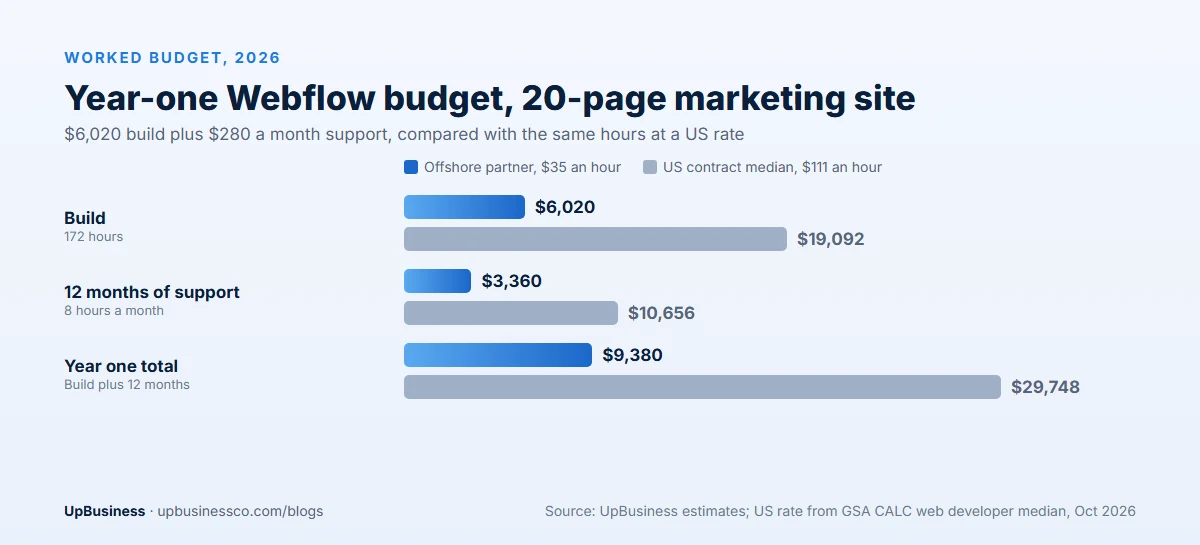
| Build total | 172 | $6,020 | $19,092 |
After launch, the company keeps 8 hours a month of support for new landing pages and small changes, or $280 a month offshore. Year one comes to about $9,380 offshore in build and support fees, plus Webflow plan costs. At $111 an hour, the same work costs about $29,700.
Webflow Template vs Custom Design
The single biggest choice in a Webflow budget is whether to start from a template or design from scratch.
A template gives you a finished layout, a style guide and working pages on day one. A partner then swaps in your colours, fonts, images and text, removes sections you don't need and adds a few that you do. This is the fastest and cheapest route, usually 30 to 60 hours for a small site. It works well for new businesses, simple service sites and campaign pages. The trade-off is that other sites use the same template, and heavy changes can take longer than starting fresh.
A custom design starts with your goals, audience and brand. A designer creates layouts in Figma, you review them, and the developer builds them in Webflow with reusable components. It costs more, usually 100 to 200 hours for a 10 to 25 page site. In return, the site looks like your brand, guides visitors to act and is easier to grow later.
A middle path works for many companies. Use a good template for the structure. Then spend design hours on the home page, the main service page and the contact flow, where design brings the most enquiries.
When Webflow Is the Right Choice
Webflow fits best when a few things are true at once. Your website is mainly for marketing, such as explaining what you do, publishing content and capturing leads. Your marketing team wants to launch pages and posts without waiting for developers. You care about design and want it to stay consistent as the site grows. And you would rather not manage hosting, plugin updates and security patches yourself.
B2B software companies, agencies, consultancies, startups and design-led brands often fit this profile. For them, Webflow's mix of design control, built-in hosting and an editor that marketers can use is a strong match.
When Webflow Is Not the Right Choice
Webflow is less suited to some projects. Large online stores with thousands of products, complex shipping or deep stock integrations usually do better on a dedicated ecommerce platform. Very large content sites, such as news sites with tens of thousands of articles, may hit CMS limits or higher plan costs. Web apps with user accounts, dashboards and complex logic need a proper application framework rather than a website builder.
Some teams also rely on specific WordPress plugins, such as advanced membership or learning tools, that have no direct Webflow match. In these cases, compare the cost of rebuilding that feature against staying where you are.
Webflow vs WordPress vs Other Website Builders
Webflow is one of several good options. The right choice depends on who will edit the site and what it must do.
| Webflow | WordPress | Simple builders (Wix, Squarespace) | |
|---|---|---|---|
| Best for | Design-led marketing sites edited by marketers | Content-heavy sites and sites needing many plugins | Small sites built by the owner |
| Hosting | Included in Webflow site plan | Paid separately to a host | Included in plan |
| Design freedom | High, without code | High, with themes and code | Medium |
| Maintenance | Low; Webflow handles updates | Higher; plugins and core need updates | Low |
| Ecommerce | Fine for small catalogs | Strong with WooCommerce | Fine for small shops |
| Typical offshore build | $3,500 to $7,000 custom | $3,000 to $8,000 custom | Often done in-house |
Webflow shines when your marketing team wants to launch pages without waiting for developers, and you value clean design and low maintenance. WordPress is often better for very large content sites or when you need specific plugins. For online stores with large catalogs, our Shopify vs WooCommerce comparison and ecommerce website development cost guide are a better starting point.
Moving From WordPress to Webflow
Many companies move to Webflow to cut plugin maintenance and give marketers more control. A migration has three cost areas: rebuilding the design, moving content and protecting search rankings.
Content moves fastest when blog posts and case studies are imported into CMS collections in bulk. Custom page layouts must be rebuilt by hand. The step people most often skip is redirects. Every old URL that changes needs a redirect to its new address, or you can lose rankings and traffic. Our website redesign SEO guide explains how to protect rankings during a move.
For a site with 50 to 200 pages, plan 80 to 200 hours, or $2,800 to $7,000 offshore, depending on how many unique layouts need rebuilding.
Red Flags in a Webflow Proposal
- Site or workspace in the agency's name. You should own both from day one.
- No class naming system. Messy classes make every future change slower.
- No redirect plan for a migration. This can cost you search traffic.
- Heavy animations with no speed testing. Slow pages lose visitors. Our website speed optimization guide explains why.
- No accessibility checks. Contrast, headings, form labels and keyboard use should be part of testing.
- No editor training. Your team should learn to add pages and posts safely before handover.
How to Keep Webflow Costs Down
- Reuse layouts. Design a small set of page layouts and components, then reuse them.
- Prepare content early. Final text and images speed up both design and build.
- Start with a strong template for simple sites. Then customise colours, fonts and sections.
- Add animations last. Launch with simple pages, then add effects where they help.
- Choose the right plan. Don't pay for a higher Webflow plan until your CMS or traffic needs it.
What Happens After Launch
A Webflow site is never really finished. In the first month after launch, expect a short list of fixes. A form may need a new field, a page may look off on one phone, or a redirect may be missing. Keep a few support hours for this.
After that, most companies settle into a steady rhythm. The marketing team publishes posts and simple pages in the Webflow editor. The partner builds new page layouts, landing pages for campaigns and small design updates, usually 5 to 20 hours a month. Every quarter, it is worth checking site speed, broken links, form deliverability and search performance, and fixing anything that has slipped.
Plan a bigger refresh every two to three years, when your brand, products or audience change. Webflow sites are built from reusable parts. So a refresh often means updating the style guide and a few layouts, not starting again. That keeps the cost far below the first build. Ask your partner to document the component system at launch. Then any future team can pick it up quickly, and you are never tied to one supplier.
Webflow Freelancer vs Agency vs a Verified Partner on UpBusiness
| Freelancer | Webflow agency | Verified partner on UpBusiness | |
|---|---|---|---|
| Typical price | $25 to $100 an hour | $100 to $200 an hour in the US | $25 to $50 an hour offshore |
| Design and build | Often one person does both | Separate designers and developers | Separate designers and developers |
| Who checks their claims | You do | You do | UpBusiness verifies documents and client work |
| Best for | Templates and small sites | Large, design-led brand sites | Custom sites at offshore rates |
A good freelancer is often the best value for a template-based site or a handful of landing pages. Larger custom sites benefit from a team, because design, build, CMS setup and testing all happen at once. A verified partner company gives you that team at offshore rates, with business documents and client work checked before they appear on UpBusiness.
What to Prepare Before You Hire
It also helps to decide your budget range before talking to partners. Sharing a range lets each partner suggest the right mix of template and custom work, rather than quoting the most expensive version of everything. A clear brief and an honest budget usually lead to tighter, more comparable quotes.
A little preparation cuts both cost and time. Before you ask for quotes, list the pages you need and mark which ones share a layout. Collect example sites you like and explain what you like about each. Write or gather your main text, logos, photos and brand colours. Decide who will edit the site after launch and how often. List the tools the site must connect to, such as your CRM, booking tool or analytics. With this in hand, partners can give firm quotes instead of wide guesses.
How to Choose a Webflow Development Partner
Ask these questions before you sign:
- Can you show three live Webflow sites you built, and explain your class naming system?
- Will the site and workspace be in our company's name?
- How many hours go to design, build, CMS, integrations and testing?
- How do you handle speed, SEO setup, redirects and accessibility?
- Will you train our team to edit the site?
- What does support cost after launch?
Compare at least three quotes side by side using our guide to comparing software development proposals, and write a clear scope first with our software project brief template. For wider budgets, see our website development cost guide, landing page cost guide and website maintenance cost guide.
When you're ready, post your project on UpBusiness with your pages, content and budget, and we'll match you with verified Webflow development partner companies.